ginger's thoughts

Silvia's blog

Category: Open Codecs

Video Conferencing in HTML5: WebRTC via Socket.io

Six months ago I experimented with Web sockets for WebRTC and the early implementations of PeerConnection in Chrome. Last week I gave a presentation about WebRTC at Linux.conf.au, so it was time to update that codebase.

I decided to use socket.io for the signalling following the idea of Luc, which made the server code even smaller and reduced it to a mere reflector:

 var app = require('http').createServer().listen(1337);
 var io = require('socket.io').listen(app);

 io.sockets.on('connection', function(socket) {
         socket.on('message', function(message) {
         socket.broadcast.emit('message', message);
     });
 });

Then I turned to the client code. I was surprised to see the massive changes that PeerConnection has gone through. Check out my slide deck to see the different components that are now necessary to create a PeerConnection.

I was particularly surprised to see the SDP object now fully exposed to JavaScript and thus the ability to manipulate it directly rather than through some API. This allows Web developers to manipulate the type of session that they are asking the browsers to set up. I can imaging e.g. if they have support for a video codec in JavaScript that the browser does not provide built-in, they can add that codec to the set of choices to be offered to the peer. While it is flexible, I am concerned if this might create more problems than it solves. I guess we’ll have to wait and see.

I was also surprised by the need to use ICE, even though in my experiment I got away with an empty list of ICE servers - the ICE messages just got exchanged through the socket.io server. I am not sure whether this is a bug, but I was very happy about it because it meant I could run the whole demo on a completely separate network from the Internet.

The most exciting news since my talk is that Mozilla and Google have managed to get a PeerConnection working between Firefox and Chrome - this is the first cross-browser video conference call without a plugin! The code differences are minor.

Since the specification of the WebRTC API and of the MediaStream API are now official Working Drafts at the W3C, I expect other browsers will follow. I am also looking forward to the possibilities of:

The best places to learn about the latest possibilities of WebRTC are webrtc.org and the W3C WebRTC WG. code.google.com has open source code that continues to be updated to the latest released and interoperable features in browsers.

The video of my talk is in the process of being published. There is a MP4 version on the Linux Australia mirror server, but I expect it will be published properly soon. I will update the blog post when that happens.

Video Conferencing in HTML5: WebRTC via Web Sockets

A bit over a week ago I gave a presentation at Web Directions Code 2012 in Melbourne. Maxine and John asked me to speak about something related to HTML5 video, so I went for the new shiny: WebRTC - real-time communication in the browser.

Presentation slides

I only had 20 min, so I had to make it tight. I wanted to show off video conferencing without special plugins in Google Chrome in just a few lines of code, as is the promise of WebRTC. To a large extent, I achieved this. But I made some interesting discoveries along the way. Demos are in the slide deck.

UPDATE: Opera 12 has been released with WebRTC support.

Housekeeping: if you want to replicate what I have done, you need to install a Google Chrome Web Browser 19+. Then make sure you go to chrome://flags and activate the MediaStream and PeerConnection experiment(s). Restart your browser and now you can experiment with this feature. Big warning up-front: it’s not production-ready, since there are still changes happening to the spec and there is no compatible implementation by another browser yet.

Here is a brief summary of the steps involved to set up video conferencing in your browser:

  1. Set up a video element each for the local and the remote video stream.
  2. Grab the local camera and stream it to the first video element.
  3. (*) Establish a connection to another person running the same Web page.
  4. Send the local camera stream on that peer connection.
  5. Accept the remote camera stream into the second video element.

Now, the most difficult part of all of this - believe it or not - is the signalling part that is required to build the peer connection (marked with (*)). Initially I wanted to run completely without a server and just enter the remote’s IP address to establish the connection. This is, however, not a functionality that the PeerConnection object provides [might this be something to add to the spec?].

So, you need a server known to both parties that can provide for the handshake to set up the connection. All the examples that I have seen, such as https://apprtc.appspot.com/, use a channel management server on Google’s appengine. I wanted it all working with HTML5 technology, so I decided to use a Web Socket server instead.

I implemented my Web Socket server using node.js (code of websocket server). The video conferencing demo is in the slide deck in an iframe - you can also use the stand-alone html page. Works like a treat.

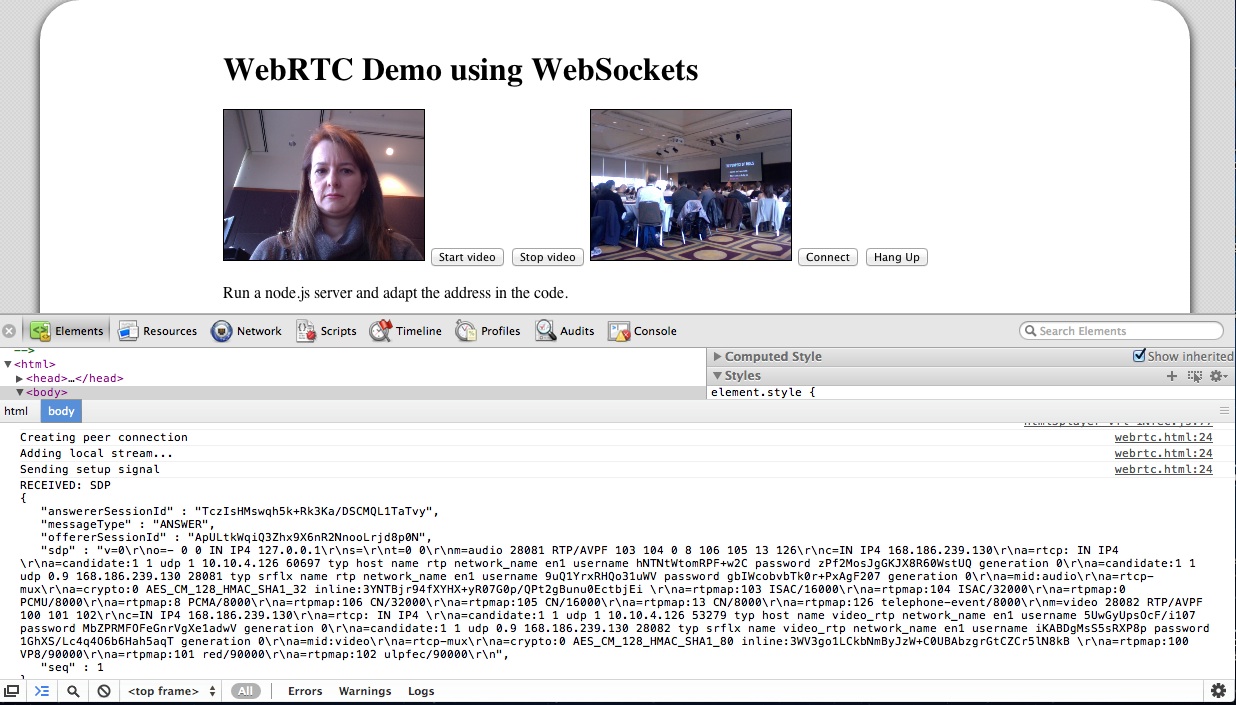
While it is still using Google’s STUN server to get through NAT, the messaging for setting up the connection is running completely through the Web Socket server. The messages that get exchanged are plain SDP message packets with a session ID. There are OFFER, ANSWER, and OK packets exchanged for each streaming direction. You can see some of it in the below image:

WebRTC demo

I’m not running a public WebSocket server, so you won’t be able to see this part of the presentation working. But the local loopback video should work.

At the conference, it all went without a hitch (while the wireless played along). I believe you have to host the WebSocket server on the same machine as the Web page, otherwise it won’t work for security reasons.

A whole new world of opportunities lies out there when we get the ability to set up video conferencing on every Web page - scary and exciting at the same time!

My crazy linux.conf.au week

In January I attended the annual Australian Linux and Open Source conference (LCA). But since I was sick all of January and had a lot to catch up on, I never got around to sharing all the talks that I gave during that time.

Drupal Down Under

It started with a talk at Drupal Down Under, which happened the weekend before LCA. I gave a talk titled “HTML5 video specifications” (video, slides).

I spoke about the video and audio element in HTML5, how to provide fallback content, how to encode content, how to control them from JavaScript, and briefly about Drupal video modules, though the next presentation provided much more insight into those. I explained how to make the HTML5 media elements accessible, including accessible controls, captions, audio descriptions, and the new WebVTT file format. I ran out of time to introduce the last section of my slides which are on WebRTC.

Linux.conf.au

On the first day of LCA I gave a talk both in the Multimedia Miniconf and the Browser Miniconf.

Browser Miniconf

In the Browser Miniconf I talked about “Web Standardisation – how browser vendors collaborate, or not” (slides). Maybe the most interesting part about this was that I tried out a new slide “deck” tool called impress.js. I’m not yet sure if I like it but it worked well for this talk, in which I explained how the HTML5 spec is authored and who has input.

I also sat on a panel of browser developers in the Browser Miniconf (more as a standards than as a browser developer, but that’s close enough). We were asked about all kinds of latest developments in HTML5, CSS3, and media standards in the browser.

Multimedia Miniconf

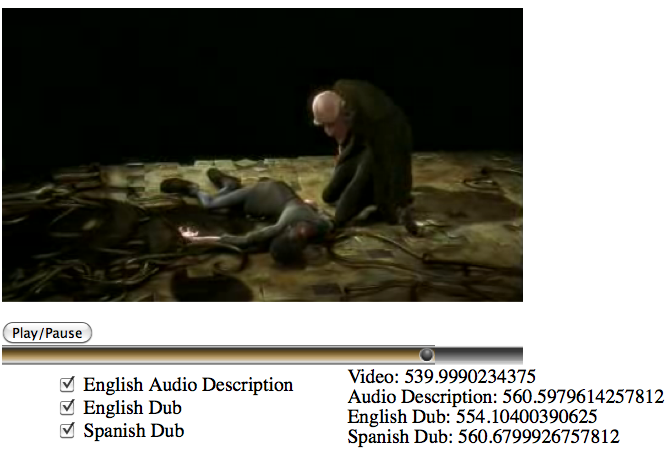
In the Multimedia Miniconf I gave a “HTML5 media accessibility update” (slides). I talked about the accessibility problems of Flash, how native HTML5 video players will be better, about accessible video controls, captions, navigation chapters, audio descriptions, and WebVTT. I also provided a demo of how to synchronize multiple video elements using a polyfill for the multitrack API.

I also provided an update on HTTP adaptive streaming APIs as a lightning talk in the Multimedia Miniconf. I used an extract of the Drupal conference slides for it.

Main conference

Finally, and most importantly, Alice Boxhall and myself gave a talk in the main linux.conf.au titled “Developing Accessible Web Apps - how hard can it be?” (video, slides). I spoke about a process that you can follow to make your Web applications accessible. I’m writing a separate blog post to explain this in more detail. In her part, Alice dug below the surface of browsers to explain how the accessibility markup that Web developers provide is transformed into data structures that are handed to accessibility technologies.

Open Media Developers Track at OVC 2011

The Open Video Conference that took place on 10-12 September was so overwhelming, I’ve still not been able to catch my breath! It was a dense three days for me, even though I only focused on the technology sessions of the conference and utterly missed out on all the policy and content discussions.

Roughly 60 people participated in the Open Media Software (OMS) developers track. This was an amazing group of people capable and willing to shape the future of video technology on the Web:

  • HTML5 video developers from Apple, Google, Opera, and Mozilla (though we missed the NZ folks),
  • codec developers from WebM, Xiph, and MPEG,
  • Web video developers from YouTube, JWPlayer, Kaltura, VideoJS, PopcornJS, etc.,
  • content publishers from Wikipedia, Internet Archive, YouTube, Netflix, etc.,
  • open source tool developers from FFmpeg, gstreamer, flumotion, VideoLAN, PiTiVi, etc,
  • and many more.

To provide a summary of all the discussions would be impossible, so I just want to share the key take-aways that I had from the main sessions.

WebRTC: Realtime Communications and HTML5

Tim Terriberry (Mozilla), Serge Lachapelle (Google) and Ethan Hugg (CISCO) moderated this session together (slides). There are activities both at the W3C and at IETF - the ones at IETF are supposed to focus on protocols, while the W3C ones on HTML5 extensions.

The current proposal of a PeerConnection API has been implemented in WebKit/Chrome as open source. It is expected that Firefox will have an add-on by Q1 next year. It enables video conferencing, including media capture, media encoding, signal processing (echo cancellation etc), secure transmission, and a data stream exchange.

Current discussions are around the signalling protocol and whether SIP needs to be required by the standard. Further, the codec question is under discussion with a question whether to mandate VP8 and Opus, since transcoding gateways are not desirable. Another question is how to measure the quality of the connection and how to report errors so as to allow adaptation.

What always amazes me around RTC is the sheer number of specialised protocols that seem to be required to implement this. WebRTC does not disappoint: in fact, the question was asked whether there could be a lighter alternative than to re-use dozens of years of protocol development - is it over-engineered? Can desktop players connect to a WebRTC session?

We are already in a second or third revision of this part of the HTML5 specification and yet it seems the requirements are still being collected. I’m quietly confident that everything is done to make the lives of the Web developer easier, but it sure looks like a huge task.

Zohar Babin (Kaltura) and myself moderated this session and I must admit that this session was the biggest eye-opener for me amongst all the sessions. There was a large number of Flash developers present in the room and that was great, because sometimes we just don’t listen enough to lessons learnt in the past.

This session gave me one of those aha-moments: it the form of the Flash appendBytes() API function.

The appendBytes() function allows a Flash developer to take a byteArray out of a connected video resource and do something with it - such as feed it to a video for display. When I heard that Web developers want that functionality for JavaScript and the video element, too, I instinctively rejected the idea wondering why on earth would a Web developer want to touch encoded video bytes - why not leave that to the browser.

But as it turns out, this is actually a really powerful enabler of functionality. For example, you can use it to:

  • display mid-roll video ads as part of the same video element,
  • sequence playlists of videos into the same video element,
  • implement DVR functionality (high-speed seeking),
  • do mash-ups,
  • do video editing,
  • adaptive streaming.

This totally blew my mind and I am now completely supportive of having such a function in HTML5. Together with media fragment URIs you could even leave all the header download management for resources to the Web browser and just request time ranges from a video through an appendBytes() function. This would be easier on the Web developer than having to deal with byte ranges and making sure that appropriate decoding pipelines are set up.

Standards for Video Accessibility

Philip Jagenstedt (Opera) and myself moderated this session. We focused on the HTML5 track element and the WebVTT file format. Many issues were identified that will still require work.

One particular topic was to find a standard means of rendering the UI for caption, subtitle, und description selection. For example, what icons should be used to indicate that subtitles or captions are available. While this is not part of the HTML5 specification, it’s still important to get this right across browsers since otherwise users will get confused with diverging interfaces.

Chaptering was discussed and a particular need to allow URLs to directly point at chapters was expressed. I suggested the use of named Media Fragment URLs.

The use of WebVTT for descriptions for the blind was also discussed. A suggestion was made to use the voice tag to allow for “styling” (i.e. selection) of the screen reader voice.

Finally, multitrack audio or video resources were also discussed and the @mediagroup attribute was explained. A question about how to identify the language used in different alternative dubs was asked. This is an issue because @srclang is not on audio or video, only on text, so it’s a missing feature for the multitrack API.

Beyond this session, there was also a breakout session on WebVTT and the track element. As a consequence, a number of bugs were registered in the W3C bug tracker.

WebM: Testing, Metrics and New features

This session was moderated by John Luther and John Koleszar, both of the WebM Project. They started off with a presentation on current work on WebM, which includes quality testing and improvements, and encoder speed improvement. Then they moved on to questions about how to involve the community more.

The community criticised that communication of what is happening around WebM is very scarce. More sharing of information was requested, including a move to using open Google+ hangouts instead of Google internal video conferences. More use of the public bug tracker can also help include the community better.

Another pain point of the community was that code is introduced and removed without much feedback. It was requested to introduce a peer review process. Also it was requested that example code snippets are published when new features are announced so others can replicate the claims.

This all indicates to me that the WebM project is increasingly more open, but that there is still a lot to learn.

Standards for HTTP Adaptive Streaming

This session was moderated by Frank Galligan and Aaron Colwell (Google), and Mark Watson (Netflix).

Mark started off by giving us an introduction to MPEG DASH, the MPEG file format for HTTP adaptive streaming. MPEG has just finalized the format and he was able to show us some examples. DASH is XML-based and thus rather verbose. It is covering all eventualities of what parameters could be switched during transmissions, which makes it very broad. These include trick modes e.g. for fast forwarding, 3D, multi-view and multitrack content.

MPEG have defined profiles - one for live streaming which requires chunking of the files on the server, and one for on-demand which requires keyframe alignment of the files. There are clear specifications for how to do these with MPEG. Such profiles would need to be created for WebM and Ogg Theora, too, to make DASH universally applicable.

Further, the Web case needs a more restrictive adaptation approach, since the video element’s API is already accounting for some of the features that DASH provides for desktop applications. So, a Web-specific profile of DASH would be required.

Then Aaron introduced us to the MediaSource API and in particular the webkitSourceAppend() extension that he has been experimenting with. It is essentially an implementation of the appendBytes() function of Flash, which the Web developers had been asking for just a few sessions earlier. This was likely the biggest announcement of OVC, alas a quiet and technically-focused one.

Aaron explained that he had been trying to find a way to implement HTTP adaptive streaming into WebKit in a way in which it could be standardised. While doing so, he also came across other requirements around such chunked video handling, in particular around dynamic ad insertion, live streaming, DVR functionality (fast forward), constraint video editing, and mashups. While trying to sort out all these requirements, it became clear that it would be very difficult to implement strategies for stream switching, buffering and delivery of video chunks into the browser when so many different and likely contradictory requirements exist. Also, once an approach is implemented and specified for the browser, it becomes very difficult to innovate on it.

Instead, the easiest way to solve it right now and learn about what would be necessary to implement into the browser would be to actually allow Web developers to queue up a chunk of encoded video into a video element for decoding and display. Thus, the webkitSourceAppend() function was born (specification).

The proposed extension to the HTMLMediaElement is as follows:

partial interface HTMLMediaElement {
  // URL passed to src attribute to enable the media source logic.
  readonly attribute [URL] DOMString webkitMediaSourceURL;

  bool webkitSourceAppend(in Uint8Array data);

  // end of stream status codes.
  const unsigned short EOS_NO_ERROR = 0;
  const unsigned short EOS_NETWORK_ERR = 1;
  const unsigned short EOS_DECODE_ERR = 2;

  void webkitSourceEndOfStream(in unsigned short status);

  // states
  const unsigned short SOURCE_CLOSED = 0;
  const unsigned short SOURCE_OPEN = 1;
  const unsigned short SOURCE_ENDED = 2;

  readonly attribute unsigned short webkitSourceState;
};

The code is already checked into WebKit, but commented out behind a command-line compiler flag.

Frank then stepped forward to show how webkitSourceAppend() can be used to implement HTTP adaptive streaming. His example uses WebM - there are no examples with MPEG or Ogg yet.

The chunks that Frank’s demo used were 150 video frames long (6.25s) and 5s long audio. Stream switching only switched video, since audio data is much lower bandwidth and more important to retain at high quality. Switching was done on multiplexed files.

Every chunk requires an XHR range request - this could be optimised if the connections were kept open per adaptation. Seeking works, too, but since decoding requires download of a whole chunk, seeking latency is determined by the time it takes to download and decode that chunk.

Similar to DASH, when using this approach for live streaming, the server has to produce one file per chunk, since byte range requests are not possible on a continuously growing file.

Frank did not use DASH as the manifest format for his HTTP adaptive streaming demo, but instead used a hacked-up custom XML format. It would be possible to use JSON or any other format, too.

After this session, I was actually completely blown away by the possibilities that such a simple API extension allows. If I wasn’t sold on the idea of a appendBytes() function in the earlier session, this one completely changed my mind. While I still believe we need to standardise a HTTP adaptive streaming file format that all browsers will support for all codecs, and I still believe that a native implementation for support of such a file format is necessary, I also believe that this approach of webkitSourceAppend() is what HTML needs - and maybe it needs it faster than native HTTP adaptive streaming support.

Standards for Browser Video Playback Metrics

This session was moderated by Zachary Ozer and Pablo Schklowsky (JWPlayer). Their motivation for the topic was, in fact, also HTTP adaptive streaming. Once you leave the decisions about when to do stream switching to JavaScript (through a function such a wekitSourceAppend()), you have to expose stream metrics to the JS developer so they can make informed decisions. The other use cases is, of course, monitoring of the quality of video delivery for reporting to the provider, who may then decide to change their delivery environment.

The discussion found that we really care about metrics on three different levels:

  • measuring the network performance (bandwidth)
  • measuring the decoding pipeline performance
  • measuring the display quality

In the end, it seemed that work previously done by Steve Lacey on a proposal for video metrics was generally acceptable, except for the playbackJitter metric, which may be too aggregate to mean much.

Device Inputs / A/V in the Browser

I didn’t actually attend this session held by Anant Narayanan (Mozilla), but from what I heard, the discussion focused on how to manage permission of access to video camera, microphone and screen, e.g. when multiple applications (tabs) want access or when the same site wants access in a different session. This may apply to real-time communication with screen sharing, but also to photo sharing, video upload, or canvas access to devices e.g. for time lapse photography.

Open Video Editors

This was another session that I wasn’t able to attend, but I believe the creation of good open source video editing software and similar video creation software is really crucial to giving video a broader user appeal.

Jeff Fortin (PiTiVi) moderated this session and I was fascinated to later see his analysis of the lifecycle of open source video editors. It is shocking to see how many people/projects have tried to create an open source video editor and how many have stopped their project. It is likely that the creation of a video editor is such a complex challenge that it requires a larger and more committed open source project - single people will just run out of steam too quickly. This may be comparable to the creation of a Web browser (see the size of the Mozilla project) or a text processing system (see the size of the OpenOffice project).

Jeff also mentioned the need to create open video editor standards around playlist file formats etc. Possibly the Open Video Alliance could help. In any case, something has to be done in this space - maybe this would be a good topic to focus next year’s OVC on?

Monday’s Breakout Groups

The conference ended officially on Sunday night, but we had a third day of discussions / hackday at the wonderful New York Lawschool venue. We had collected issues of interest during the two previous days and organised the breakout groups on the morning (Schedule).

In the Content Protection/DRM session, Mark Watson from Netflix explained how their API works and that they believe that all we need in browsers is a secure way to exchange keys and an indicator of protection scheme is used - the actual protection scheme would not be implemented by the browser, but be provided by the underlying system (media framework/operating system). I think that until somebody actually implements something in a browser fork and shows how this can be done, we won’t have much progress. In my understanding, we may also need to disable part of the video API for encrypted content, because otherwise you can always e.g. grab frames from the video element into canvas and save them from there.

In the Playlists and Gapless Playback session, there was massive brainstorming about what new cool things can be done with the video element in browsers if playback between snippets can be made seamless. Further discussions were about a standard playlist file formats (such as XSPF, MRSS or M3U), media fragment URIs in playlists for mashups, and the need to expose track metadata for HTML5 media elements.

What more can I say? It was an amazing three days and the complexity of problems that we’re dealing with is a tribute to how far HTML5 and open video has already come and exciting news for the kind of applications that will be possible (both professional and community) once we’ve solved the problems of today. It will be exciting to see what progress we will have made by next year’s conference.

Thanks go to Google for sponsoring my trip to OVC.

UPDATE: We actually have a mailing list for open media developers who are interested in these and similar topics - do join at http://lists.annodex.net/cgi-bin/mailman/listinfo/foms.
The new FOMS: Open Media Developers at OVC

Since 2007 I have organised the annual Foundations of Open Media Software (FOMS) developers workshop. Last year it was held for the first time in the northern hemisphere, in fact on the two days straight after the Open Video Conference (OVC).

This year I’m really excited to announce that the workshop will be an integral part of the Open Video Conference on 10-12 September 2011.

FOMS 2011 will take place as the Open Media Developers track at OVC and I would like to see as many if not more open media software developers attend as we had in last year’s FOMS.

Why should you go?

Well, firstly of course the people. As in previous years, we will have some of the key developers in open media software attend - not as celebrities, but to work with other key developers on hard problems and to make progress.

Then, secondly we believe we have some awesome sessions in preparation:

How we run it

I’m actually not quite satisfied with just these sessions. I’d like to be more flexible on how we make the three days a success for everyone. And this implies that there will continue to be room to add more sessions, even while at the conference, and create breakout groups to address really hard issues all the way through the conference.

I insist on this flexibility because I have seen in past years that the most productive outcomes are created by two or three people breaking away from the group, going into a corner and hacking up some demos or solutions to hard problems and taking that momentum away after the workshop.

To allow this to happen, we will have a plenary on the first day during which we will identify who is actually present at the workshop, what they are working on, what sessions they are planning on a attending, and what other topics they are keen to learn about during the conference that may not yet be addressed by existing sessions.

We’ll repeat this exercise on the Monday after all the rest of the conference is finished and we get a quieter day to just focus on being productive.

But is it worth the effort?

As in the past years, whether the workshop is a success for you depends on you and you alone. You have the power to direct what sessions and breakout groups are being created, and you have the possibility to find others at the workshop that share an interest and drag them away for some productive brainstorming or coding.

I’m going to make sure we have an adequate number of rooms available to actually achieve such an environment. I am very happy to have the support of OVC for this and I am assured we have the best location with plenty of space.

Trip sponsorships

As in previous FOMSes, we have again made sure that travel and conference sponsorship is available to community software developers that would otherwise not be able to attend FOMS. We have several such sponsorships and I encourage you to email the FOMS committee or OVC about it. Mention what you’re working on and what you’re interested to take away from OVC and we can give you free entry, hotel and flight sponsorship.

Oh, and don’t forget to Register for OVC!

Ideas for new HTML5 apps

At the recent Linux conference in Brisbane, Australia, I promised a free copy of my book to the person that could send me the best idea for an HTML5 video application. I later also tweeted about it.

While I didn’t get many emails, I am still impressed by the things people want to do. Amongst the posts were the following proposals:

  • Develop a simple video cutting tool to, say setting cut points and having a very simple backend taking the cut points and generating quick enough output. The cutting doesn’t need to retranscode.
  • Develop a polyfill for the track element
  • Use HTML5 video, especially the tracking between video and text, to better present video from the NZ Parliament.
  • Making a small MMO game using WebGL, HTML5 audio and WebSockets. I also want to use the same code for desktop and web.

These are all awesome ideas and I found it really hard to decide whom to give the free book to. In the end, I decided to give it to Brian McKenna, who is working on the MMO game - simply because it it is really pushing the boundaries of several HTML5 technologies.

To everyone else: the book is actually not that expensive to buy from APRESS or Amazon and you can get the eBook version there, too.

Thanks to everyone who started really thinking about this and sent in a proposal!

HTML5 Video Presentations at LCA 2011

Working in the WHAT WG and the W3C HTML WG, you sometimes forget that all the things that are being discussed so heatedly for standardization are actually leading to some really exciting new technologies that not many outside have really taken note of yet.

This week, during the Australian Linux Conference in Brisbane, I’ve been extremely lucky to be able to show off some awesome new features that browser vendors have implemented for the audio and video elements. The feedback that I got from people was uniformly plain surprise - nobody expected browser to have all these capabilities.

The examples that I showed off have mostly been the result of working on a book for almost 9 months of the past year and writing lots of examples of what can be achieved with existing implementations and specifications. They have been inspired by diverse demos that people made in the last years, so the book is linking to many more and many more amazing demos.

Incidentally, I promised to give a copy of the book away to the person with the best idea for a new Web application using HTML5 media. Since we ran out of time, please shoot me an email or a tweet (@silviapfeiffer) within the next 4 weeks and I will send another copy to the person with the best idea. The copy that I brought along was given to a student who wanted to use HTML5 video to display on surfaces of 3D moving objects.

So, let’s get to the talks.

On Monday, I gave a presentation on “Audio and Video processing in HTML5”, which had a strong focus on the Mozilla Audio API.

I further gave a brief lightning talk about “HTML5 Media Accessibility Update”. I am expecting lots to happen on this topic during this year.

Finally, I gave a presentation today on “The Latest and Coolest in HTML5 Media” with a strong focus on video, but also touching on audio and media accessibility.

The talks were streamed live - congrats to Ryan Verner for getting this working with support from Ben Hutchings from DebConf and the rest of the video team. The videos will apparently be available from http://linuxconfau.blip.tv/ in the near future.

UPDATE 4th Feb 2011: And here is my LCA talk …

with subtitles on YouTube:

Talk at Web Directions South, Sydney: HTML5 audio and video

On 14th October I gave a talk at Web Directions South on “HTML5 audio and video - using these exciting new elements in practice”.

I wanted to give people an introduction into how to use these elements while at the same time stirring their imagination as to the design possibilities now that these elements are available natively in browsers. I re-used some of the demos that I have put together for the book that I am currently writing, added some of the cool stuff that others have done and finished off with an outlook towards what new features will probably arrive next.

“Slides” are now available, which are really just a Web page with some demos that work in modern browsers.

Table of contents:

HTML5 Audio and Video

  1. Cross browser
  2. Cross browser
  3. Encoding
  4. Fallback considerations
  5. CSS and
  6. audio plans

adaptive HTTP streaming for open codecs

At this week’s FOMS in New York we had one over-arching topic that seemed to be of interest to every single participant: how to do adaptive bitrate streaming over HTTP for open codecs. On the first day, there was a general discussion about the advantages and disadvantages of adaptive HTTP streaming, while on the second day, we moved towards designing a solution for Ogg and WebM. While I didn’t attend all the discussions, I want to summarize the insights that I took out of the days in this blog post and the alternative implementation strategies that were came up with.

Use Cases for Adaptive HTTP Streaming

Streaming using RTP/RTSP has in the past been the main protocol to provide live video streams, either for broadcast or for real-time communication. It has been purpose-built for chunked video delivery and has features that many customers want, such as the ability to encrypt the stream, to tell players not to store the data, and to monitor the performance of the stream such that its bandwidth can be adapted. It has, however, also many disadvantages, not least that it goes over ports that normal firewalls block and thus is rather difficult to deploy, but also that it requires special server software, a client that speaks the protocol, and has a signalling overhead on the transport layer for adapting the stream.

RTP/RTSP has been invented to allow for high quality of service video consumption. In the last 10 years, however, it has become the norm to consume “canned” video (i.e. non-live video) over HTTP, making use of the byte-range request functionality of HTTP for seeking. While methods have been created to estimate the size of a pre-buffer before starting to play back in order to achieve continuous playback based on the bandwidth of your pipe at the beginning of downloading, not much can be done when one runs out of pre-buffer in the middle of playback or when the CPU on the machine doesn’t manage to catch up with decoding of the sheer amount of video data: your playback stops to go into re-buffering in the first case and starts to become choppy in the latter case.

An obvious approach to improving this situation is the scale the bandwidth of the video stream down, potentially even switch to a lower resolution video, right in the middle of playback. Apple’s HTTP live streaming, Microsoft’s Smooth Streaming, and Adobe’s Dynamic Streaming are all solutions in this space. Also, ISO/MPEG is working on DASH (Dynamic Adaptive Streaming over HTTP) is an effort to standardize the approach for MPEG media. No solution yets exist for the open formats within Ogg or WebM containers.

Some features of HTTP adaptive streaming are:

  • Enables adaptation of downloading to avoid continuing buffering when network or machine cannot cope.
  • Gapless switching between streams of different bitrate.
  • No special server software is required - any existing Web Server can be used to provide the streams.
  • The adaptation comes from the media player that actually knows what quality the user experiences rather than the network layer that knows nothing about the performance of the computer, and can only tell about the performance of the network.
  • Adaptation means that several versions of different bandwidth are made available on the server and the client switches between them based on knowledge it has about the video quality that the user experiences.
  • Bandwidth is not wasted by downloading video data that is not being consumed by the user, but rather content is pulled moments just before it is required, which works both for the live and canned content case and is particularly useful for long-form content.

Viability

In discussions at FOMS it was determined that mid-stream switching between different bitrate encoded audio files is possible. Just looking at the PCM domain, it requires stitching the waveform together at the switch-over point, but that is not a complex function. To be able to do that stitching with Vorbis-encoded files, there is no need for a overlap of data, because the encoded samples of the previous window in a different bitrate page can be used as input into the decoding of the current bitrate page, as long as the resulting PCM samples are stitched.

For video, mid-stream switching to a different bitrate encoded stream is also acceptable, as long as the switch-over point adheres to a keyframe, which can be independently decoded.

Thus, the preparation of the alternative bitstream videos requires temporal synchronisation of keyframes on video - the audio can deal with the switch-over at any point. A bit of intelligent encoding is thus necessary - requiring the encoding pipeline to provide regular keyframes at a certain rate would be sufficient. Then, the switch-over points are the keyframes.

Technical Realisation

With the solutions from Adobe, Microsoft and Apple, the technology has been created such there are special tools on the server that prepare the content for adaptive HTTP streaming and provide a manifest of the prepared content. Typically, the content is encoded in versions of different bitrates and the bandwidth versions are broken into chunks that can be decoded independently. These chunks are synchronised between the different bitrate versions such that there are defined switch-over points. The switch-over points as well as the file names of the different chunks are documented inside a manifest file. It is this manifest file that the player downloads instead of the resource at the beginning of streaming. This manifest file informs the player of the available resources and enables it to orchestrate the correct URL requests to the server as it progresses through the resource.

At FOMS, we took a step back from this approach and analysed what the general possibilities are for solving adaptive HTTP streaming. For example, it would be possible to not chunk the original media data, but instead perform range requests on the different bitrate versions of the resource. The following options were identified.

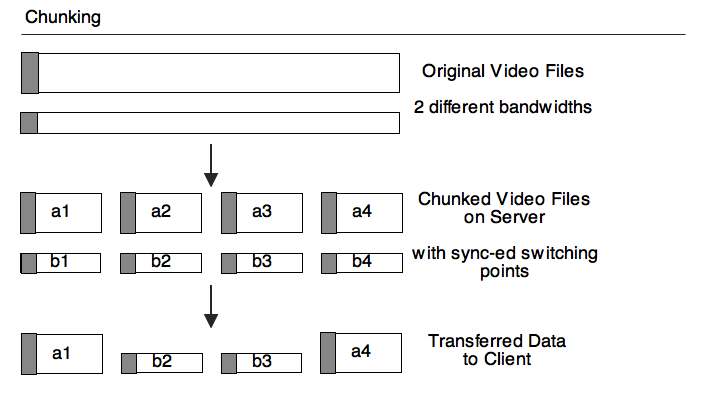
Chunking

With Chunking, the original bitrate versions are chunked into smaller full resources with defined switch-over points. This implies creation of a header on each one of the chunks and thus introduces overhead. Assuming we use 10sec chunks and 6kBytes per chunk, that results in 5kBit/sec extra overhead. After chunking the files this way, we provide a manifest file (similar to Apple’s m3u8 file, or the SMIL-based manifest file of Microsoft, or Adobe’s Flash Media Manifest file). The manifest file informs the client about the chunks and the switch-over points and the client requests those different resources at the switch-over points.

Disadvantages:

  • Header overhead on the pipe.
  • Switch-over delay for decoding the header.
  • Possible problem with TCP slowstart on new files.
  • A piece of software is necessary on server to prepare the chunked files.
  • A large amount of files to manage on the server.
  • The client has to hide the switching between full resources.

Advantages:

  • Works for live streams, where increasing amounts of chunks are written.
  • Works well with CDNs, because mid-stream switching to another server is easy.
  • Chunks can be encoded such that there is no overlap in the data necessary on switch-over.
  • May work well with Web sockets.
  • Follows the way in which proprietary solutions are doing it, so may be easy to adopt.
  • If the chunks are concatenated on the client, you get chained Ogg files (similar concept in WebM?), which are planned to be supported by Web browsers and are thus legal files.

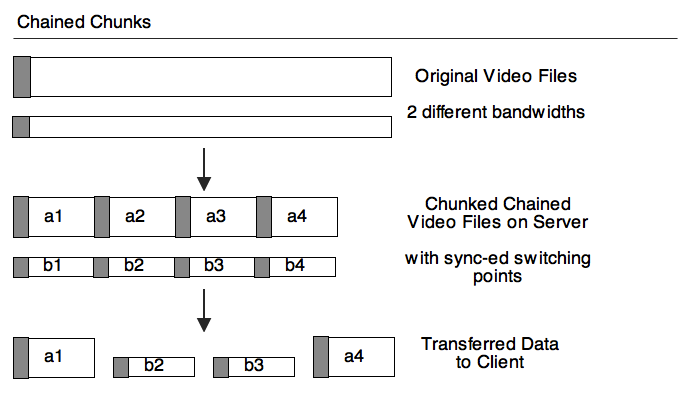
Chained Chunks

Alternatively to creating the large number of files, one could also just create the chained files. Then, the switch-over is not between different files, but between different byte ranges. The headers still have to be read and parsed. And a manifest file still has to exist, but it now points to byte ranges rather than different resources.

Advantages over Chunking:

  • No TCP-slowstart problem.
  • No large number of files on the server.

Disadvantages over Chunking:

  • Mid-stream switching to other servers is not easily possible - CDNs won’t like it.
  • Doesn’t work with Web sockets as easily.
  • New approach that vendors will have to grapple with.

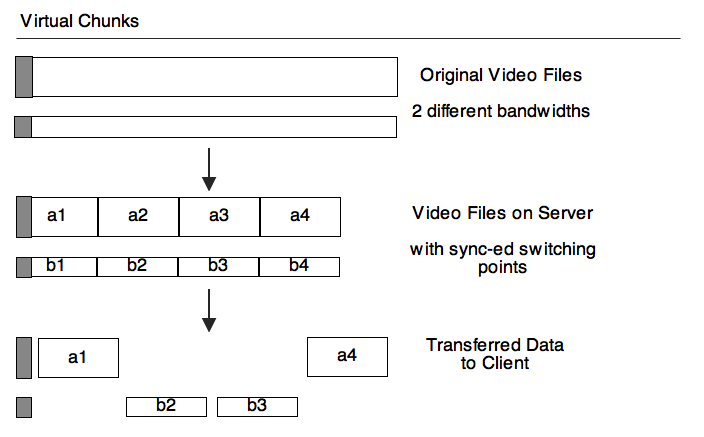
Virtual Chunks

Since in Chained Chunks we are already doing byte-range requests, it is a short step towards simply dropping the repeating headers and just downloading them once at the beginning for all possible bitrate files. Then, as we seek to different positions in “the” file, the byte range of the bitrate version that makes sense to retrieve at that stage would be requested. This could even be done with media fragment URIs, through addressing with time ranges is less accurate than explicit byte ranges.

In contrast to the previous two options, this basically requires keeping n different encoding pipelines alive - one for every bitrate version. Then, the byte ranges of the chunks will be interpreted by the appropriate pipeline. The manifest now points to keyframes as switch-over points.

Advantage over Chained Chunking:

  • No header overhead.
  • No continuous re-initialisation of decoding pipelines.

Disadvantages over Chained Chunking:

  • Multiple decoding pipelines need to be maintained and byte ranges managed for each.

Unchunked Byte Ranges

We can even consider going all the way and not preparing the alternative bitrate resources for switching, i.e. not making sure that the keyframes align. This will then require the player to do the switching itself, determine when the next keyframe comes up in its current stream then seek to that position in the next stream, always making sure to go back to the last keyframe before that position and discard all data until it arrives at the same offset.

Disadvantages:

  • There will be an overlap in the timeline for download, which has to be managed from the buffering and alignment POV.
  • Overlap poses a challenge of downloading more data than necessary at exactly the time where one doesn’t have bandwidth to spare.
  • Requires seeking.
  • Messy.

Advantages:

  • No special authoring of resources on the server is needed.
  • Requires a very simple manifest file only with a list of alternative bitrate files.

Final concerns

At FOMS we weren’t able to make a final decision on how to achieve adaptive HTTP streaming for open codecs. Most agreed that moving forward with the first case would be the right thing to do, but the sheer number of files that can create is daunting and it would be nice to avoid that for users.

Other goals are to make it work in stand-alone players, which means they will need to support loading the manifest file. And finally we want to enable experimentation in the browser through JavaScript implementation, which means there needs to be an interface to provide the quality of decoding to JavaScript. Fortunately, a proposal for such a statistics API already exists. The number of received frames, the number of dropped frames, and the size of the video are the most important statistics required.

State of Media Accessibility in HTML5

Today I gave a talk at the Open Video Conference about the state of the specifications in HTML5 for media accessibility.

To be clear: at this exact moment, there is no actual specification text in the W3C version of HTML5 for media accessibility. There is, however, some text in the WHATWG version, providing a framework for text-based alternative content. Other alternative content still requires new specification text. Finally, there is no implementation in any browser yet for media accessibility, but we are getting closer. As browser vendors are moving towards implementing support for the WHATWG specifications of the element, the TimedTrack JavaScript API, and the WebSRT format, video sites can also experiment with the provided specifications and contribute feedback to improve the specifications.

Attached are my slides from today’s talk. I went through some of the key requirements of accessibility users and showed how they are being met by the new specifications (in green) or could be met with some still-to-be-developed specifications (in blue). Note that the talk and slides focus on accessibility needs, but the developed technologies will be useful far beyond just accessibility needs and will also help satisfy other needs, such as the needs of internationalization (through subtitles), of exposing multitrack audio/video (through the JavaScript API), of providing timed metadata (through WebSRT), or even of supporting Karaoke (through WebSRT). In the tables on the last two pages I summarize the gaps in the specifications where we will be working on next and also show what is already possible with given specifications.

Your metadata is not my metadata

Over the last two days we had the Open Subtitles Summit here in New York. It was very exciting to feel the energy in the room to make a change to media accessibility - I am sure we will see much development over the next 12 months. We spoke much about HTML5 video and standards and had many discussions about subtitles, captions, and other accessibility information.

On Wednesday we had a discussion about metadata and I quickly realized that “your metadata is not my metadata”: everyone used the word for something different. So, I suggested to have a metadata discussion on Thursday where we would put a structure onto all of this, identify what kinds of metadata we have and whether and how it should be supported in HTML5 standards.

Our basic findings are very simple and widely accepted. There are three fundamentally different types of metadata:

  • Technical metadata about video: information about the format of the resource - things that can be determined automatically and are non-controversial, such as the width, height, framerate, audio sample rate etc. This information can be used to, e.g. decide if a video is appropriate for a certain device.
  • Semantic metadata about video: semantic information about the video resource - e.g. license, author, publication date, version, attribution, title, description. This information is good for search and identification.
  • Timed semantic metadata: semantic information that is associated with time intervals of the video, not with the full video - e.g. active speaker, location, date-time, objects.

As we talked about this further, however, we identified subclasses of these generic types that are very important to identify because they will be handled differently.

We found that semantic metadata can be separated into universal metadata and domain-specific metadata. Universal metadata is semantic metadata that can basically be applied to any content. There is very little of that and the W3C Media Annotations WG has done a pretty good job in identifying it. Domain-specific metadata is such metadata that only applies to some content, e.g. all the videos about sports have metadata such as game scores, players, or type of sport.

As for adding such metadata into media resources, we discussed that it makes sense to have the universal metadata explicitly spelled out and to have a generic means to associate name-value pairs with resource. Of course it will all be stored in databases, but there was also a requirement to have it encoded into the media resource - and in our discussion case: into external captions or subtitle files.

As for timed metadata - it is possible to separate this into metadata that is only relevant as part of a subtitle or caption file, because the metadata relates to a certain word or a word sequence, and into independent timed metadata that can be stored in, e.g. JSON or some similar format.

Since we are particularly interested in subtitles and captions, the timed metadata that is associated with words or word sequences is particularly important. The most natural metadata that is useful as part of subtitles is of course speaker segmentation. We also identified that hyperlinks to related content are just as important, since it can enable applications such as popcorn.js.

Potentially there is a use for metadata association with any sequence of words in a caption or subtitle, which could be satisfied with the use of a generic markup element for a sequence of words, such that microdata or RDFa may get associated. A request for such a generic means of associating metadata was made. However, the need for it still has to be confirmed with good use cases - the breakout group was out of time as we came to this point. So, leave your ideas for use cases in the requirements - they will help shape standards.

Upcoming conferences / workshops

Lots is happening in open source multimedia land in the next few months.

Check out these cool upcoming conferences / workshops / miniconfs…

September 29th and 30th, New York Open Subtitles Design Summit October 1st and 2nd, New York Open Video Conference

October 3rd and 4th, New York Foundations of Open Media Software Developer Workshop

January 24/25th, Brisbane, Australia LCA Multimedia Miniconf

VP8/WebM: Adobe is the key to open video on the Web

Google have today announced the open sourcing of VP8 and the creation of a new media format WebM.

Technical Challenges

As I predicted earlier, Google had to match VP8 with an audio codec and a container format - their choice was a subpart of the Matroska format and the Vorbis codec. To complete the technical toolset, Google have:

  • developed ffmpeg patches, so an open source encoding tool for WebM will be available
  • developed GStreamer and DirectShow plugins, so players that build on these frameworks will be able to decode WebM,
  • and developed an SDK such that commercial partners can implement support for WebM in their products.

This has already been successful and several commercial software products are already providing support for WebM.

Google haven’t forgotten the mobile space either - a bunch of Hardware providers are listed as supporters on the WebM site and it can be expected that developments have started.

The speed of development of software and hardware around WebM is amazing. Google have done an amazing job at making sure the technology matures quickly - both through their own developments and by getting a substantial number of partners included. That’s just the advantage of being Google rather than a Xiph, but still an amazing achievement.

Browsers

As was to be expected, Google managed to get all the browser vendors that are keen to support open video to also support WebM: Chrome, Firefox and Opera all have come out with special builds today that support WebM. Nice work!

What is more interesting, though, is that Microsoft actually announced that they will support WebM in future builds of IE9 - not out of the box, but on systems where the codec is already installed. Technically, that is be the same situation as it will be for Theora, but the difference in tone is amazing: in this blog post, any codec apart from H.264 was condemned and rejected, but the blog post about WebM is rather positive. It signals that Microsoft recognize the patent risk, but don’t want to be perceived of standing in the way of WebM’s uptake.

Apple have not yet made an announcement, but since it is not on the list of supporters and since all their devices exclusively support H.264 it stands to expect that they will not be keen to pick up WebM.

Publishers

What is also amazing is that Google have already achieved support for WebM by several content providers. The first of these is, naturally, YouTube, which is offering a subset of its collection also in the WebM format and they are continuing to transcode their whole collection. Google also has Brightcov, Ooyala, and Kaltura on their list of supporters, so content will emerge rapidly.

Uptake

So, where do we stand with respect to a open video format on the Web that could even become the baseline codec format for HTML5? It’s all about uptake - if a substantial enough ecosystem supports WebM, it has all chances of becoming a baseline codec format - and that would be a good thing for the Web.

And this is exactly where I have the most respect for Google. The main challenge in getting uptake is in getting the codec into the hands of all people on the Internet. This, in particular, includes people working on Windows with IE, which is still the largest browser from a market share point of view. Since Google could not realistically expect Microsoft to implement WebM support into IE9 natively, they have found a much better partner that will be able to make it happen - and not just on Windows, but on many platforms.

Yes, I believe Adobe is the key to creating uptake for WebM - and this is admittedly something I have completely overlooked previously. Adobe has its Flash plugin installed on more than 90% of all browsers. Most of their users will upgrade to a new version very soon after it is released. And since Adobe Flash is still the de-facto standard in the market, it can roll out a new Flash plugin version that will bring WebM codec support to many many machines - in particular to Windows machines, which will in turn enable all IE9 users to use WebM.

Why would Adobe do this and thus cement its Flash plugin’s replacement for video use by HTML5 video? It does indeed sound ironic that the current market leader in online video technology will be the key to creating an open alternative. But it makes a lot of sense to Adobe if you think about it.

Adobe has itself no substantial standing in codec technology and has traditionally always had to license codecs. Adobe will be keen to move to a free codec of sufficient quality to replace H.264. Also, Adobe doesn’t earn anything from the Flash plugins themselves - their source of income are their authoring tools. All they will need to do to succeed in a HTML5 WebM video world is implement support for WebM and HTML5 video publishing in their tools. They will continue to be the best tools for authoring rich internet applications, even if these applications are now published in a different format.

Finally, in the current hostile space between Apple and Adobe related to the refusal of Apple to allow Flash onto its devices, this may be the most genius means of Adobe at getting back at them. Right now, it looks as though the only company that will be left standing on the H.264-only front and outside the open WebM community will be Apple. Maybe implementing support for Theora wouldn’t have been such a bad alternative for Apple. But now we are getting a new open video format and it will be of better quality and supported on hardware. This is exciting.

IP situation

I cannot, however, finish this blog post on a positive note alone. After reading the review of VP8 by a x.264 developer, it seems possible that VP8 is infringing on patents that are outside the patent collection that Google has built up in codecs. Maybe Google have calculated with the possibility of a patent suit and put money away for it, but Google certainly haven’t provided indemnification to everyone else out there. It is a tribute to Google’s achievement that given a perceived patent threat - which has been the main inhibitor of uptake of Theora - they have achieved such an uptake and industry support around VP8. Hopefully their patent analysis is sound and VP8 is indeed a safe choice.

UPDATE (22nd May): After having thought about patents and the situation for VP8 a bit more, I believe the threat is really minimal. You should also read these thoughts of a Gnome developer, these of a Debian developer and the emails on the Theora mailing list.

W3C Media Annotations API standard

Recently, I was asked to review the W3C Media Annotations specifications as they are about to go into Last Call (a state that comes before the request for implementations at the W3C).

The W3C Media Annotations group has defined a set of metadata that they believe is representative and common for media resources. The ontology consist of the following fields:

  • ma:identifier: a URI or string to identify a resource
  • ma:title: a string providing the title of the resource
  • ma:language: a language code describing the language used in the resource
  • ma:locator: the URI at which the resource can be accessed
  • ma:contributor: a URI or string identifying the contributor and the nature of the contribution
  • ma:creator: a URI or string identifying an author
  • ma:createDate: a date of creation or publication of the resource
  • ma:location: a string or geo code identifying where the resource has been shot/recorded
  • ma:description: a string describing the content of the resource
  • ma:keyword: a word or word combination providing a topic, keyword or tag representing the resource
  • ma:genre: a string providing the genre of the resource
  • ma:rating: rating value, including the rating scale
  • ma:relation: a URI and string identifying a related resource and the relationship
  • ma:collection: a URI or string providing the name of a collection to which the resource belongs
  • ma:copyright: a URI or string with the copyright statement.
  • ma:license: a string or URI with the usage license
  • ma:publisher: a string or URI with the publisher of the resource
  • ma:targetAudience: a URI and classification string providing the issuer of the classification and the classification value
  • ma:fragments: a list of string and URI values that identify media fragments and their type
  • ma:namedFragments: a list of string and URI values the provide names to media fragments
  • ma:frameSize: a width - height pair in pixels
  • ma:compression: a string providing the compression algorithm
  • ma:duration: a float to provide the resource duration in seconds
  • ma:format String: the mime type of the resource
  • ma:samplingrate: a float with the audio sampling rate
  • ma:framerate: a float with the video frame rate
  • ma:bitrate: a float providing the average bit rate in kbps
  • ma:numTracks: an int of the number of tracks

Note that some of these fields are not single values, but simple constructs of multiple values. Thus, they are actually more complex than name-value pairs that, e.g. are typically used in HTML meta headers or in Dublin Core. I regard this as an issue for implementations.

The fields were chosen as typical metadata being available about media resources. The media fragments fields are a bit dubious in this respect, but could be useful in future.

The metadata is determined either from within the resource itself or from a metadata collection about the resource. As such, the document maps several existing metadata and media resource formats to this interface, amongst them:

As they didn’t have a mapping table for Ogg content, I offered the following:

MAWGRelationOgg propertiesHow to do the mappingDatatype
Descriptive Properties (Core Set)
Identification
ma:identifierexactNameName field in skeleton header (new)String
ma:titleexactTitleTITLE field in vorbiscomment headerString
exactTitleTitle field in skeleton header (new)String
relatedAlbumALBUM title in vorbiscomment headerString
ma:languageexactLanguageLanguage field in skeleton header (new)language code
ma:locatorexactfile URI from systemURI
Creation
ma:contributorexactArtist, PerformerARTIST and PERFORMER vorbiscomment headersStrings
ma:creatorrelatedOrganizationORGANIZATION field in vorbiscomment header
ma:createDateexactDateDATE field in vorbiscomment headerISO date format
ma:locationexactLocationLOCATION field in vorbiscomment headerString
Content description
ma:descriptionexactDescriptionDESCRIPTION field in vorbiscomment headerString
ma:keywordN/A
ma:genreexactGenreGENRE field in vorbiscomment headerString
ma:ratingN/A
Relational
ma:relationrelatedVersion, TracknumberVERSION (version of a title), TRACKNUMBER (CD track) fields in vorbiscomment headerStrings
ma:collectionrelatedAlbumALBUM field of vorbiscomment headerString
Rights
ma:copyrightexactCopyrightCOPYRIGHT field of vorbiscomment headerString
ma:licenseexactLicenseLICENSE field of vorbiscomment headerString
Distribution
ma:publisherrelatedOrganizationORGNIZATION field of vorbiscomment headerString
ma:targetAudiencemore specificRoleRole field of Skeleton header (new)String
Fragments
ma:fragmentsN/A
ma:namedFragmentsN/A
Technical Properties
ma:frameSizeexactextract from binary header of video trackint, int (width x height)
ma:compressionexactContent-typeContent-type field of Skeleton headerMIME type
ma:durationexactcalculate as duration = last_sample_time - first_sample_time of OggIndex header of skeletonFloat (or rather: rational - rational)
ma:formatexactContent-typeContent-type field of Skeleton headerMIME type
ma:samplingrateexactcalculate as granulerate = granulerate_numerator / granulerate_denominator of Skeleton headerRational (or rather int / int)
ma:framerateexactcalculate as granulerate = granulerate_numerator / granulerate_denominator of Skeleton headerRational (or rather int / int)
ma:bitrateexactcalculate as bitrate = length_of_segment / duration from OggIndex headers of skeletonFloat
ma:numTracksexactTracknumberTRACKNUMBER field of vorbiscomment header (track number on album)Int

You will notice that the table mentions 4 fields in skeleton with a “new” marker - they are actually proposed fields in skeleton - a bit of coding will be necessary to introduce them into software. The space for these fields already exists in message header fields, so it won’t require a change of the skeleton format.

In the second specification of the Media Annotations WG, the group offers a standard API to access (i.e. read) the defined fields. They also intend to create an API to write the fields, but I doubt that will be easy because of the vast amount of file types they intend to support.

There is basically a single function that allows the extraction of metadata: MAObject[] getProperty(in DOMString propertyName, in optional DOMString sourceFormat, in optional DOMString subtype, in optional DOMString language, in optional DOMString fragment );

I proposed it may be possible to include this into HTML5 as follows: interface HTMLMediaElement : HTMLElement { ... getter MAObject getProperty(in DOMString propertyName, in optional unsigned long trackIndex); ... }

This would either extract the property for a particular track in a media resource or for the complete resource if no track index is given. The only problem I see is that the returned object is different depending on the requested property - the MAObject is only a parent class for the returned object types. I am not sure it is therefore possible to specify this easily in HTML5.

Overall I thought the specification was a nice piece of work. I am not sure I agree with all the chosen fields, but that is always an issue with metadata. The most important fields are there and that’s what matters.

HTML5 Media and Accessibility presentation

Today, I was invited to give a talk at my old workplace CSIRO about the HTML5 media elements and accessibility.

A lot of the things that have gone into Ogg and that are now being worked on in the W3C in different working groups - including the Media Fragments and HTML5 WGs - were also of concern in the Annodex project that I worked on while at CSIRO. So I was rather excited to be able to report back about the current status in HTML5 and where we’re at with accessibility features.

Check out the presentation here. It contains a good collection of links to exciting demos of what is possible with the new HTML5 media elements when combined with other HTML features.

I tried something now with this presentation: I wrote it in a tool called S5, which makes use only of HTML features for the presentation. It was quite a bit slower than I expected, e.g. reloading a page always included having to navigate to that page. Also, it’s not easily possible to do drawings, unless you are willing to code them all up in HTML. But otherwise I have found it very useful for, in particular, including all the used URLs and video element demos directly in the slides. I was inspired with using this tool by Chris Double’s slides from LCA about implementing HTML 5 video in Firefox.

Google's challenges of freeing VP8

—\n 189823\n\n17753616 bbb_youtube_h264_499kbit.mp4\n13898515 bbb_youtube_h264_499kbit.h264\n 3796188 bbb_youtube_h264_499kbit.aac\n--------\n 58913\n\nI hope you believe me now..” parent: 0

  • id: 607 author: “DonDiego” authorUrl: "" date: “2010-02-25 09:31:12” content: “@Louise: FLV and MP4 are general-purpose container formats that can contain audio, video, subtitles and metadata in a variety of flavors.” parent: 0
  • id: 608 author: “Monty” authorUrl: “http://xiph.org” date: “2010-02-25 10:53:24” content: “DonDiego, you troll this every chance you get. I’m getting tired of addressing it in one place, having the rebuttal entirely ignored, and then having you plaster it somewhere else, anywhere else that’s visible.\n\nOgg is different from your favorite container. We know. It does not need to be extended for every new codec. It’s a transport layer that does not include metadata (that’s for Skeleton). Mp4 and Nut make metadata part of a giant monolithic design. Whoop-de-do. The overhead depends on how it’s being used (for the high bitrate BBB above, it’s using a tiny page size tuned to low bitrate vids, an aspect of the encoder that produced it, not Ogg itself). Etc, etc. \n\nDoing something different than the way you and your group would do it is not ‘horribly flawed’ it is just… different.\n\nWe’re not dropping Ogg and breaking tens of millions of decoders to use mp4 or Nut just because a few folks are angry that their pet format came too late or because your country doesn’t have software patents. Where I live, patents exist. You’re free to do anything that you want with the codecs, of course. Go ahead and put them in MOV or Nut! As you loudly proclaim, you’re in a country that doesn’t have software patents, so you don’t have to care.\n\nOr, “for the love of all that is holy”, get over it. Last I checked you weren’t willing to use Theora either… so why exactly are you here…? Obvious troll is obvious.” parent: 0
  • id: 609 author: “Chris Smart” authorUrl: “http://blog.christophersmart.com” date: “2010-02-25 11:12:47” content: “@DonDiego\nPage 93 of the ISO Base File Format standard states that Apple, Matsushita and Telefonaktiebolaget LM Ericsson assert patents in relation to this format.\n\nHere’s the standard:\nhttp://standards.iso.org/ittf/PubliclyAvailableStandards/c051533_ISO_IEC_14496-12_2008.zip\n\n-c” parent: 0
  • id: 610 author: “Monty” authorUrl: “http://xiph.org” date: “2010-02-25 11:39:57” content: “Since I have to rebut this again lest it grow legs:\n\nFor the record, If I was redesigning the Ogg container today, I’d consider changing two things:\n\n1) The specific packet length encoding encoding tops out at an overhead efficiency of .5%. If you accept an efficiency hit on small packet sizes, you can improve large packet size efficiency. This is one of the things Diego is ranting about. We actually had an informal meeting about this at FOMS in 2008. We decided that breaking every Ogg decoder ever shipped was not worth a theoretical improvement of .3% (depending on usage).\n\n2) Ogg page checksums are whole-page and mandatory. Today I’d consider making them switchable, where they can either cover the whole page or just the page header. It would optionally reduce the computational overhead for streams where error detection is internal to the codec packet format, or for streams where the user encoding does not care about error detection. Again— not worth breaking the entire install base. \n\nAt FOMS we decided that if we were starting from scratch, the first was a good idea and we were split on the checksums. But we’re not starting from scratch, and compatibility/interop is paramount.\n\nThe third big thing Diego (and the mplayer community in general) hate is the intentional, conscious decision to allow a codec to define how to parse granule positions for that codec’s stream. Granpos parsing thus requires a call into the codec. \n\nThe practical consequence: When an Ogg file contains a stream for which a user doesn’t have the codec installed… they can’t decode the stream! gasp Wait… how is that different from any other system? \n\nWhat’s different is that the demuxer also can’t parse the timestamps on those pages that wouldn’t be decodable anyway. Also, see above, parsing a timestamp requires a call to the installed codec. The mplayer mux layer can’t cope with this design, and they won’t change the player. We’re supposed to change our format instead.\n\nFourth cited difference is that Ogg is transport only and stream metadata is in Skeleton (or some other layer sitting inside the low level Ogg transport stream) rather than part of a monolithic stream transport design. Practical difference? None really. Except that their mux/demux design can’t handle it, and they’re not interested in changing that either.\n\nI hope this clarifies the years of sustained anti-Ogg vitriol from the Mplayer and spin-off communities. Could Ogg be improved? Sure! Is that a reason to burn everything and start over? DonDiego seems to think so.” parent: 0
  • id: 611 author: “Chris Smart” authorUrl: “http://blog.christophersmart.com” date: “2010-02-25 11:41:42” content: “@DonDiego\n\nYour assertion that FLV supports a variety of is not quite true (depends on your definition of “variety” - having “two” could be considered “variety”).\n\nAccording to the spec (“http://www.adobe.com/devnet/flv/pdf/video_file_format_spec_v10.pdf\”), FLV only supports the following Audio formats:\nPCM\nMP3\nNollymoser\nG.711\nAAC\nSpeex\n\nLikewise, only a few video formats are supported, namely:\nVP6\nH.263\nH.264\n\nMost importantly, it does not support free video and audio formats such as Theora and Vorbis.\n\n-c” parent: 0
  • id: 612 author: “Multimedia Mike” authorUrl: “http://multimedia.cx/eggs/” date: “2010-02-25 12:14:31” content: “@Chris Smart: Technically, there’s nothing preventing FLV from supporting a much larger set of audio and video codecs. However, it’s generally only useful to encode codecs that the Adobe Flash Player natively supports since that’s the primary use case for FLV. Adding support for another codec is generally just a matter of deciding on a new unique ID for that codec.\n\nDeciding on a new unique ID for a codec is usually all that’s necessary for adding support for a new codec to a general-purpose container format. It’s why AVI is still such a catch-all format— just think of a new unique ID (32-bit FourCC) for your experimental codec.\n\nThe beef we have with Ogg is — as Monty eloquently describes in his comment — that Ogg increases the coupling between container and codec layers. This adds complexity that most multimedia systems don’t have to deal with.” parent: 0
  • id: 613 author: “Louise” authorUrl: "" date: “2010-02-25 12:17:03” content: “@Monty\n\nVery interesting read!!\n\nIt is scary how a container that is suppose to free us from the proprietary containers, can be so bad.\n\nI found this blog from a x264 developer\nhttp://x264dev.multimedia.cx/?p=292\n\nwhich had this to say about ogg:\n\n[quote]\nMKV is not the best designed container format out there (it” parent: 0
  • id: 614 author: “Multimedia Mike” authorUrl: “http://multimedia.cx/eggs/” date: “2010-02-25 12:23:01” content: “@Louise: “Do you think VP8 would be back wards compatible if it contains 3rd party patents, and they were removed?”\n\nBackwards compatible with what?” parent: 0
  • id: 615 author: “Monty” authorUrl: “http://xiph.org” date: “2010-02-25 14:08:36” content: ”> It is scary how a container that is suppose to free us from the \n> proprietary containers, can be so bad.\n\nIt isn’t. It is very different from one what set of especially pretentious wonks expects and they’ve been wanking about it for coming up on a decade. None of this makes an ounce of difference to users, and somehow other software groups don’t seem to have any trouble with Ogg. For such a fatally flawed system, it seems to work pretty well in practice :-P\n\nSuggestions like ‘They should have just used MKV’ doesn’t make sense. Ogg predates MKV by many years, and interleave is a fairly recent feature in MKV. \n\nThe format designed by the mplayer folks is named Nut. Despite many differences in the details, the system it resembles most closely… is Ogg. Subjective evaluation of course, but I always considered the resemblance uncanny. \n\nLast of all, suppose just out of old fashioned spite and frustration, Xiph says ‘No more Ogg for the container! We use Nut now!’ That… pretty much ends FOSS’s practical chances of having any relevance in web video or really any net multimedia for the forseeable future. …all to get that .3% and a design change under the blankets that no user could ever possibly care about. Sign me up!” parent: 0
  • id: 616 author: “silvia” authorUrl: “http://blog.gingertech.net/” date: “2010-02-25 20:39:55” content: “@DonDiego To be fair, in your file size example, you should provide the correct sums:\n\n== quote\n17307153 bbb_theora_486kbit.ogv\n15009926 bbb_theora_486kbit.theora\n2107404 bbb_theora_486kbit.vorbis\n” parent: 0
  • id: 617 author: “Louise” authorUrl: "" date: “2010-02-25 21:20:28” content: “@Monty\n\nWas NUT designed before MKV was released?” parent: 0
  • id: 618 author: “DonDiego” authorUrl: "" date: “2010-02-25 22:39:45” content: “@silvia: I am providing the correct sums! You are misreading my table. Let me reformat the table slightly and pad with zeroes for readability:\n\n 17307153 bbb_theora_486kbit.ogv (the complete file)\n- 15009926 bbb_theora_486kbit.theora (the video track)\n- 02107404 bbb_theora_486kbit.vorbis (the audio track)\n ========\n 00189823 (container overhead)\n\n 17753616 bbb_youtube_h264_499kbit.mp4 (the complete file)\n- 13898515 bbb_youtube_h264_499kbit.h264 (the video track)\n- 03796188 bbb_youtube_h264_499kbit.aac (the audio track)\n ========\n 00058913 (container overhead)\n\nSo in this application, Ogg has more than 300% the overhead of MP4. Ogg is known to produce large overhead, but I did not expect this order of magnitude. Now I believe Monty that it’s possible to reduce this, but the purpose of Greg’s comparison was to test this particular configuration without additional tweaks. Otherwise the H.264 and AAC encoding settings could be tweaked further as well…\n\nI wonder what you tested when you say that in your experience Ogg files come out smaller than MPEG files. The term “MPEG files” is about as broad as it gets in the multimedia world. Yes, the MPEG-TS container has very high overhead, but it is designed for streaming over lossy sattelite links. This special purpose warrants the overhead tradeoff.” parent: 0
  • id: 619 author: “DonDiego” authorUrl: "" date: “2010-02-25 22:44:32” content: “@louise: NUT was designed after Matroska already existed.” parent: 0
  • id: 620 author: “Monty” authorUrl: “http://www.xiph.org/” date: “2010-02-26 08:16:54” content: “Silvia: DonDiego was illustrating a broken-out subtraction. His numbers are correct, as is his claim; Ogg is introducing more overhead (1%). That’s almost certainly reduceable, but I’ve not looked at the page structure in Vorbose to be sure of that claim. .5%-.7% is the intended working range. It climbs if the muxer is splitting too many packets or the packets are just too small (not the case here).\n\n>So in this application, Ogg has more than 300% the overhead of MP4. \n>Ogg is known to produce large overhead, but I did not expect this \n>order of magnitude.\n\nYes, Ogg is using more overhead. Let’s assume that a better muxer gets me .7% overhead (yeah, even our own muxer is overly straightforward and doesn’t try anything fancy; it hasn’t been updated since 1998 or so. “Have to extend to container for every new codec” jeesh…)\n\nSo this is really a screaming fight over the difference between .7% and .3%? \n\nI don’t debate for a second that Nut’s packet length encoding is better, and that’s the lion’s share of the difference assuming the file is muxed properly. And if/when (long term view, ‘when’ is almost certainly correct) Ogg needs to be refreshed in some way that has to break spec anyway, the Nut packet encoding will be one of the first things added because at that point it’s a ‘why not?’. But until then there’s no sensible way to defend the havoc a container change would wreak and all for reducing a .7% bitstream overhead down to .3%. It would be optimising something completely insignificant at great practical cost.” parent: 0
  • id: 621 author: “silvia” authorUrl: “http://blog.gingertech.net/” date: “2010-02-26 10:07:54” content: “@monty, @DonDiego thanks for the clarifications” parent: 0
  • id: 622 author: “DonDiego” authorUrl: "" date: “2010-02-26 11:43:00” content: “@Monty: You are giving me far too much credit! “for the love of all that is holy and some that is not, don’t do that” is a quote from Mans in reply to somebody proposing to add ‘#define _GNU_SOURCE’ to FFmpeg. I have been looking for an opportunity to steal that phrase and take credit as being funny for a long time. SCNR ;-p\n\nSpeaking of memorable quotes I cannot help but point at the following classic out of your feather after trying and failing to get patches into MPlayer:\nhttp://lists.mplayerhq.hu/pipermail/mplayer-dev-eng/2007-November/054865.html\n\n======\nFine. I give up.\n\nThere are plenty of things about the design worth arguing about… but\nyou guys are more worried about the color of the mudflaps on this\ndumptruck. You’re rejecting considered decisions out of hand with\nvague, irrelevant dogma. I’ve seen two legitimate bugs brought up so\nfar in a mountain of “WAAAH! WE DON’T LIKE YOUR INDEEEEENT.”\n\nI have the only mplayer/mencoder on earth that can always dump WMV2\nand WMV3 without losing sync. I just needed it for me. I thought it\nwould be nice to submit it for all your users who have been asking for\nthis for years. But it just ceased being worth it.\n\nPatch retracted. You can all go fuck yourselves. Life is too short\nfor this asshattery.\n\nMonty\n=====\n\nWe remember you fondly. I and many others didn’t know what asshat meant before, but now it found a place in everybody’s active vocabulary. I’m not being ironic BTW, sometimes nothing warms the heart more than a good flame and few have generated more laughter than yours :-)\n\nThe ironic thing is that your fame brought you attention and the attention brought detailed reviews, which made patch acceptance harder.\n\nI also failed getting patches into Tremor. You rejected them for silly reasons, but, admittedly, I did not have the energy to flame it through…\n\nFor the record: I have no vested interest in NUT. Some of the comments above could be read to suggest that Ogg would be a good base when starting from a clean slate. This is wrong, Ogg is the weakest part of the Xiph stack. You know that, but there are people all around the internet proclaiming otherwise. This does not help your case, on the contrary, so I try to inject facts into the discussion. Admittedly, sometimes I do it with a little bit of flair of my own ;-)\n\nCheers, Diego” parent: 0
  • id: 623 author: “Monty” authorUrl: “http://www.xiph.org/” date: “2010-02-26 12:06:52” content: “@DonDiego\n\na) I was indeed bucking up against rampant asshattery.\n\nb) Not sure how any of that is even slightly relevant to this thread.\n\nYou’re bringing it up in some sort of attempt to shame or embarrass because you’ve lost on facts? For the record, I meant it when I said it then, and I don’t feel any differently now. And asshat is indeed a fabulous word.\n\n[FTR, you’ve had two patches rejected and several more accepted if the twelve hits from Xiph.Org Trac are a complete set.]\n\nMonty” parent: 0
  • id: 624 author: “silvia” authorUrl: “http://blog.gingertech.net/” date: “2010-02-26 12:12:01” content: “This blog is not for personal attacks, but only for discussing technical issues. Unfortunately, the discussion on these comments is developing in a way that I cannot support any longer. I have therefore decided to close comments.\n\nThank you everyone for your contributions.” parent: 0

Since On2 Technology’s stockholders have approved the merger with Google, there are now first requests to Google to open up VP8.

I am sure Google is thinking about it. But … what does “it” mean?

Freeing VP8 Simply open sourcing it and making it available under a free license doesn’t help. That just provides open source code for a codec where relevant patents are held by a commercial entity and any other entity using it would still need to be afraid of using that technology, even if it’s use is free.

So, Google has to make the patents that relate to VP8 available under an irrevocable, royalty-free license for the VP8 open source base, but also for any independent implementations of VP8. This at least guarantees to any commercial entity that Google will not pursue them over VP8 related patents.

Now, this doesn’t mean that there are no submarine or unknown patents that VP8 infringes on. So, Google needs to also undertake an intensive patent search on VP8 to be able to at least convince themselves that their technology is not infringing on anyone else’s. For others to gain that confidence, Google would then further have to indemnify anyone who is making use of VP8 for any potential patent infringement.

I believe - from what I have seen in the discussions at the W3C - it would only be that last step that will make companies such as Apple have the confidence to adopt a “free” codec.

An alternative to providing indemnification is the standardisation of VP8 through an accepted video standardisation body. That would probably need to be ISO/MPEG or SMPTE, because that’s where other video standards have emerged and there are a sufficient number of video codec patent holders involved that a royalty-free publication of the standard will hold a sufficient number of patent holders “under control”. However, such a standardisation process takes a long time. For HTML5, it may be too late.

Technology Challenges Also, let’s not forget that VP8 is just a video codec. A video codec alone does not encode a video. There is a need for an audio codec and a encapsulation format. In the interest of staying all open, Google would need to pick Vorbis as the audio codec to go with VP8. Then there would be the need to put Vorbis and VP8 in a container together - this could be Ogg or MPEG or QuickTime’s MOOV. So, apart from all the legal challenges, there are also technology challenges that need to be mastered.

It’s not simple to introduce a “free codec” and it will take time!

Google and Theora There is actually something that Google should do before they start on the path of making VP8 available “for free”: They should formulate a new license agreement with Xiph (and the world) over VP3 and Theora. Right now, the existing license that was provided by On2 Technologies to Theora (link is to an early version of On2’s open source license of VP3) was only for the codebase of VP3 and any modifications of it, but doesn’t in an obvious way apply to an independent re-implementations of VP3/Theora. The new agreement between Google and Xiph should be about the patents and not about the source code. (UPDATE: The actual agreement with Xiph apparently also covers re-implementations - see comments below.)

That would put Theora in a better position to be universally acceptable as a baseline codec for HTML5. It would allow, e.g. Apple to make their own implementation of Theora - which is probably what they would want for ipods and iphones. Since Firefox, Chrome, and Opera already support Ogg Theora in their browsers using the on2 licensed codebase, they must have decided that the risk of submarine patents is low. So, presumably, Apple can come to the same conclusion.

Free codecs roadmap I see this as the easiest path towards getting a universally acceptable free codec. Over time then, as VP8 develops into a free codec, it could become the successor of Theora on a path to higher quality video. And later still, when the Internet will handle large resolution video, we can move on to the BBC’s Dirac/VC2 codec. It’s where the future is. The present is more likely here and now in Theora.

ADDITION: Please note the comments from Monty from Xiph and from Dan, ex-On2, about the intent that VP3 was to be completely put into the hands of the community. Also, Monty notes that in order to implement VP3, you do not actually need any On2 patents. So, there is probably not a need for Google to refresh that commitment. Though it might be good to reconfirm that commitment.

ADDITION 10th April 2010: Today, it was announced that Google put their weight behind the Theorarm implementation by helping to make it BSD and thus enabling it to be merged with Theora trunk. They also confirm on their blog post that Theora is “really, honestly, genuinely, 100% free”. Even though this is not a legal statement, it is good that Google has confirmed this.

Accessibility support in Ogg and liboggplay

At the recent FOMS/LCA in Wellington, New Zealand, we talked a lot about how Ogg could support accessibility. Technically, this means support for multiple text tracks (subtitles/captions), multiple audio tracks (audio descriptions parallel to main audio track), and multiple video tracks (sign language video parallel to main video track).

Creating multitrack Ogg files The creation of multitrack Ogg files is already possible using one of the muxing applications, e.g. oggz-merge. For example, I have my own little collection of multitrack Ogg files at http://annodex.net/~silvia/itext/elephants_dream/multitrack/. But then you are stranded with files that no player will play back.

Multitrack Ogg in Players As Ogg is now being used in multiple Web browsers in the new HTML5 media formats, there are in particular requirements for accessibility support for the hard-of-hearing and vision-impaired. Either multitrack Ogg needs to become more of a common case, or the association of external media files that provide synchronised accessibility data (captions, audio descriptions, sign language) to the main media file needs to become a standard in HTML5.

As it turn out, both these approaches are being considered and worked on in the W3C. Accessibility data that are audio or video tracks will in the near future have to come out of the media resource itself, but captions and other text tracks will also be available from external associated elements.

The availability of internal accessibility tracks in Ogg is a new use case - something Ogg has been ready to do, but has not gone into common usage. MPEG files on the other hand have for a long time been used with internal accessibility tracks and thus frameworks and players are in place to decode such tracks and do something sensible with them. This is not so much the case for Ogg.

For example, a current VLC build installed on Windows will display captions, because Ogg Kate support is activated. A current VLC build on any other platform, however, has Ogg Kate support deactivated in the build, so captions won’t display. This will hopefully change soon, but we have to look also beyond players and into media frameworks - in particular those that are being used by the browser vendors to provide Ogg support.

Multitrack Ogg in Browsers Hopefully gstreamer (which is what Opera uses for Ogg support) and ffmpeg (which is what Chrome uses for Ogg support) will expose all available tracks to the browser so they can expose them to the user for turning on and off. Incidentally, a multitrack media JavaScript API is in development in the W3C HTML5 Accessibility Task Force for allowing such control.

The current version of Firefox uses liboggplay for Ogg support, but liboggplay’s multitrack support has been sketchy this far. So, Viktor Gal - the liboggplay maintainer - and I sat down at FOMS/LCA to discuss this and Viktor developed some patches to make the demo player in the liboggplay package, the glut-player, support the accessibility use cases.

I applied Viktor’s patch to my local copy of liboggplay and I am very excited to show you the screencast of glut-player playing back a video file with an audio description track and an English caption track all in sync:

elephants_dream_with_audiodescriptions_and_captions

Further developments There are still important questions open: for example, how will a player know that an audio description track is to be played together with the main audio track, but a dub track (e.g. a German dub for an English video) is to be played as an alternative. Such metadata for the tracks is something that Ogg is still missing, but that Ogg can be extended with fairly easily through the use of the Skeleton track. It is something the Xiph community is now working on.

Summary This is great progress towards accessibility support in Ogg and therefore in Web browsers. And there is more to come soon.

Audio Track Accessibility for HTML5

I have talked a lot about synchronising multiple tracks of audio and video content recently. The reason was mainly that I foresee a need for more than two parallel audio and video tracks, such as audio descriptions for the vision-impaired or dub tracks for internationalisation, as well as sign language tracks for the hard-of-hearing.

It is almost impossible to introduce a good scheme to deliver the right video composition to a target audience. Common people will prefer bare a/v, vision-impaired would probably prefer only audio plus audio descriptions (but will probably take the video), and the hard-of-hearing will prefer video plus captions and possibly a sign language track . While it is possible to dynamically create files that contain such tracks on a server and then deliver the right composition, implementation of such a server method has not been very successful in the last years and it would likely take many years to roll out such new infrastructure.

So, the only other option we have is to synchronise completely separate media resource together as they are selected by the audience.

It is this need that this HTML5 accessibility demo is about: Check out the demo of multiple media resource synchronisation.

I created a Ogg video with only a video track (10m53s750). Then I created an audio track that is the original English audio track (10m53s696). Then I used a Spanish dub track that I found through BlenderNation as an alternative audio track (10m58s337). Lastly, I created an audio description track in the original language (10m53s706). This creates a video track with three optional audio tracks.

I took away all native controls from these elements when using the HTML5 audio and video tag and ran my own stop/play and seeking approaches, which handled all media elements in one go.

I was mostly interested in the quality of this experience. Would the different media files stay mostly in sync? They are normally decoded in different threads, so how big would the drift be?

The resulting page is the basis for such experiments with synchronisation.

The page prints the current playback position in all of the media files at a constant interval of 500ms. Note that when you pause and then play again, I am re-synching the audio tracks with the video track, but not when you just let the files play through.

I have let the files play through on my rather busy Macbook and have achieved the following interesting drift over the course of about 9 minutes:

Drift between multiple parallel played media elements

You will see that the video was the slowest, only doing roughly 540s, while the Spanish dub did 560s in the same time.

To fix such drifts, you can always include regular re-synchronisation points into the video playback. For example, you could set a timeout on the playback to re-sync every 500ms. Within such a short time, it is almost impossible to notice a drift. Don’t re-load the video, because it will lead to visual artifacts. But do use the video’s currentTime to re-set the others. (UPDATE: Actually, it depends on your situation, which track is the best choice as the main timeline. See also comments below.)

It is a workable way of associating random numbers of media tracks with videos, in particular in situations where the creation of merged files cannot easily be included in a workflow.

Tutorial on HTML5 open video at LCA 2010

During last week’s LCA, Jan Gerber, Michael Dale and I gave a 3 hour tutorial on how to publish HTML5 video in an open format.

We basically taught people how to create and publish Ogg Theora video in HTML5 Web pages and how to make them work across browsers, including much of the available tools and libraries. We’re hoping that some people will have learnt enough to include modules in CMSes such as Drupal, Joomla and Wordpress, which will easily support the publishing of Ogg Theora.

I have been asked to share the material that we used. It consists of:

Note that if you would like to walk through the exercises, you should install the following software beforehand:

You might need to look for packages of your favourite OS (e.g. Windows or Mac, Ubuntu or Debian).

The exercises include:

  • creating a Ogg video from an editor
  • transcoding a video using http://firefogg.org/
  • creating a poster image using OggThumb
  • writing a first HTML5 video Web page with Ogg Theora
  • publishing it on a Web Server, with correct MIME type & Duration hint
  • writing a second HTML5 video Web page with Ogg Theora & MP4 to cover Safari/Webkit
  • transcoding using ffmpeg2theora in a script
  • writing a third HTML5 video Web page with Cortado fallback
  • writing a fourth Web page using “Video for Everybody”
  • writing a fifth Web page using “mwEmbed”
  • writing a sixth Web page using firefogg for transcoding before upload
  • and a seventh one with a progress bar
  • encoding srt subtitles into an Ogg Kate track
  • writing an eighth Web page using cortado to display the Ogg Kate track

For those that would like to see the slides here immediately, a special flash embed:

Enjoy!

HTML5 video: 25% H.264 reach vs. 95% Ogg Theora reach

Vimeo started last week with a HTML5 beta test. They use the H.264 codec, probably because much of their content is already in this format through the Flash player.

But what really surprised me was their claim that roughly 25% of their users will be able to make use of their HTML5 beta test. The statement is that 25% of their users use Safari, Chrome, or IE with Chrome Frame. I wondered how they got to that number and what that generally means to the amount of support of H.264 vs Ogg Theora on the HTML5-based Web.

According to Statcounter’s browser market share statistics, the percentage of browsers that support HTML5 video is roughly: 31.1%, as summed up from Firefox 3.5+ (22.57%), Chrome 3.0+ (5.21%), and Safari 4.0+ (3.32%) (Opera’s recent release is not represented yet).

Out of those 31.1%,

8.53% browsers support H.264

and

27.78% browsers support Ogg Theora.

Given these numbers, Vimeo must assume that roughly 16% of their users have Chrome Frame in IE installed. That would be quite a number, but it may well be that their audience is special.

So, how is Ogg Theora support doing in comparison, if we allow such browser plugins to be counted?

With an installation of XiphQT, Safari can be turned into a browser that supports Ogg Theora. The Chome Frame installation will also turn IE into a Ogg Theora supporting browser. These could get the browser support for Ogg Theora up to 45%. Compare this to a claimed 48% of MS Silverlight support.

But we can do even better for Ogg Theora. If we use the Java Cortado player as a fallback inside the video element, we can capture all those users that have Java installed, which could be as high as 90%, taking Ogg Theora support potentially up to 95%, almost up to the claimed 99% of Adobe Flash.

I’m sure all these numbers are disputable, but it’s an interesting experiment with statistics and tells us that right now, Ogg Theora has better browser support than H.264.

UPDATE: I was told this article sounds aggressive. By no means am I trying to be aggressive - I am stating the numbers as they are right now, because there is a lot of confusion in the market. People believe they reach less audience if they publish in Ogg Theora compared to H.264. I am trying to straighten this view.

Video Streaming from Linux.conf.au

You probably heard it already: Linux.conf.au is live streaming its video in a Microsoft proprietary format.

Fortunately, there is now a re-broadcast that you can get in an open format from http://stream.v2v.cc:8000/ . It comes from a server in Europe, but relies on transcoding here in New Zealand, so it may not be completely reliable.

UPDATE: A second server is now also available from the US at http://repeater.xiph.org:8000/.

Today, the down under open source / Linux conference linux.conf.au in Wellington started with the announcement that every talk and mini-conf will be live streamed to the Internet and later published online. That’s an awesome achievement!

However, minutes after the announcement, I was very disappointed to find out that the streams are actually provided in a proprietary format and through a proprietary streaming protocol: a Microsoft streaming service that provides Windows media streams.

Why stream an open source conference in a proprietary format with proprietary software? If we cannot use our own technologies for our own conferences, how will we get the rest of the world to use them?

I must say, I am personally embarrassed, because I was part of several audio/video teams of previous LCAs that have managed to record and stream content in open formats and with open media software. I would have helped get this going, but wasn’t aware of the situation.

I am also the main organiser of the FOMS Workshop (Foundations of Open Media Software) that ran the week before LCA and brought some of the core programmers in open media software into Wellington, most of which are also attending LCA. We have the brains here and should be able to get this going.

Fortunately, the published content will be made available in Ogg Theora/Vorbis. So, it’s only the publicly available stream that I am concerned about.

Speaking with the organisers, I can somewhat understand how this came to be. They took the “easy” way of delegating the video work to an external company. Even though this company is an expert in open source and networking, their media streaming customers are all using Flash or Windows media software, which are current de-facto standards and provide extra features such as DRM. It seems apart from linux.conf.au there were no requests on them for streaming Ogg Theora/Vorbis yet. Their existing infrastructure includes CDN distribution and CDN providers certainly typically don’t provide Ogg Theora/Vorbis support or Icecast streaming.

So, this is actually a problem founded in setting up streaming through a professional service rather than through the community. The way in which this was set up at other events was to get together a group of volunteers that provided streaming reflectors for free. In this way, a community-created CDN is built that can deal with the streams. That there are no professional CDN providers available yet that provide Icecast support is a sign that there is a gap in the market.

But phear not - a few of the FOMS folk got together to fix the situation.

It involved setting up Icecast streams for each room’s video stream. Since there is no access to the raw video stream, there is a need to transcode the video from proprietary codecs to the open Ogg Theora/Vorbis format.

To do this legally, a purchase of the codec libraries from Fluendo was necessary, which cost a whopping EURO 28 and covers all the necessary patent licenses. The glue to get the videos from mms to icecast streams is a GStreamer pipeline which I leave others to talk about.

Now, we have all the streams from the conference available as Ogg Theora/Video streams, we can also publish them in HTML5 video elements. Check out this Web page which has all the video streams together on a single page. Note that the connections may be a bit dodgy and some drop-outs may occur.

Further, let me recommend the Multimedia Miniconf at linux.conf.au, which will take place tomorrow, Tuesday 19th January. The Miniconf has decided to add a talk about “How to stream you conference with open codecs” to help educate any potential future conference organisers and point out the software that helps solve these issues.

UPDATE: I should have stated that I didn’t actually do any of the technical work: it was all done by Ralph Giles, Jan Gerber, and Jan Schmidt.

HTML5 Video element discussions at TPAC meetings

Last week’s TPAC (2009 W3C Technical Plenary / Advisory Committee) meetings were my second time at a TPAC and I found myself becoming highly involved with the progress on accessibility on the HTML5 video element. There were in particular two meetings of high relevanct: the Video Accessibility workshop and Friday’s HTML5 breakout group on the video element.

HTML5 Video Accessibility Workshop

The week started on Sunday with the “HTML5 Video Accessibility workshop” at Stanford University, organised by John Foliot and Dave Singer. They brought together a substantial number of people all representing a variety of interest groups. Everyone got their chance to present their viewpoint - check out the minutes of the meeting for a complete transcript.

The list of people and their discussion topics were as follows:

Accessibility Experts

  • Janina Sajka, chair of WAI Protocols and Formats: represented the vision-impaired community and expressed requirements for a deeply controllable access interface to audio-visual content, preferably in a structured manner similar to DAISY.
  • Sally Cain, RNIB, Member of W3C PF group: expressed a deep need for audio descriptions, which are often overlooked besides captions.
  • Ken Harrenstien, Google: has worked on captioning support for video.google and YouTube and shared his experiences, e.g. http://www.youtube.com/watch?v=QRS8MkLhQmM, and automated translation.
  • Victor Tsaran, Yahoo! Accessibility Manager: joined for a short time out of interest.

Practicioners

  • John Foliot, professor at Stanford Uni: showed a captioning service that he set up at Stanford University to enable lecturers to publish more accessible video - it uses humans for transcription, but automated tools to time-align, and provides a Web interface to the staff.
  • Matt May, Adobe: shared what Adobe learnt about accessibility in Flash - in particular that an instream-only approach to captions was a naive approach and that external captions are much more flexible, extensible, and can fit into current workflows.
  • Frank Olivier, Microsoft: attended to listen and learn.

Technologists

  • Pierre-Antoine Champin from Liris (France), who was not able to attend, sent a video about their research work on media accessibility using automatic and manual annotation.
  • Hironobu Takagi, IBM Labs Tokyo, general chair for W4A: demonstrated a text-based audio description system combined with a high-quality, almost human-sounding speech synthesizer.
  • Dick Bulterman, Researcher at CWI in Amsterdam, co-chair of SYMM (group at W3C doing SMIL): reported on 14 years of experience with multimedia presentations and SMIL (slides) and the need to make temporal and spatial synchronisation explicit to be able to do the complex things.
  • Joakim S

FOMS and LCA Multimedia Miniconf

If you haven’t proposed a presentation yet, got ahead and register yourself for:

FOMS (Foundations of Open Media Software workshop) at http://www.foms-workshop.org/foms2010/pmwiki.php/Main/CFP

LCA Multimedia Miniconf at http://www.annodex.org/events/lca2010_mmm/pmwiki.php/Main/CallForP

It’s already November and there’s only Christmas between now and the conferences!

I’m personally hoping for many discussions about HTML5

But there are heaps of other topics to discuss and anyone doing any work with open media software will find a fruitful discussions at FOMS.

Cortado 0.5.0 released

Cortado is a java applet that provides support for Ogg Theora/Vorbis to Web publishers. It’s particularly useful to publishers that want to use Ogg Theora/Vorbis in Browsers that do not yet support the HTML5 video element with Ogg.

Cortado was originally developed by Fluendo SA under a LGPL license and contains a re-implementation of Theora and Vorbis in Java (jheora and jcraft). After a few years of low maintenance, the Wikimedia Foundation took it in their hands to undust the code for their use in the Wikimedia Commons, where only unencumberd open video format are acceptable.

As Ralph states in his announcement of the new release: earlier this year, Xiph.org took over maintenance of the Cortado java applet to help concentrate interest and expertise on this important component of the free media codec infrastructure. Therefore, the official website for Cortado is as now part of the Xiph. [If somebody could update the Wikipedia article - that would be awesome!]

So, I am very happy to point to the first Cortado release in three years. Source and sample builds are available from the Xiph.org download site.

Ralph writes further:

The new version is tagged 0.5.0 to indicate both the change in hosting and the significant new support for files from the new libtheora encoder implementation and Kate embedded subtitles.

In particular, 0.5.0 has:

  • Support for files encoded with Theora 1.1
  • Faster YUV to RGB conversion with better results
  • Basic support for embedded Ogg Kate streams
  • Seeking fixed for files with an Ogg Skeleton track
  • Maintained compatibility with the Microsoft VM

This is an awesome example of the power of open source and what a group of people can achieve. Congratulations to everyone at Xiph, Wikipedia, and anyone else who contributed to the release!

Web Directions South 2009 talk on HTML5 video

Yesterday, I gave a talk on the HTML5 video element at Web Directions South.

The title was “Taking HTML5

_This talk focuses on the efforts engaged by W3C to improve the new HTML 5 media elements with mechanisms to allow people to access multimedia content, including audio and video. Such developments are also useful beyond accessibility needs and will lead to a general improvement of the usability of media, making media discoverable and generally a prime citizen on the Web.

Silvia will discuss what is currently technically possible with the HTML5 media elements, and what is still missing. She will describe a general framework of accessibility for HTML5 media elements and present her work for the Mozilla Corporation that includes captions, subtitles, textual audio annotations, timed metadata, and other time-aligned text with the HTML5 media elements. Silvia will also discuss work of the W3C Media Fragments group to further enhance video usability and accessibility by making it possible to directly address temporal offsets in video, as well as spatial areas and tracks._

Here are my slides:

Download the pdf from here.

There was also a video recording and I will add that here as soon as it is published.

UPDATE: The video is available on Tinyvid:

I’m not going to try and upload this 50min long video to YouTube - with it’s 10 min limit, I won’t get very far.

WebJam 2009 talk on video accessibility

On Wednesday evening I gave a 3 min presentation on video accessibility in HTML5 at the WebJam in Sydney. I used a video as my presentation means and explained things while playing it back. Here is the video, without my oral descriptions, but probably still useful to some. Note in particular how you can experience the issues of deaf (HoH), blind (VI) and foreign language users:

The Ogg version is here.

New proposal for captions and other timed text for HTML5

The first specification for how to include captions, subtitles, lyrics, and similar time-aligned text with HTML5 media elements has received a lot of feedback - probably because there are several demos available.

The feedback has encouraged me to develop a new specification that includes the concerns and makes it easier to associate out-of-band time-aligned text (i.e. subtitles stored in separate files to the video/audio file). A simple example of the new specification using srt files is this:

<video src="video.ogv" controls>
   <itextlist category="CC">
     <itext src="caption_en.srt" lang="en"/>
     <itext src="caption_de.srt" lang="de"/>
     <itext src="caption_fr.srt" lang="fr"/>
     <itext src="caption_jp.srt" lang="jp"/>
   </itextlist>
 </video>

By default, the charset of the itext file is UTF-8, and the default format is text/srt (incidentally a mime type the still needs to be registered). Also by default the browser is expected to select for display the track that matches the set default language of the browser. This has been proven to work well in the previous experiments.

Check out the new itext specification, read on to get an introduction to what has changed, and leave me your feedback if you can!

The itextlist element You will have noticed that in comparison to the previous specification, this specification contains a grouping element called “itextlist”. This is necessary because we have to distinguish between alternative time-aligned text tracks and ones that can be additional, i.e. displayed at the same time. In the first specification this was done by inspecting each itext element’s category and grouping them together, but that resulted in much repetition and unreadable specifications.

Also, it was not clear which itext elements were to be displayed in the same region and which in different ones. Now, their styling can be controlled uniformly.

The final advantage is that association of callbacks for entering and leaving text segments as extracted from the itext elements can now be controlled from the itextlist element in a uniform manner.

This change also makes it simple for a parser to determine the structure of the menu that is created and included in the controls element of the audio or video element.

Incidentally, a patch for Firefox already exists that makes this part of the browser. It does not yet support this new itext specification, but here is a screenshot that Felipe Corr

W3C Workshop/Barcamp on HTML5 Video Accessibility

Web accessibility veteran John Foliot of Stanford University and Apple’s QuickTime EcoSystem Manager Dave Singer are organising a W3C Workshop/Barcamp on Video Accessibility on the Sunday before the W3C’s annual combined technical plenary meeting TPAC.

The workshop will take place on 1st November at Stanford University - see details on the Workshop. If you read the announcement, you will see that this is about understanding all the issues around video (and audio) accessibility, understanding existing approaches, and trying to find solutions for HTML5 that all browser vendors will be able to support.

The workshop is run under the W3C Hypertext Coordination Group and registration is required.

W3C membership is not required in order to participate in the gathering. However, you are required to contribute your knowledge actively and constructively to the Workshop. You must come prepared to present on one of the questions in this document to help inform the discussion and make progress on proposing solutions.

I am very excited about this workshop because I think it is high time to move things forward.

If I can get my travel sorted, I will present my results on the video accessibility work that I did for Mozilla. It will cover both: out-of-band accessibility data for video elements, as well as in-line accessibility data and how to expose a common API in the Web browser for them. I have recently experimented with encoding srt and lrc files in Ogg and displaying them in Firefox by using the patches that were contributed by OggK and Felipe into Firefox. More about this soon.

Tracking Status of Video Accessibility Work

Just a brief note to let everyone know about a new wikipage I created for my Mozilla work about video accessibility, where I want to track the status and outcomes of my work. You can find it at https://wiki.mozilla.org/Accessibility/Video_a11y_Aug09. It lists the following sections: Test File Collection, Specifications, Demo implementations using JavaScript, Related open bugs in Mozilla, and Publications.

HTML5 audio element accessibility

As part of my experiments in video accessibility I am also looking at the audio element. I have just finished a proof of concept for parsing Lyrics files for music in lrc format.

The demo uses Tay Zonday’s “Chocolate Rain” song both as a video with subtitles and as an audio file with lyrics. Fortunately, he published these all under a creative commons license, so I was able to use this music file. BTW: I found it really difficult to find a openly licensed music file with lyrics.

While I was at it, I also cleaned up all the old demos and now have a nice list of all demos in a central file.

Updated video accessibility demo

Just a brief note to share that I have updated the video accessibility demo at http://www.annodex.net/~silvia/itext/elephant_no_skin.html.

It should now support ARIA and tab access to the menu, which I have simply put next to the video. I implemented the menu by learning from YUI. My Firefox 3.5.3 actually doesn’t tab through it, but then it also doesn’t tab through the YUI example, which I think is correct. Go figure.

Also, the textual audio descriptions are improved and should now work better with screenreaders.

I have also just prepared a recorded audio description of “Elephants Dreams” (German accent warning).

You can also download the multitrack Ogg Theora video file that contains the original audio and video track plus the audio description as an extra track, created using oggz-merge.

As soon as some kind soul donates a sign language track for “Elephants Dream”, I will have a pretty complete set of video accessibility tracks for that video. This will certainly become the basis for more video a11y work!

URI fragments vs URI queries for media fragment addressing

In the W3C Media Fragment Working Group (MFWG) we have had long discussions about the use of the URI query (”?”) or the URI fragment (”#”) addressing approach for addressing directly into media fragments, and the diverse new HTTP headers required to serve such URI requests, considering such side conditions as the stripping-off of fragment parameters from a URI by Web browsers, or the existence of caching Web proxies.

As explained earlier, URI queries request (primary) resources, while URI fragments address secondary resources, which have a relationship to their primary resource. So, in the strictest sense of their specifications, to address segments in media resources without losing the context of the primary resource, we can only use URI fragments.

Browser-supported Media Fragment URIs

For this reason, URI fragments are also the way in which my last media fragment addressing demo has been implemented. For example, I would address

Demo of deep hyperlinking into HTML5 video

In an effort to give a demo of some of the W3C Media Fragment WG specification capabilities, I implemented a HTML5 page with a video element that reacts to fragment offset changes to the URL bar and the

Demo Features

The demo can be found on the Annodex Web server. It has the following features:

If you simply load that Web page, you will see the video jump to an offset because it is referred to as “elephants_dream/elephant.ogv#t=20”.

If you change or add a temporal fragment in the URL bar, the video jumps to this time offset and overrules the video’s fragment addressing. (This only works in Firefox 3.6, see below - in older Firefoxes you actually have to reload the page for this to happen.) This functionality is similar to a time linking functionality that YouTube also provides.

When you hit the “play” button on the video and let it play a bit before hitting “pause” again - the second at which you hit “pause” is displayed in the page’s URL bar . In Firefox, this even leads to an addition to the browser’s history, so you can jump back to the previous pause position.

Three input boxes allow for experimentation with different functionality.

  • The first one contains a link to the current Web page with the media fragment for the current video playback position. This text is displayed for cut-and-paste purposes, e.g. to send it in an email to friends.

  • The second one is an entry box which accepts float values as time offsets. Once entered, the video will jump to the given time offset. The URL of the video and the page URL will be updated.

  • The third one is an entry box which accepts a video URL that replaces the . It is meant for experimentation with different temporal media fragment URLs as they get loaded into the

Javascript Hacks

You can look at the source code of the page - all the javascript in use is actually at the bottom of the page. Here are some of the juicy bits of what I’ve done:

Since Web browsers do not support the parsing and reaction to media fragment URIs, I implemented this in javascript. Once the video is loaded, i.e. the “loadedmetadata” event is called on the video, I parse the video’s @currentSrc attribute and jump to a time offset if given. I use the @currentSrc, because it will be the URL that the video element is using after having parsed the @src attribute and all the containing elements (if they exist). This function is also called when the video’s @src attribute is changed through javascript.

This is the only bit from the demo that the browsers should do natively. The remaining functionality hooks up the temporal addressing for the video with the browser’s URL bar.

To display a URL in the URL bar that people can cut and paste to send to their friends, I hooked up the video’s “pause” event with an update to the URL bar. If you are jumping around through javascript calls to video.currentTime, you will also have to make these changes to the URL bar.

Finally, I am capturing the window’s “hashchange” event, which is new in HTML5 and only implemented in Firefox 3.6. This means that if you change the temporal offset on the page’s URL, the browser will parse it and jump the video to the offset time.

Optimisation

Doing these kinds of jumps around on video can be very slow when the seeking is happening on the remote server. Firefox actually implements seeking over the network, which in the case of Ogg can require multiple jumps back and forth on the remote video file with byte range requests to locate the correct offset location.

To reduce as much as possible the effort that Firefox has to make with seeking, I referred to Mozilla’s very useful help page to speed up video. It is recommended to deliver the X-Content-Duration HTTP header from your Web server. For Ogg media, this can be provided through the oggz-chop CGI. Since I didn’t want to install it on my Apache server, I hard coded X-Content-Duration in a .htaccess file in the directory that serves the media file. The .htaccess file looks as follows:

<Files "elephant.ogv"> Header set X-Content-Duration "653.791" </Files>

This should now help Firefox to avoid the extra seek necessary to determine the video’s duration and display the transport bar faster.

I also added the @autobuffer attribute to the

ToDos

This is only a first and very simple demo of media fragments and video. I have not made an effort to capture any errors or to parse a URL that is more complicated than simply containing “#t=”. Feel free to report any bugs to me in the comments or send me patches.

Also, I have not made an effort to use time ranges, which is part of the W3C Media Fragment spec. This should be simple to add, since it just requires to stop the video playback at the given end time.

Also, I have only implemented parsing of the most simple default time spec in seconds and fragments. None of the more complicated npt, smpte, or clock specifications have been implemented yet.

The possibilities for deeper access to video and for improved video accessibility with these URLs are vast. Just imagine hooking up the caption elements of e.g. an srt file with temporal hyperlinks and you can provide deep interaction between the video content and the captions. You could even drive this to the extreme and jump between single words if you mark up each with its time relationship. Happy experimenting!

UPDATE: I forgot to mention that it is really annoying that the video has to be re-loaded when the @src attribute is changed, even if only the hash changes. As support for media fragments is implemented in

Thanks go to Chris Double and Chris Pearce from Mozilla for their feedback and suggestions for improvement on an early version of this.

Media Fragment addressing into a live stream

A few months back, Thomas reported on a cool flumotion experiment that he hacked together which allows jumping back in time on a live video stream.

Thomas used a URI scheme with a negative offset to do the jumping back on the http stream: http://localhost:8800?offset=-120

John left a comment pointing to current work being done in the W3C on Media Fragment addressing, but had to notice that despite Annodex’s temporal URIs having a live stream addressing feature, the new W3C draft didn’t accommodate such a use case.

We got to work in the working group and I am very happy to announce that as of today there is now a draft specification for addressing time offsets by wall-clock time.

Say, you are watching Thomas’ live stream from above at http://localhost:8800 and you want to jump back by 2 min. Your player would grab the current streaming time, e.g. 2009-08-26T12:34:04Z and subtract the two minutes, giving 2009-08-26T12:32:04Z. Then the player would use this to tell your streaming server to jump back by two minutes using this URL: http://localhost:8800#t=clock:2009-08-26T12:32:04Z.

Or another example would be: you had a stream running all day from a conference and you want to go back to a particular session. You know that it was between 10am and 11am German time (UTC+2 right now). Then your URL would be as follows: http://conference:8800#t=clock:2009-08-26T10:00+02:00,2009-08-26T11:00+02:00

Now if only there was an implementation… :-)

Jumping to time offsets in HTML5 video

For many years now I have been progressing a deeper view of video on the Web than just as a binary blob. We need direct access to time offsets and sections of videos.

Such direct access can be achieved either by providing a javascript interface through which a video’s playback position can be controlled, or by using URLs that directly communicate with the Web server about controlling the playback position. I will explain the approaches that can be applied on the HTML5

Controlling a video’s playback with javascript

currentTime

Right now, you can use the video element’s “currentTime” property to read and set the current playback position of a video resource. This is very useful to directly jump between different sections in the video, such as exemplified in the BBC’s recent R&D TV demo. To jump to a time offset in a video, all you have to do in javascript is:

var video = document.getElementsByTagName("video")[0]; video.currentTime = starttimeoffset;

timeupdate

Further, if you want to stop playback at a certain time point, you can use another functionality of the HTML5

video.addEventListener("timeupdate", function() { if (video.currentTime >= endtimeoffset) { video.pause(); }}, false);

When the “timeupdate” event fires, which is supposed to happen at a min resolution of 250ms, you can catch the end of your desired interval fairly accurately.

setTimeout / setInterval

Alternatively to using the “timeupdate” event that is provided by the

setTimeout(video.pause(), (endtimeoffset - starttimeoffset)*1000);

The “setTimeout” function is used to call a function or evaluate an expression after a specified number of milliseconds. So, you’d have to call this straight after starting the playback at the given starttimeoffset.

If instead you wanted something to happen at a frequent rate in parallel to the video playback (such as check if you need to display a new ad or a new subtitle), you could use the javascript setInterval function:

setInterval( function() {displaySubtitle(video.currentTime);}, 100);

The “setInterval” function is used to call a function or evaluate an expression at the specified intervall. So, in the given example, every 100ms it is tested whether a new subtitle needs to be displayed for the video current playback time.

Note that for subtitles it makes a lot more sense to use the existing “timeupdate” event of the video rather than creating a frequenty setInterval interrupt, since this will continue calling the function until clearInterval() is called or the window is closed. Also, the BBC found in experiments with Firefox that “timeupdate” is more accurate than polling the “currentTime” regularly.

Controlling a video’s playback through a URL

There are some existing example implementations that control a video’s playback time through a URL.

In 2001, in the Annodex project we proposed temporal URIs and implemented the spec for Ogg content. This is now successfully in use at Metavid.org, where it is very useful since Metavid handles very long videos where direct access to subsections is critical. A URL such as http://metavid.org/wiki/Stream:Senate_proceeding_02-13-09/0:05:40/0:47:29 work well to directly view that segment.

More recently, YouTube rolled out a URI scheme to directly jump to an offset in a YouTube video, e.g. http://www.youtube.com/watch?v=PjDw3azfZWI#t=31m09s. While most YouTube content is short form, and such direct access may not make much sense for a video of less than 2 min duration, some YouTube content is long enough to make this a very useful feature.

You may have noticed that the YouTube use of URIs for jumping to offsets is slightly different to the one used by Metavid. The YouTube video will be displayed as always, but the playback position in the video player changes based on the time offset. The Metavid video in contrast will not display a transport bar for the full video, but instead only present the requested part of the video with an appropriate localised keyframe.

Having realised the need for such URLs, the W3C created a Media Fragments working group.

Proposed Time schemes

For temporal addressing, it currently proposes the following schemes:

t=10,20 t=npt:10,20 . t=120s,121.5s t=npt:120,0:02:01.5 . t=smpte-30:0:02:00,0:02:01:15 t=smpte-25:0:02:00:00,0:02:01:12.1 . t=clock:20090726T111901Z,20090726T121901Z

If there is no time scheme given, it defaults to “npt”, which stands for “normal playback time”. It is basically a time offset given in seconds, but can be provided in a few different formats.

If a “smpte” scheme is given, the time code is provided in the way in which DVRs display time codes, namely according to the SMPTE timecode standard.

Finally, a “clock” time scheme can be given. This is relevant in particular to live streaming applications, which would like to provide a URL under which a live video is provided, but also allow the user to jump back in time to previously streamed data.

Fragments and Queries

Further, the W3C Media Fragment Working Group is discussing the use of both URI addressing schemes for time offsets: fragments (”#”) and queries (”?”).

The important difference is that queries produce a new resource, while fragments provide a sub-resource.

This means that if you load a URI such as http://www.example.org/video.ogv?t=60,100 , the resulting resource is a video of duration 40s. Since relates to the full resource, it is possible to expect from the user agent (i.e. web browser) to display a timeline of 60-100 rather than 0-40 - after all, the browser could just get this out of the URL. However, it is essentially a new resource and could therefore just be regarded as a different video.

If instead you load a URI such as http://www.example.org/video.ogv#t=60,100, the user agent recognizes http://www.example.org/video.ogv as the resource and knows that it is supposed to display the 40s extract of that resource. Using no special server support, the browser could just implement this using the currentTime and timeUpdate javascript functionality.

An optimisation should, however, be made on this latter fragment delivery such that a user does not have to wait until the full beginning of the resource is downloaded before playback starts: Web servers should be expected to implement a server extension that can deal with such offsets and then deliver from the time offset rather than the beginning of the file.

How this is communicated to the server - what extra headers or http communication mechanisms should be used - is currently under discussion at the W3C Media Fragments working group.

The different aspects of video accessibility

In the last week, I have received many emails replying to my request for feedback on the video accessibility demo. Thanks very much to everyone who took the time.

Interestingly, I got very little feedback on the subtitles and textual audio annotation aspects of my demo, actually, even though that was the key aspect of my analysis. It’s my own fault, however, because I chose a good looking video player skin over an accessible one.

This is where I need to take a step back and explain about the status of HTML5 video and its general accessibility aspects. Some of this is a repetition of an email that I sent to the W3C WAI-XTECH mailing list.

Browser support of HTML5 video

The HTML5 video tag is still a rather new tag that has not been implemented in all browsers yet - and not all browsers support the Ogg Theora/Video codec that my demo uses. Only the latest Firefox 3.5 release will support my demo out of the box. For Chrome and Opera you will have to use the latest nightly build (which I am not even sure are publicly available). IE does not support it at all. For Safari/Webkit you will need the latest release and install the XiphQT quicktime component to provide support for the codec.

My recommendation is clearly to use Firefox 3.5 to try this demo.

Standardisation status of HTML5 video

The standardisation of the HTML5 video tag is still in process. Some of the attributes have not been validated through implementations, some of the use cases have not been turned into specifications, and most importantly to the topic of interest here, there have been very little experiments with accessibility around the HTML5 video tag.

Accessibility of video controls

Most of the comments that I received on my demo were concerned with the accessibility of the video controls.

In HTML5 video, there is a attribute called @controls. If it is available, the browser is expected to display default controls on top of the video. Here is what the current specification says:

“This user interface should include features to begin playback, pause playback, seek to an arbitrary position in the content (if the content supports arbitrary seeking), change the volume, and show the media content in manners more suitable to the user (e.g. full-screen video or in an independent resizable window).”

In Firefox 3.5, the controls attribute currently creates the following controls:

  • play/pause button (toggles between the two)
  • slider for current playback position and seeking (also displays how much of the video has currently been downloaded)
  • duration display
  • roll-over button for volume on/off and to display slider for volume
  • FAIK fullscreen is not currently implemented

Further, the HTML5 specification prescribes that if the @controls attribute is not available, “user agents may provide controls to affect playback of the media resource (e.g. play, pause, seeking, and volume controls), but such features should not interfere with the page’s normal rendering. For example, such features could be exposed in the media element’s context menu.”

In Firefox 3.5, this has been implemented with a right-click context menu, which contains:

  • play/pause toggle
  • mute/unmute toggle
  • show/hide controls toggle

When the controls are being displayed, there are keyboard shortcuts to control them:

  • space bar toggles between play and pause
  • left/right arrow winds video forward/back by 5 sec
  • CTRL+left/right arrow winds video forward/back by 60sec
  • HOME+left/right jumps to beginning/end of video
  • when focused on the volume button, up/down arrow increases/decreases volume

As for exposure of these controls to screen readers, Mozilla implemented this in June, see Marco Zehe’s blog post on it. It implies having to use focus mode for now, so if you haven’t been able to use keyboard for controlling the video element yet, that may be the reason.

New video accessibility work

My work is actually meant to take video accessibility a step further and explore how to deal with what I call time-aligned text files for video and audio. For the purposes of accessibility, I am mainly concerned with subtitles, captions, and audio descriptions that come in textual form and should be read out by a screen reader or made available to braille devices.

I am exploring both, time-aligned text that comes within a video file, but also those that are available as external Web resources and are just associated to the video through HTML. It is this latter use case that my demo explored.

To create a nice looking demo, I used a skin for the video player that was developed by somebody else. Now, I didn’t pay attention to whether that skin was actually accessible and this is the source of most of the problems that have been mentioned to me thus far.

A new, simpler demo I have now developed a new demo that uses the default player controls which should be accessible as described above. I hope that the extra button that I implemented for the menu with all the text tracks is now accessible through a screen reader, too.

UPDATE: Note that there is currently a bug in Firefox that prevents tabbing to the video element from working. This will be possible in future.

First experiments with itext

My accessibility work for Mozilla is showing first results.

I have now implemented a demo for the previously proposed element. During the development process, the specification became more concrete.

I’m sure you’re keen to check out the demo.

Please note the following features of the demo:

  • It experiments with four different types of time-aligned text: subtitles, captions, chapters, and textual audio annotations.
  • It extends the video controls by a menu button for the time-aligned text tracks. This enables the user to switch between different languages for the different tracks.
  • The textual audio annotations are mapped into an aria-live activated div element, such that they are indeed read out by screen-readers; this div sits behind the video, invisible to everyone else.
  • The chapters are displayed as text on top of the video.
  • The subtitles and captions are displayed as overlays at the bottom of the video.
  • The display styles and positions are supposed to be default display mechanisms for these kinds of tracks, that could be overwritten by the stylesheet of a Web developer, who intends to place the text elsewhere on screen.

In order to “hear” the textual audio annotations work, you will need to install a screen reader such as JAWS, NVDA, or the firevox plugin on the Mac.

As far as I am aware, this is the first demo of HTML5 video accessibility that includes support for the vision-impaired, hearing-impaired, and also for foreign language speakers.

There have been initial discussions about this proposal, the results of which are captured in the wiki page. I expect a lot more heated discussion will happen on the WHATWG mailing list when I post it soon. I am well aware that probably most of the javascript API will need to be changed, and also some of the HTML.

Also please note that there are some bugs still left on the software, which should not inhibit the discussion at this stage. We will definitely develop a newer and better version.

I am particularly proud that I was able to make this work in the experimental builds of Opera and Chrome, as well as in Safari with XiphQT installed, and of course in Firefox 3.5.

Screenshot of first itext video player Screenshot of first itext video player experiment
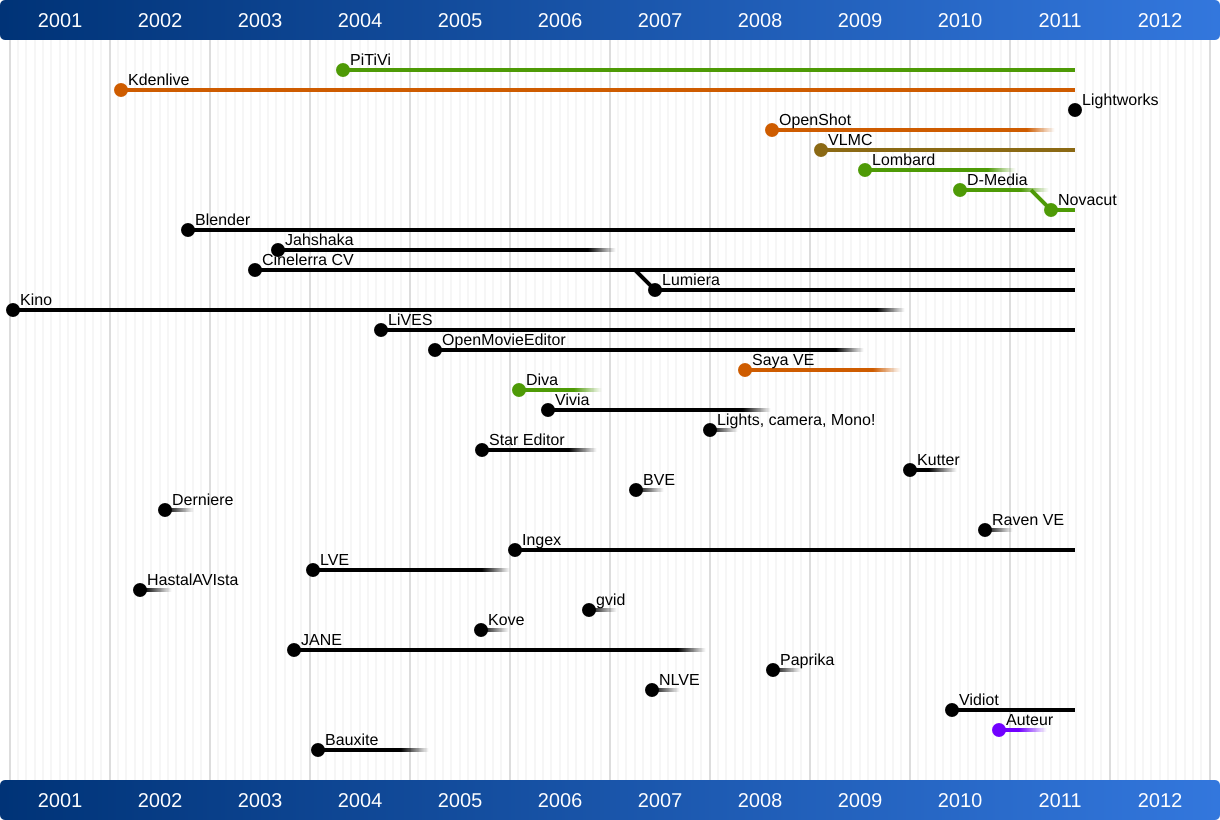
More video accessibility work

It’s already old news, but I am really excited about having started a new part-time contract with Mozilla to continue pushing the HTML5 video and audio elements towards accessibility.

My aim is two-fold: firstly to improve the HTML5 audio and video tags with textual representations, and secondly to hook up the Ogg file format with these accessibility features through an Ogg-internal text codec.

The textual representation that I am after is closely based on the itext elements I have been proposing for a while. They are meant to be a simple way to associate external subtitle/caption files with the HTML5 video and audio tags. I am initially looking at srt and DFXP formats, because I think they are extremes of a spectrum of time-aligned text formats from simple to complex. I am preparing a specification and javascript demonstration of the itext feature and will then be looking for constructive criticism from accessibility, captioning, Web, video and any other expert who cares to provide input. My hope is to move the caption discussion forward on the WHATWG and ultimately achieve a cross-browser standard means for associating time-aligned text with media streams.

The Ogg-internal solution for subtitles - and more generally for time-aligned text - is then a logical next step towards solving accessibility. From the many discussions I have had on the topic of how best to associate subtitles with video I have learnt that there is a need for both: external text files with subtitles, as well as subtitles that are multiplexed with the media into a single binary fie. Here, I am particularly looking at the Kate codec as a means of multiplexing srt and DFXP into Ogg.

Eventually, the idea is to have a seamless interface in the Web Browser for dealing with subtitles, captions, karaoke, timed metadata, and similar time-aligned text. The user interaction should be identical no matter whether the text comes from within a binary media file or from a secondary Web resource. Once this seamless interface exists, hooking up accessibility tools such as screen readers or braille devices to the data should in theory be simple.

Javascript libraries for support

Now that Firefox 3.5 is released with native HTML5

This blog post collects the javascript libraries that I have found thus far and that are for different purposes, so you can pick the one most appropriate for you. Be aware that the list is probably already outdated when I post the article, so if you could help me keeping it up-to-date with comments, that would be great. :-)

Before I dig into the libraries, let me explain how fallback works with

Generally, if you’re using the HTML5

<video src="video.ogv" controls> Your browser does not support the HTML5 video element. </video>

To do more than just text, you could provide a video fallback option. There are basically two options: you can fall back to a Flash solution:

<video src="video.ogv" controls> <object width="320" height="240"> <param name="movie" value="video.swf"> <embed src="video.swf" width="320" height="240"> </embed> </object> </video>

or if you are using Ogg Theora and don’t want to create a video in a different format, you can fall back to using the java player called cortado:

<video src="video.ogv" controls width="320" height="240"> <applet code="com.fluendo.player.Cortado.class" archive="http://theora.org/cortado.jar" width="320" height="240"> <param name="url" value="video.ogv"/> </applet> </video>

Now, even if your browser support’s the

<video controls width="320" height="240"> <source src="video.ogv" type="video/ogg" /> <source src="video.mp4" type="video/mp4" /> </video>

You can of course combine all the methods above to optimise the experience for your users, which is what has been done in this and this (Video For Everybody) example without the use of javascript. I actually like these approaches best and you may want to check them out before you consider using a javascript library.

But now, let’s look at the promised list of javascript libraries.

Firstly, let’s look at some libraries that let you support more than just one codec format. These allow you to provide video in the format most preferable by the given browser-mediaframework-OS combination. Note that you will need to encode and provide your videos in multiple formats for these to work.

  • mv_embed: this is probably the library that has been around the longest to provide &let;video> fallback mechanisms. It has evolved heaps over the last years and now supports Ogg Theora and Flash fallbacks.
  • several posts that demonstrate how to play flv files in a
  • html5flash: provides on top of the Ogg Theora and MPEG4 codec support also Flash support in the HTML5 video element through a chromeless Flash video player. It also exposes the
  • foxyvideo: provides a fallback flash player and a JavaScript library for HTML5 video controls that also includes a nearly identical ActionScript implementation.

Finally, let’s look at some libraries that are only focused around Ogg Theora support in browsers:

  • Celt’s javascript: a minimal javascript that checks for native Ogg Theora
  • stealthisfilm’s javascript: checks for native support, VLC, liboggplay, Totem, any other Ogg Theora player, and cortado as fallback.
  • Wikimedia’s javascript: checks for QuickTime, VLC, native, Totem, KMPlayer, Kaffeine and Mplayer support before falling back to Cortado support.

The history of Ogg on the Web

In the year 2000, while working at CSIRO as a research scientist, I had the idea that video (and audio) should be hyperlinked content on the Web just like any Web page. Conrad Parker and I developed the vision of a “Continuous Media Web” and called the technology that was necessary to develop “Annodex” for “annotated and indexed media”.

Not many people now know that this was really the beginning of Ogg on the Web. Until then, Ogg Vorbis and the emerging Ogg Theora were only targeted at desktop applications in competition to MP3 and MPEG-2.

Within a few years, we developed the specifications for a markup language for video called CMML that would provide the annotations, anchor points, and hyperlinks for video to make it possible to search and index video, hyperlink into video section, and hyperlink out of video sections.

We further developed the specification of temporal URIs to actually address to temporal offsets or segments in video.

And finally, we developed extensions to the Xiph Ogg framework to allow it to carry CMML, and more generally multi-track codecs. The resulting files were originally called “Annodex files”, but through increasing collaboration with Xiph, the specifications were simplified and included natively into Ogg and are now known as “Ogg Skeleton”.

Apart from specifications, we also developed lots of software to make the vision actually come true. Conrad, in particular, developed many libraries that helped develop software on top of the raw Xiph codecs, which include liboggz and libfishsound. Libraries were developed to deal with CMML and with embedding CMML into Ogg. Apache modules were developed to deal with segmenting sections from Ogg files and deliver them as a reply to a temporal URI request. And finally we actually developed a Firefox extension that would allow us to display the Ogg Theora/Vorbis videos inside a Web Browser.

Over time, a lot more sofware was developed, amongst them: php, perl and python bindings for Annodex, DirectShow filters to have Ogg Theora/Vorbis support on Windows, an ActiveX control for Windows, an authoring tool for CMML on Windows, Ogg format validation software, mobile phone support for Ogg Theora/Vorbis, and a video wiki for CMML and Ogg Theora called cmmlwiki. Several students and Annodex team members at CSIRO helped develop these, including Andre Pang (who now works for Pixar), Zen Kavanagh (who now works for Microsoft), and Colin Ward (who now works for Symbian). Most of the software was released as open source software by CSIRO and is available now either in the Annodex repository or the Xiph repositories.

Annodex technology became increasingly part of Xiph technology as team members also became increasingly part of the Xiph community, such as by now it’s rather difficult to separate out the Annodex people from the Xiph people.

Over time, other projects picked up on the Annodex technology. The first were in fact ethnographic researchers, who wanted their audio-visual ethnographic recordings usable in deeply. Also, other multimedia scientists experimented with Annodex. The first actual content site to publish a large collection of Ogg Theora video with annotations was OpenRoadTrip by Scott Shawcroft and Brandon Hines in 2006. Soon after, Michael Dale and Aphid from Metavid started really using the Annodex set of technologies and contributing to harden the technology. Michael was also a big advocate for helping Wikimedia and Archive.org move to using Ogg Theora.

By 2006, the team at CSIRO decided that it was necessary to develop a simple, cross-platform Ogg decoding and playback library that would allow easy development of applications that need deep control of Ogg audio and video content. Shane Stephens was the key developer of that. By the time that Chris Double from Firefox picked up liboggplay to include Ogg support into Firefox natively, CSIRO had stopped working on Annodex, Shane had left the project to work for Google on Wave, and we eventually found Viktor Gal as the new maintainer for liboggplay. We also found Cristian Adam as the new maintainer for the DirectShow filters (oggcodecs).

Now that the basic Ogg Theora/Vorbis support for the HTML5

I spent this week at the Open Video Conference in New York and was amazed about the 800 and more people that understand the value of open video and the need for open video technologies to allow free innovation and sharing. I can feel that the ball has got rolling - the vision developed almost 10 years ago is starting to take shape. Sometimes, in very very rare moments, you can feel that history has just been made. The Open Video Conference was exactly one such point in time. Things have changed. Forever. For the better. I am stunned.

YouTube Ogg Theora+Vorbis &amp; H.263/H.264 comparison

On Jun 13th 2009 Chris DiBona of Google claimed on the WhatWG mailing list:

“If [youtube] were to switch to theora and maintain even a semblance of the current youtube quality it would take up most available bandwidth across the Internet.”

Everyone who has ever encoded a Ogg Theora/Vorbis file and in parallel encoded one with another codec will have to immediately protest. It is sad that even the best people fall for FUD spread by the un-enlightened or the ones who have their own agenda.

Fortunately, Gregory Maxwell from Wikipedia came to the rescue and did an actual “YouTube / Ogg/Theora comparison”. It’s a good read and a comparison on one video. He has put his instructions there, so anyone can repeat it for themselves. You will have to start with a pretty good quality video though to see such differences.

Cool HTML5 video demos

I’ve always thought that the most compelling reason to go with HTML5 Ogg video over Flash are the cool things it enables you to do with video within the webpage.

I’ve previously collected the following videos and demos:

First there was a demo of a potential javascript interface to playing Ogg video inside the Web browser, which was developed by CSIRO. The library in use later became the library that Mozilla used in Firefox 3.5:

Then there were Michael Dale’s demos of Metavidwiki with its direct search, access and reuse of video segments, even a little web-based video editor:

Then there was Chris Double’s video SVG demo with cool moving, resizing and reshaping of video:

and Chris kept them coming:

Then Chris Blizzard also made a cool demo for showing synchronised video and graph updates as well as a motion detector:

And now we have Firefox Director Mike Belitzer show off the latest and coolest to TechCrunch, the dynamic content injection bit of which you can try out yourself here:

It just keeps getting better!

UPDATE: Here are some more I’ve come across:

Sites with Ogg in HTML5 video tag

Yesterday, somebody mentioned that the HTML5 video tag with Ogg Theora/Vorbis can be played back in Safari if you have XiphQT installed (btw: the 0.1.9 release of XiphQT is upcoming). So, today I thought I should give it a quick test. It indeed works straight through the QuickTime framework, so the player looks like a QuickTime player. So, by now, Firefox 3.5, Chrome, Safari with XiphQT, and experimental builds of Opera support Ogg Theora/Vorbis inside the HTML5 video tag. Now we just need somebody to write some ActiveX controls for the Xiph DirectShow Filters and it might even work in IE.

While doing my testing, I needed to go to some sites that actually use Ogg Theora/Vorbis in HTML5 video tags. Here is a list that I came up with in no particular order:

I’m sure there’s a lot more out there - feel free to post links in the comments.

Firefox plugin to encode Ogg video

Michael Dale just posted this to theora-dev. Go to one of the given URLs to install the Firefox plugin that lets you transcode video to Ogg using your Web browser.

Firefogg is developed by Jan Gerber and lives at http://www.firefogg.org/. There is a javascript API available so you can make use of Firefogg in your own Website project to allow people to upload any video and transcode it to Ogg on the fly.

Enjoy!

On Fri, Jun 5, 2009 at 7:08 AM, Michael Dale wrote: > I mentioned it in the #theora channel a few days ago but here it is with > a more permanent url: > > http://www.firefogg.org/make/advanced.html > & > http://www.firefogg.org/make/ > > These will be simple links you can send people so that they can encode > source footage to a local ogg video file with the latest and greatest > ogg encoders (presently thusnelda and vorbis). Updates to thusnelda and > possible other free codecs will be pushed out via firefogg updates ;) > > Pass along any feedback if things break or what not. > > I am also doing testing with “embed” these encoder interface. For those > familiar with jQuery: an example to rewrite all your file inputs with > firefogg enhanced inputs: $(“input:[type=‘file’]“).firefogg() … Feel > free to expeirment based on those examples. The form rewrite has mostly > only been tested in the mediaWiki context: > http://sandbox.kaltura.com/testwiki/index.php/Special:Upload > but with minor hacking should work elsewhere :) > > enjoy > —michael > > _______________________________________________ > theora mailing list > theora@xiph.org > http://lists.xiph.org/mailman/listinfo/theora >

Dailymotion using Ogg and other recent cool open video news

This past week was amazing, not because of Google Wave, which everybody seems to be talking about now, and not because of Microsoft’s launch of the bing search engine, but amazing for the world of open video.

  1. YouTube are experimenting with the HTML5 video tag. The demo only works in HTML5 video capable browsers, such as Firefox 3.5, Safari, Opera, and the new Chrome, which leads me straight to the next news.
  2. The Google Chrome 3 browser now supports the HTML5 video tag. The linked release only supports MPEG encoded video, but that’s a big step forward.
  3. More importantly even, recently committed code adds Ogg Theora/Vorbis support to Google Chrome 3’s video tag! This is based on using ffmpeg at this stage, which needs some further work to e.g. gain Ogg Kate support. But this is great news for open media!
  4. And then the biggest news: Dailymotion, one of the largest social video networks, has re-encoded all their videos to Ogg Theora/Vorbis and have launched an openvideo platform. The blog post is slightly negative about video quality - probably because they used an older encoder. The Xiph community has already recommended use of recommends experimenting with the new Thusnelda encoder and the latest ffmpeg2theora release that supports it, since they provide higher compression ratios and better quality.
  5. That latest ffmpeg2theora release is really awesome news by itself, but I’d also like to mention two other encoding tools that were released last week: the updated XiphQT QuickTime components, that now allow export to Ogg Theora/Vorbis directly from iMovie (I tested it and it’s awesome) and the new GStreamer command-line based python encoder gst2ogg which works mostly like ffmpeg2theora.

Overall a really exciting week for open media and HTML5 video! I think things are only going to heat up more in this space as more content publishers and more browsers will join the video tag implementations and the Ogg Theora/Vorbis support.

FOMS 2009: video introductions available

In January this year we had the third Foundations of Open Media software workshop for developers. The focus this year was on legal issues around codecs, Xiph and Web video (HTML5 video and video servers), authoring/editing software, and accessibility. Check out the complete set of areas of concern and community goals that we decided upon.

As every year, at the beginning of the workshop every participant provided a 5 min introduction about their field of speciality and the current challenges. These are video recorded and shared with the community.

The videos and accompanying slides have been available for about 2 months now, but I haven’t gotten around to blogging about it - apologies everyone! So, here are your star videos in reverse alphabetic order published using open source video software only:

Enjoy!

Video as an enabler for broadband applications

Last week, I gave a brief statement on the importance of video as an enabler for broadband applications at the Public Sphere event of Senator Kate Lundy.

I found it really difficult to summarize all the things that I find important about video technology in a modern distributed online world in a 10 min speech. Therefore, I’d like to extend on some of the key points that I was trying to make in this blog post.

Video provides presence

One of the biggest problems we have with the online world is that it mostly still evolves around text. To exchange information with others, to publish, to chat (email, irc or twitter) or do our work, we mostly still rely on the written word as a communication means. However, we all know how restrictive this is - everyone who has ever seen a flame war develop on a mailing list, a friendship break over a badly formulated email, a host of negative comments posted on a mis-formulated blog post, or a twitter storm explode over a misunderstanding knows that text is very hard to get right. Lacking any sort of personal expression supporting the expressed words (other than the occasional emoticon), sentences can be read or interpreted in the wrong way.

A phone call (or skype call) is better than text: how often have you exchanged 10 or even 20 emails with a friend to e.g. arrange to meet for a beer, when a simple phone call would have solved it within seconds. But even a phone call provides a reduced set of communication channels in comparison to a personal meeting: gesture, posture, mime and motion are there to enrich communication channels and help us understand the other better. Just think about the cognitive challenges in a phone conference in comparison to the ease of speaking to people when you see them.

With communication that uses video, we have a much higher communication “bandwidth” between people, i.e. a lot less has to be actually said in words so we can understand each other, because gesture, posture, mime and motion speak for us, too. While we cannot touch each other in a video communication, e.g. for shaking hands or kissing cheeks, video provides for all these other channels of communication providing a much higher perceived feeling of “presence” to the remote person or people. When my son speaks over skype with my family in Germany, and we cannot turn on the web cam because the bandwidth and latency are too poor, he loses interest very quickly in speaking to these “soul-less” voices.

The availability of bandwidth will make it possible for humans to communicate with each other at a more natural level, feeling more engaged and involved. This has implications not just on immediate communications, such as person-to-person calls or video conferences, but on any application that requires the interaction of people.

Video requirements are the block to create new applications

Bandwidth requirements for most online applications are pretty low. Consider for example a remote surgery where a surgical expert on one end operates on a patient at a remote location with surgical staff and operating equipment. The actual data that needs to be exchanged between the surgeon and the operating machines is fairly low - they are mostly command-control data that has to be delivered at high accuracy and low delay, but does not require high bandwidth. What turns such a remote surgery scenario into a challenge with existing networks are the requirements for multiple video channels - the surgeon needs to be visible to the staff and probably to the patient - in turn, the surgeon needs to see the staff, needs to see the patient from multiple angles to gain the full picture, needs to see the supporting documents such as X-rays, schedules, blood analysis etc, and of course he needs to see the video coming from the operating equipment possibly from within the patient that gives him feedback on the actual operation.

As you can see, it is video that creates the need for high bandwidth.

This is not restricted to medical applications. Almost all new remote applications that we create end up having a huge visual requirement with multiple video streams. This is natural, since almost all remote applications involve more than one person and each person has the capability to look into different directions. Thus, the presence of each person has to be replicated and the representation of the environment has to be replicated.

Even in a simple scenario such as a video conference, a single camera and microphone are very restrictive and do not provide the ability to every participant to interact with any of the other people present, but restrict them to the person/group that the camera is currently focused on. Back channels such as affirmative side chats or mimic exchanges of opinion are lost. Multiple video channels can make up for this.

In my experience from the many projects I have been somewhat involved with over the years that tried to develop new remote applications - teleteaching at Mannheim University or the CeNTIE project at CSIRO - video is the bandwidth-needy channel, but video is not the main purpose of the application. Rather, the needs for information for the involved people are what drives the setup of the data and communication channels for a particular application.

Immediately, applications in the following areas come to mind that will be enabled through broadband:

  • education: remote lectures, remote seminars, remote tutoring, remote access to research text/data
  • health: remote surgery, remote expert visits, remote patient monitoring
  • business: remote workplace, remote person-to-person collaboration with data sharing and visualisation, remote water-cooler conversations, remote team presence
  • entertainment: remote theatre/concert/opera visit, home cinema, high-quality video-on-demand

But ultimately, there is impact into all aspects of our lives: consider e.g. the new possibilities for citizen involvement in politics with remote video technology, or collaborative remote video editing in video production, or in sports for data collection. Simply ask yourself “what would I do differently if I had unlimited bandwidth?” and I’m sure you will come up with at least another 2 or 3 new applications in your field of expertise that have not been mentioned before.

Technical challenges

Video (with audio) is an inherently volatile data stream that is highly sensitive to specific kinds of networking issues.

End-to-end delays such as are typical with satellite-based connections destroy the feeling of presence and create at best awkward communications, at worst destructive feedback-loops in live operations. Unfortunately, there is a natural limit to the speed in which data can flow between two points. Given that the largest distance between two points on earth is approx 20,000 km and the speed of light is approx 300,000 km/s, a roundtrip must take at least 133ms. Considering that humans can detect a delay as small as 10ms in a remote communication and are really put off by a delay of 100ms, this is a technical challenge that we will find hard to overcome. It shows, however, that it is a technical requirement to minimize end-to-end dealys as much as possible.

Packet jitter is another challenge that video deals with badly. In networks, packets cannot easily be guaranteed to arrive at a certain required rate. For example, video needs to play back at a fixed picture rate (typically 25 frames per second) for humans to be able to view it as smooth motion. Whether video is transferred live or from a file, video packets are required to arrive at a certain rate such that the pictures can be decoded and displayed at the expected rate. The variance in delay of packets arriving because of network congestion is called packet jitter. If packet jitter is high, the video will either have to stop and buffer packets until enough video frames have arrived for it to display again, or it will have to drop packets and therefore video frames to keep in sync with a live stream. Typically the biggest problem of dropping packets is the drop-out of audio - while we can tolerate some drop-outs in video, audio drop-outs are unacceptable to maintain a conversation.

In most of the application scenarios, there is a varying need for video quality.

For example, a head shot of a person that is required for communication doesn’t need high-quality video - it is sufficient if the person can be seen and the communication can be held. The audio resolution can be telephone quality (i.e. 8kHz audio sampling rate) and the video can be highly compressed and at a smallish resolution (e.g. 320x240 px) giving standard skype quality video which requires about 400Kbps in bandwidth.

At the other end of the scale are e.g. medical and large-screen applications where a high sound quality is required e.g. to hear heart beats properly (i.e. 48-96kHz audio sampling rate) and the video can’t be compressed (much) so as not to introduce artifacts, which gives at a high HDTV resolution of e.g. 1920x1080px bandwidth requirements of 30Mbps compressed - uncompressed would be about triple that.

So, depending on the tolerance of the application to picture size, compression artifacts, and the number of parallel video streams required, bandwidth requirements for video can be relatively low or really high.

Further technical issues around video are that online video can be handled differently to analog video. The video can have all sorts of metadata associated with it - it can have hyperlinks to other content - it can be accompanied by advertising in more flexible ways - and it can be automatically personalised towards the needs of the individual viewers, just to name a few rich functions of online video. It is here where a lot of new ideas for monetisation will evolve.

Non-technical challenges

Apart from technical challenges, the use of video also creates issues in other dimensions.

People are worried about their behaviour as it is always potentially recorded and thus may not perform their duties with the same focus and concentration as is necessary.

People are worried about video connections always being potentially enabled and thus having potentially a remote listener/viewer that is unwanted.

On top of such privacy issues come issues in data security as increasingly data is distributed remotely.

We should also not forget that there are people that have varying requirements for their communication. A large challenge for such new applications will be to make them accessible. For example the automated creation of captions for remote video communication may well turn out to be a major challenge, but also an opportunity for later archiving and search.

When looking at the expected move of professional video content from TV to online, there are more issues about copyrighted content and usage rights - mostly this has to do with legacy content where online use was not considered in licensing agreements. This is a large inhibitor e.g. for Australia in creating a Hulu-like service.

In fact, monetisation is a huge issue, since video is not cheap: there is a cost in the development of applications, there is a cost in bandwidth, in storage, and a cost in content production that has to be covered somewhere. Simply expecting the user to pay for being online and then to pay again for each separate application, potentially subscribing to a multitude of services, may not be the best way to cope with the cost. Advertising will certainly play a big role in the monetisation mix and new forms of advertising will emerge, such as personalised permission-based advertising based on the information available about a person e.g. through their Google searches.

In this context, the measurement of the use of video in bandwidth, storage and as part of an application will be a big enabler towards figuring out how to pay for all the involved expenditure and what new monetisation models to come up with.

Further in the context of cost and monetisation it should be added that the use of open source software, in particular open source video technology such as open codecs can help bring down cost while at the same time create more interoperability. For example, if Skype used an open codec and open protocols rather than their proprietary technology, other applications could be built using the skype infrastructure and user base.

Approach to developing good new applications

These are just the challenges for video streams themselves. However, in new applications, video streams will just be a tool for creating an integral application, ultimately driven by the processes and data needs of the application. The creation of all the other parts of the application - the machinery, control panels, the data pools, the processes, the human interface, security and privacy measures etc - are what make up the product challenge. A product ultimately has to function in a way that makes it a usable tool in achieving a certain outcome. Unless the use of the product becomes natural and the distance disappears from the minds of the people involved, a remote application does not succeed.

The CeNTIE project, the approach towards the development of new remote applications was to assume no limits on available bandwidth. Then a challenge would be identified in an application area, e.g. in the medical space, and a prototype would be built with lots of input from the domain experts. Then the prototype would actually be deployed into a real working situation and tested. The feedback from the domain experts would be used to improve the application with further technology and improved processes. Ultimately, a usable setup would emerge, which was then ready to be turned into a product for commercialisation.

We have the capabilities here in Australia to develop world-class new applications on high-bandwidth networks. We need to support this further with bandwidth - hopefully the NBN will achieve this. But we also need to support this further with commercialisation support - unfortunately most of the applications that I saw being developed at the CSIRO never made it past the successful prototype. But this is fodder for another blog post at a different time.

Finally, I’d like to point out that we also have a large challenge in overcoming tradition. Most of us would be challenged to trust a doctor and his equipment for doing a surgical operation on our body from a remote location. There are issues of trust and culture involved that may take us a while to deal with and accept.

UPDATE (11/6/09): It seems that CISCO’s latest report, which predicts global IP traffic to increase 5-fold over the next 3 years, agrees with the analysis that most of this increase will be caused by video.

New Theora encoder further improved

After posting only a month ago about the new Thusnelda release, there continues to be good news from the open codec front.

Monty posted last week about further improvements and this time there are actual statistics thanks to Greg Maxwell. Looking at the PSNR (peak signal-to-noise ratio) measure, the further improved Thusdnelda outstrips even the X.264 implementation of H.264.

Don’t get me wrong: PSNR is only one measure, it is an objective measure and the statistics were only calculated on one particular piece. Further analysis are needed, though these are very encouraging statistics.

This is important not just because it shows that open codecs can be as good in quality as proprietary ones. What is more important though is that Ogg Theora is royalty free and implementable in both proprietary and free software browsers.

H.264’s licensing terms, however, will really kick in in 2010, so that may well encourage more people to actually use Ogg Theora/Vorbis (or another open codec like Ogg Dirac/Vorbis) with the new HTML5 video element.