deck.js is one of the new HTML5-based presentation tools. It’s simple to use, in particular for your basic, every-day presentation needs. You can also create more complex slides with animations etc. if you know your HTML and CSS.
Yesterday at linux.conf.au (LCA), I gave a presentation using deck.js. But I didn’t give it from the lectern in the room in Perth where LCA is being held - instead I gave it from the comfort of my home office at the other end of the country.
I used my laptop with in-built webcam and my Chrome browser to give this presentation. Beforehand, I had uploaded the presentation to a Web server and shared the link with the organiser of my speaker track, who was on site in Perth and had set up his laptop in the same fashion as myself. His screen was projecting the Chrome tab in which my slides were loaded and he had hooked up the audio output of his laptop to the room speaker system. His camera was pointed at the audience so I could see their reaction.
I loaded a slide master URL: http://html5videoguide.net/presentations/lca_2014_webrtc/?master
and the room loaded the URL without query string: http://html5videoguide.net/presentations/lca_2014_webrtc/.
Then I gave my talk exactly as I would if I was in the same room. Yes, it felt exactly as though I was there, including nervousness and audience feedback.
How did we do that? WebRTC (Web Real-time Communication) to the rescue, of course!
We used one of the modules of the rtc.io project called rtc-glue to add the video conferencing functionality and the slide navigation to deck.js. It was actually really really simple!
Here are the few things we added to deck.js to make it work:
Code added to index.html to make the video connection work:
The iceServers config is required to punch through firewalls - you may also need a TURN server. Note that you need a signalling server - in our case we used http://rtc.io/switchboard/, which runs the code from rtc-switchboard.
Code added to index.html to synchronize slide navigation:
glue.events.once('connected', function(signaller) { if (location.search.slice(1) !== '') { $(document).bind('deck.change', function(evt, from, to) { signaller.send('/slide', { idx: to, sender: signaller.id }); }); } signaller.on('slide', function(data) { console.log('received notification to change to slide: ', data.idx); $.deck('go', data.idx); });});
This simply registers a callback on the slide master end to send a slide position message to the room end, and a callback on the room end that initiates the slide navigation.
Feel free to write your own slides in this manner - I would love to have more users of this approach. It should also be fairly simple to extend this to share pointer positions, so you can actually use the mouse pointer to point to things on your slides remotely. Would love to hear your experiences!
Note that the slides are actually a talk about the rtc.io project, so if you want to find out more about these modules and what other things you can do, read the slide deck or watch the talk when it has been published by LCA.
Many thanks to Damon Oehlman for his help in getting this working.
BTW: somebody should really fix that print style sheet for deck.js - I’m only ever getting the one slide that is currently showing. ;-)
I decided to use socket.io for the signalling following the idea of Luc, which made the server code even smaller and reduced it to a mere reflector:
 var app = require('http').createServer().listen(1337);
 var io = require('socket.io').listen(app);

 io.sockets.on('connection', function(socket) {
         socket.on('message', function(message) {
         socket.broadcast.emit('message', message);
     });
 });
Then I turned to the client code. I was surprised to see the massive changes that PeerConnection has gone through. Check out my slide deck to see the different components that are now necessary to create a PeerConnection.
I was particularly surprised to see the SDP object now fully exposed to JavaScript and thus the ability to manipulate it directly rather than through some API. This allows Web developers to manipulate the type of session that they are asking the browsers to set up. I can imaging e.g. if they have support for a video codec in JavaScript that the browser does not provide built-in, they can add that codec to the set of choices to be offered to the peer. While it is flexible, I am concerned if this might create more problems than it solves. I guess we’ll have to wait and see.
I was also surprised by the need to use ICE, even though in my experiment I got away with an empty list of ICE servers - the ICE messages just got exchanged through the socket.io server. I am not sure whether this is a bug, but I was very happy about it because it meant I could run the whole demo on a completely separate network from the Internet.
The most exciting news since my talk is that Mozilla and Google have managed to get a PeerConnection working between Firefox and Chrome - this is the first cross-browser video conference call without a plugin! The code differences are minor.
Since the specification of the WebRTC API and of the MediaStream API are now official Working Drafts at the W3C, I expect other browsers will follow. I am also looking forward to the possibilities of:
multi-peer video conferencing like the efforts around webrtc.io,
The best places to learn about the latest possibilities of WebRTC are webrtc.org and the W3C WebRTC WG. code.google.com has open source code that continues to be updated to the latest released and interoperable features in browsers.
The video of my talk is in the process of being published. There is a MP4 version on the Linux Australia mirror server, but I expect it will be published properly soon. I will update the blog post when that happens.
A bit over a week ago I gave a presentation at Web Directions Code 2012 in Melbourne. Maxine and John asked me to speak about something related to HTML5 video, so I went for the new shiny: WebRTC - real-time communication in the browser.
I only had 20 min, so I had to make it tight. I wanted to show off video conferencing without special plugins in Google Chrome in just a few lines of code, as is the promise of WebRTC. To a large extent, I achieved this. But I made some interesting discoveries along the way. Demos are in the slide deck.
UPDATE: Opera 12 has been released with WebRTC support.
Housekeeping: if you want to replicate what I have done, you need to install a Google Chrome Web Browser 19+. Then make sure you go to chrome://flags and activate the MediaStream and PeerConnection experiment(s). Restart your browser and now you can experiment with this feature. Big warning up-front: it’s not production-ready, since there are still changes happening to the spec and there is no compatible implementation by another browser yet.
Here is a brief summary of the steps involved to set up video conferencing in your browser:
Set up a video element each for the local and the remote video stream.
Grab the local camera and stream it to the first video element.
(*) Establish a connection to another person running the same Web page.
Send the local camera stream on that peer connection.
Accept the remote camera stream into the second video element.
Now, the most difficult part of all of this - believe it or not - is the signalling part that is required to build the peer connection (marked with (*)). Initially I wanted to run completely without a server and just enter the remote’s IP address to establish the connection. This is, however, not a functionality that the PeerConnection object provides [might this be something to add to the spec?].
So, you need a server known to both parties that can provide for the handshake to set up the connection. All the examples that I have seen, such as https://apprtc.appspot.com/, use a channel management server on Google’s appengine. I wanted it all working with HTML5 technology, so I decided to use a Web Socket server instead.
I implemented my Web Socket server using node.js (code of websocket server). The video conferencing demo is in the slide deck in an iframe - you can also use the stand-alone html page. Works like a treat.
While it is still using Google’s STUN server to get through NAT, the messaging for setting up the connection is running completely through the Web Socket server. The messages that get exchanged are plain SDP message packets with a session ID. There are OFFER, ANSWER, and OK packets exchanged for each streaming direction. You can see some of it in the below image:
I’m not running a public WebSocket server, so you won’t be able to see this part of the presentation working. But the local loopback video should work.
At the conference, it all went without a hitch (while the wireless played along). I believe you have to host the WebSocket server on the same machine as the Web page, otherwise it won’t work for security reasons.
A whole new world of opportunities lies out there when we get the ability to set up video conferencing on every Web page - scary and exciting at the same time!
With the latest developments in HTML5 and the still fairly new ARIA (Accessible Rich Interface Applications) attributes introduced by the W3C WAI (Web Accessibility Initiative), browsers have now implemented many features that allow you to make your JavaScript-heavy Web applications accessible.
Since I began working on making a complex web application accessible just over a year ago, I discovered that there was no step-by-step guide to approaching the changes necessary for creating an accessible Web application. Therefore, many people believe that it is still hard, if not impossible, to make Web applications accessible. In fact, it can be approached systematically, as this article will describe.
This post is based on a talk that Alice Boxhall and I gave at the recent Linux.conf.au titled “Developing accessible Web apps – how hard can it be?” (slides, video), which in turn was based on a Google Developer Day talk by Rachel Shearer (slides).
These talks, and this article, introduce a process that you can follow to make your Web applications accessible: each step will take you closer to having an application that can be accessed using a keyboard alone, and by users of screenreaders and other accessibility technology (AT).
The recommendations here only roughly conform to the requirements of WCAG (Web Content Accessibility Guidelines), which is the basis of legal accessibility requirements in many jurisdictions. The steps in this article may or may not be sufficient to meet a legal requirement. It is focused on the practical outcome of ensuring users with disabilities can use your Web application.
Step-by-step Approach
The steps to follow to make your Web apps accessible are as follows:
Use native HTML tags wherever possible
Make interactive elements keyboard accessible
Provide extra markup for AT (accessibility technology)
If you are a total newcomer to accessibility, I highly recommend installing a screenreader and just trying to read/navigate some Web pages. On Windows you can install the free NVDA screenreader, on Mac you can activate the pre-installed VoiceOver screenreader, on Linux you can use Orca, and if you just want a browser plugin for Chrome try installing ChromeVox.
1. Use native HTML tags
As you implement your Web application with interactive controls, try to use as many native HTML tags as possible.
HTML5 provides a rich set of elements which can be used to both add functionality and provide semantic context to your page. HTML4 already included many useful interactive controls, like ,
I’m pretty proud of this, which is why I’m dedicating a short blog post to it: today, John and I released my first WordPress plugin as open source to the WordPress plugins site.
It’s got the boring name “External Videos” and builds a bridge between your WordPress instance and videos of channels on a video hosting site - currently supported are YouTube, Vimeo, and DotSub.
It does this by using a brand-new feature to be introduced in WordPress 3: custom post types.
Check out the screenshots on the plugins page to see more - I’m unfortunately not yet running this Website with WordPress 3, so am not yet using this plugin’s features.
In the admin interface of WordPress, you enter the video channels that you want to pull videos from. Then it goes and pulls the videos with their metadata from these sites and creates video posts for them. That pulling is done once a day to update with new posts. The videos can be looked at in the admin interface under a separate video post section. They can be linked to WordPress posts and pages where the video may be discussed in context.
The video posts can be exposed on the WordPress site through a gallery, which is created by a short code, that can be added to any WordPress page. The gallery of thumbnails clicks through to an overlay with each video and its metadata as well as a link to the related WordPress post.
You can also add a widget to the side bar of the WordPress site with links to the most recent videos.
There are many more features that I want to develop for this plugin. I’d of course like to move it to HTML5 video instead of Adobe Flash. But for now I am happy with it.
I’d like to say thank you to John Ferlito, who helped with some of the coding, to Jeff Waugh for suggesting that it would best be developed using the new post types feature, and to Senator Kate Lundy and Pia Waugh at her office, who funded a part of the development. I am hoping they will find it useful to give their awesome collection of videos better exposure.
Recently, I was asked to review the W3C Media Annotations specifications as they are about to go into Last Call (a state that comes before the request for implementations at the W3C).
The W3C Media Annotations group has defined a set of metadata that they believe is representative and common for media resources. The ontology consist of the following fields:
ma:identifier: a URI or string to identify a resource
ma:title: a string providing the title of the resource
ma:language: a language code describing the language used in the resource
ma:locator: the URI at which the resource can be accessed
ma:contributor: a URI or string identifying the contributor and the nature of the contribution
ma:creator: a URI or string identifying an author
ma:createDate: a date of creation or publication of the resource
ma:location: a string or geo code identifying where the resource has been shot/recorded
ma:description: a string describing the content of the resource
ma:keyword: a word or word combination providing a topic, keyword or tag representing the resource
ma:genre: a string providing the genre of the resource
ma:rating: rating value, including the rating scale
ma:relation: a URI and string identifying a related resource and the relationship
ma:collection: a URI or string providing the name of a collection to which the resource belongs
ma:copyright: a URI or string with the copyright statement.
ma:license: a string or URI with the usage license
ma:publisher: a string or URI with the publisher of the resource
ma:targetAudience: a URI and classification string providing the issuer of the classification and the classification value
ma:fragments: a list of string and URI values that identify media fragments and their type
ma:namedFragments: a list of string and URI values the provide names to media fragments
ma:frameSize: a width - height pair in pixels
ma:compression: a string providing the compression algorithm
ma:duration: a float to provide the resource duration in seconds
ma:format String: the mime type of the resource
ma:samplingrate: a float with the audio sampling rate
ma:framerate: a float with the video frame rate
ma:bitrate: a float providing the average bit rate in kbps
ma:numTracks: an int of the number of tracks
Note that some of these fields are not single values, but simple constructs of multiple values. Thus, they are actually more complex than name-value pairs that, e.g. are typically used in HTML meta headers or in Dublin Core. I regard this as an issue for implementations.
The fields were chosen as typical metadata being available about media resources. The media fragments fields are a bit dubious in this respect, but could be useful in future.
The metadata is determined either from within the resource itself or from a metadata collection about the resource. As such, the document maps several existing metadata and media resource formats to this interface, amongst them:
As they didn’t have a mapping table for Ogg content, I offered the following:
MAWG
Relation
Ogg properties
How to do the mapping
Datatype
Descriptive Properties (Core Set)
Identification
ma:identifier
exact
Name
Name field in skeleton header (new)
String
ma:title
exact
Title
TITLE field in vorbiscomment header
String
exact
Title
Title field in skeleton header (new)
String
related
Album
ALBUM title in vorbiscomment header
String
ma:language
exact
Language
Language field in skeleton header (new)
language code
ma:locator
exact
file URI from system
URI
Creation
ma:contributor
exact
Artist, Performer
ARTIST and PERFORMER vorbiscomment headers
Strings
ma:creator
related
Organization
ORGANIZATION field in vorbiscomment header
ma:createDate
exact
Date
DATE field in vorbiscomment header
ISO date format
ma:location
exact
Location
LOCATION field in vorbiscomment header
String
Content description
ma:description
exact
Description
DESCRIPTION field in vorbiscomment header
String
ma:keyword
N/A
ma:genre
exact
Genre
GENRE field in vorbiscomment header
String
ma:rating
N/A
Relational
ma:relation
related
Version, Tracknumber
VERSION (version of a title), TRACKNUMBER (CD track) fields in vorbiscomment header
Strings
ma:collection
related
Album
ALBUM field of vorbiscomment header
String
Rights
ma:copyright
exact
Copyright
COPYRIGHT field of vorbiscomment header
String
ma:license
exact
License
LICENSE field of vorbiscomment header
String
Distribution
ma:publisher
related
Organization
ORGNIZATION field of vorbiscomment header
String
ma:targetAudience
more specific
Role
Role field of Skeleton header (new)
String
Fragments
ma:fragments
N/A
ma:namedFragments
N/A
Technical Properties
ma:frameSize
exact
extract from binary header of video track
int, int (width x height)
ma:compression
exact
Content-type
Content-type field of Skeleton header
MIME type
ma:duration
exact
calculate as duration = last_sample_time - first_sample_time of OggIndex header of skeleton
Float (or rather: rational - rational)
ma:format
exact
Content-type
Content-type field of Skeleton header
MIME type
ma:samplingrate
exact
calculate as granulerate = granulerate_numerator / granulerate_denominator of Skeleton header
Rational (or rather int / int)
ma:framerate
exact
calculate as granulerate = granulerate_numerator / granulerate_denominator of Skeleton header
Rational (or rather int / int)
ma:bitrate
exact
calculate as bitrate = length_of_segment / duration from OggIndex headers of skeleton
Float
ma:numTracks
exact
Tracknumber
TRACKNUMBER field of vorbiscomment header (track number on album)
Int
You will notice that the table mentions 4 fields in skeleton with a “new” marker - they are actually proposed fields in skeleton - a bit of coding will be necessary to introduce them into software. The space for these fields already exists in message header fields, so it won’t require a change of the skeleton format.
In the second specification of the Media Annotations WG, the group offers a standard API to access (i.e. read) the defined fields. They also intend to create an API to write the fields, but I doubt that will be easy because of the vast amount of file types they intend to support.
There is basically a single function that allows the extraction of metadata: MAObject[] getProperty(in DOMString propertyName, in optional DOMString sourceFormat, in optional DOMString subtype, in optional DOMString language, in optional DOMString fragment );
I proposed it may be possible to include this into HTML5 as follows: interface HTMLMediaElement : HTMLElement { ... getter MAObject getProperty(in DOMString propertyName, in optional unsigned long trackIndex); ... }
This would either extract the property for a particular track in a media resource or for the complete resource if no track index is given. The only problem I see is that the returned object is different depending on the requested property - the MAObject is only a parent class for the returned object types. I am not sure it is therefore possible to specify this easily in HTML5.
Overall I thought the specification was a nice piece of work. I am not sure I agree with all the chosen fields, but that is always an issue with metadata. The most important fields are there and that’s what matters.
At the recent FOMS/LCA in Wellington, New Zealand, we talked a lot about how Ogg could support accessibility. Technically, this means support for multiple text tracks (subtitles/captions), multiple audio tracks (audio descriptions parallel to main audio track), and multiple video tracks (sign language video parallel to main video track).
Creating multitrack Ogg files The creation of multitrack Ogg files is already possible using one of the muxing applications, e.g. oggz-merge. For example, I have my own little collection of multitrack Ogg files at http://annodex.net/~silvia/itext/elephants_dream/multitrack/. But then you are stranded with files that no player will play back.
Multitrack Ogg in Players As Ogg is now being used in multiple Web browsers in the new HTML5 media formats, there are in particular requirements for accessibility support for the hard-of-hearing and vision-impaired. Either multitrack Ogg needs to become more of a common case, or the association of external media files that provide synchronised accessibility data (captions, audio descriptions, sign language) to the main media file needs to become a standard in HTML5.
As it turn out, both these approaches are being considered and worked on in the W3C. Accessibility data that are audio or video tracks will in the near future have to come out of the media resource itself, but captions and other text tracks will also be available from external associated elements.
The availability of internal accessibility tracks in Ogg is a new use case - something Ogg has been ready to do, but has not gone into common usage. MPEG files on the other hand have for a long time been used with internal accessibility tracks and thus frameworks and players are in place to decode such tracks and do something sensible with them. This is not so much the case for Ogg.
For example, a current VLC build installed on Windows will display captions, because Ogg Kate support is activated. A current VLC build on any other platform, however, has Ogg Kate support deactivated in the build, so captions won’t display. This will hopefully change soon, but we have to look also beyond players and into media frameworks - in particular those that are being used by the browser vendors to provide Ogg support.
Multitrack Ogg in Browsers Hopefully gstreamer (which is what Opera uses for Ogg support) and ffmpeg (which is what Chrome uses for Ogg support) will expose all available tracks to the browser so they can expose them to the user for turning on and off. Incidentally, a multitrack media JavaScript API is in development in the W3C HTML5 Accessibility Task Force for allowing such control.
The current version of Firefox uses liboggplay for Ogg support, but liboggplay’s multitrack support has been sketchy this far. So, Viktor Gal - the liboggplay maintainer - and I sat down at FOMS/LCA to discuss this and Viktor developed some patches to make the demo player in the liboggplay package, the glut-player, support the accessibility use cases.
I applied Viktor’s patch to my local copy of liboggplay and I am very excited to show you the screencast of glut-player playing back a video file with an audio description track and an English caption track all in sync:
Further developments There are still important questions open: for example, how will a player know that an audio description track is to be played together with the main audio track, but a dub track (e.g. a German dub for an English video) is to be played as an alternative. Such metadata for the tracks is something that Ogg is still missing, but that Ogg can be extended with fairly easily through the use of the Skeleton track. It is something the Xiph community is now working on.
Summary This is great progress towards accessibility support in Ogg and therefore in Web browsers. And there is more to come soon.
Recently, I was asked for some help on coding with an HTML5 video element and its events. In particular the question was: how do I display the time position that somebody seeked to in a video?
Here is a code snipped that shows how to use the seeked event:
<video onseeked="writeVideoTime(this.currentTime);" src="video.ogv" controls></video> <p>position:</p><div id="videotime"></div> <script type="text/javascript"> // get video element var video = document.getElementsByTagName("video")[0]; function writeVideoTime(t) { document.getElementById("videotime").innerHTML=t; } </script>
Other events that can be used in a similar way are:
loadstart: UA requests the media data from the server
progress: UA is fetching media data from the server
suspend: UA is on purpose idling on the server connection mid-fetching
abort: UA aborts fetching media data from the server
error: UA aborts fetching media because of a network error
emptied: UA runs out of network buffered media data (I think)
stalled: UA is waiting for media data from the server
play: playback has begun after play() method returns
pause: playback has been paused after pause() method returns
loadedmetadata: UA has received all its setup information for the media resource, duration and dimensions and is ready to play
loadeddata: UA can render the media data at the current playback position for the first time
waiting: playback has stopped because the next frame is not available yet
playing: playback has started
canplay: playback can resume, but at risk of buffer underrun
canplaythrough: playback can resume without estimated risk of buffer underrun
seeking: seeking attribute changed to true (may be too short to catch)
seeked: seeking attribute changed to false
timeupdate: current playback position changed enough to report on it
ended: playback stopped at media resource end; ended attribute is true
ratechange: defaultPlaybackRate or playbackRate attribute have just changed
durationchange: duration attribute has changed
volumechange:volume attribute or the muted attribute has changed
I have talked a lot about synchronising multiple tracks of audio and video content recently. The reason was mainly that I foresee a need for more than two parallel audio and video tracks, such as audio descriptions for the vision-impaired or dub tracks for internationalisation, as well as sign language tracks for the hard-of-hearing.
It is almost impossible to introduce a good scheme to deliver the right video composition to a target audience. Common people will prefer bare a/v, vision-impaired would probably prefer only audio plus audio descriptions (but will probably take the video), and the hard-of-hearing will prefer video plus captions and possibly a sign language track . While it is possible to dynamically create files that contain such tracks on a server and then deliver the right composition, implementation of such a server method has not been very successful in the last years and it would likely take many years to roll out such new infrastructure.
So, the only other option we have is to synchronise completely separate media resource together as they are selected by the audience.
I created a Ogg video with only a video track (10m53s750). Then I created an audio track that is the original English audio track (10m53s696). Then I used a Spanish dub track that I found through BlenderNation as an alternative audio track (10m58s337). Lastly, I created an audio description track in the original language (10m53s706). This creates a video track with three optional audio tracks.
I took away all native controls from these elements when using the HTML5 audio and video tag and ran my own stop/play and seeking approaches, which handled all media elements in one go.
I was mostly interested in the quality of this experience. Would the different media files stay mostly in sync? They are normally decoded in different threads, so how big would the drift be?
The resulting page is the basis for such experiments with synchronisation.
The page prints the current playback position in all of the media files at a constant interval of 500ms. Note that when you pause and then play again, I am re-synching the audio tracks with the video track, but not when you just let the files play through.
I have let the files play through on my rather busy Macbook and have achieved the following interesting drift over the course of about 9 minutes:
You will see that the video was the slowest, only doing roughly 540s, while the Spanish dub did 560s in the same time.
To fix such drifts, you can always include regular re-synchronisation points into the video playback. For example, you could set a timeout on the playback to re-sync every 500ms. Within such a short time, it is almost impossible to notice a drift. Don’t re-load the video, because it will lead to visual artifacts. But do use the video’s currentTime to re-set the others. (UPDATE: Actually, it depends on your situation, which track is the best choice as the main timeline. See also comments below.)
It is a workable way of associating random numbers of media tracks with videos, in particular in situations where the creation of merged files cannot easily be included in a workflow.
We basically taught people how to create and publish Ogg Theora video in HTML5 Web pages and how to make them work across browsers, including much of the available tools and libraries. We’re hoping that some people will have learnt enough to include modules in CMSes such as Drupal, Joomla and Wordpress, which will easily support the publishing of Ogg Theora.
I have been asked to share the material that we used. It consists of:
Over the years, I have flown a lot - mainly between Sydney and Frankfurt or Sydney and San Francisco. Today, for the first time in a long time, I had a flight with Qantas from Sydney to San Francisco. And I must say: it was the most productive and most comfortable economy flight I had in a long time.
This is gonna feel awkward, since it’s not one of my usual technical posts. But I just have to say “Thank you” to Qantas. When I fly to the US, I tend to catch a US airline because they usually turn up as the cheapest. This time, Qantas was the second cheapest, so I decided to spend the extra hundred bucks on getting a modern airline. Yes, get that US airlines: no matter which of you I take, I always feel like I am thrown back into the last century. Legspace is rare, seats are uncomfortable, food is crap, service is poor, oh … and have you ever heard of personal entertainment screens? Yes, I know, your planes are from the last century. But honestly: I had a personal entertainment screen on my Singapore Airlines flight when coming to Australia for the first time in 1998! Couldn’t you at least upgrade the inside of your planes?
Anyway, back to this flight. It all started with the question: would you like to sit in the centre isle in front of the baby bassinet? Oh, I usually take a window seat to get some peace and quiet - but hey, I’m not going to say “no” to space! And, man did I use it!
I settled in with a good book and a little nap until the first meal and after that felt strengthened and awake enough to start hacking. With my new MacBook Pro, I was bound to get a few hours in before the battery would die on me. Not the 7 hours, that Apple claims, but that’s because I was going to do lots of compiles of Firefox. Anyway - without a seat in front of me, without the personal entertainment screen pulled out, and with the nice thick cushion that Qantas supply on my lap, protecting me from the laptop heat, I almost felt like I was back home in my living room.
On top of that - and unfortunately for Qantas, but fortunately for me - the plane was only two thirds full, so I had the middle seat on my left empty, which I immediately used to extend my table space. I had continuing catering service for the next 4-5 hours of compiling, applying OggK patches to the new Chris Double Firefox codebase, and fixing compile errors (all configuration based - I have yet to get to writing actual code). Ongoing catering service, no need to cook for myself, uninterrupted coding time, good music from the inflight entertainment service - I think I’ll move my office into a Qantas plane! Not been this productive in ages!
Everywhere around me the lights were out, people were watching movies, but I was working and really enjoying it. And then, the battery was empty, half way into the flight. Bummer! But I didn’t give up this easily. Thought it’d be worth asking if there was a way to recharge without occupying a toilet for two hours. And as with everything else, Qantas inflight personnel made an extra effort to please: they found me a empty seat in business class and hooked up the laptop for an hour to recharge. Totally, utterly awesome! I got it back after another nice reading break - cannot start watching movies, since that makes the brain go mash. I got another few hours of compiling in before my body forced me to catch a few hours of sleep.
Now, I’m about an hour away from San Fran and the laptop claims 40min of power left. Funnily, that number seems to go up rather than down, so I’m sure it will last until arrival (uh! It’s now at 1:24min - oh, compilation just finished!). Hopefully I will be able to find out, why some of the Ogg Theora/Vorbis/Kate videos that I created using kateenc and oggz-merge don’t play in the patched Firefox. After all, it would be awesome to be able to show it off in the upcoming HTML5 Video Accessibility workshop!
The feedback has encouraged me to develop a new specification that includes the concerns and makes it easier to associate out-of-band time-aligned text (i.e. subtitles stored in separate files to the video/audio file). A simple example of the new specification using srt files is this:
By default, the charset of the itext file is UTF-8, and the default format is text/srt (incidentally a mime type the still needs to be registered). Also by default the browser is expected to select for display the track that matches the set default language of the browser. This has been proven to work well in the previous experiments.
Check out the new itext specification, read on to get an introduction to what has changed, and leave me your feedback if you can!
The itextlist element You will have noticed that in comparison to the previous specification, this specification contains a grouping element called “itextlist”. This is necessary because we have to distinguish between alternative time-aligned text tracks and ones that can be additional, i.e. displayed at the same time. In the first specification this was done by inspecting each itext element’s category and grouping them together, but that resulted in much repetition and unreadable specifications.
Also, it was not clear which itext elements were to be displayed in the same region and which in different ones. Now, their styling can be controlled uniformly.
The final advantage is that association of callbacks for entering and leaving text segments as extracted from the itext elements can now be controlled from the itextlist element in a uniform manner.
This change also makes it simple for a parser to determine the structure of the menu that is created and included in the controls element of the audio or video element.
Incidentally, a patch for Firefox already exists that makes this part of the browser. It does not yet support this new itext specification, but here is a screenshot that Felipe Corr
As part of my experiments in video accessibility I am also looking at the audio element. I have just finished a proof of concept for parsing Lyrics files for music in lrc format.
It should now support ARIA and tab access to the menu, which I have simply put next to the video. I implemented the menu by learning from YUI. My Firefox 3.5.3 actually doesn’t tab through it, but then it also doesn’t tab through the YUI example, which I think is correct. Go figure.
Also, the textual audio descriptions are improved and should now work better with screenreaders.
As soon as some kind soul donates a sign language track for “Elephants Dream”, I will have a pretty complete set of video accessibility tracks for that video. This will certainly become the basis for more video a11y work!
In the W3C Media Fragment Working Group (MFWG) we have had long discussions about the use of the URI query (”?”) or the URI fragment (”#”) addressing approach for addressing directly into media fragments, and the diverse new HTTP headers required to serve such URI requests, considering such side conditions as the stripping-off of fragment parameters from a URI by Web browsers, or the existence of caching Web proxies.
As explained earlier, URI queries request (primary) resources, while URI fragments address secondary resources, which have a relationship to their primary resource. So, in the strictest sense of their specifications, to address segments in media resources without losing the context of the primary resource, we can only use URI fragments.
Browser-supported Media Fragment URIs
For this reason, URI fragments are also the way in which my last media fragment addressing demo has been implemented. For example, I would address
In an effort to give a demo of some of the W3C Media Fragment WG specification capabilities, I implemented a HTML5 page with a video element that reacts to fragment offset changes to the URL bar and the
If you simply load that Web page, you will see the video jump to an offset because it is referred to as “elephants_dream/elephant.ogv#t=20”.
If you change or add a temporal fragment in the URL bar, the video jumps to this time offset and overrules the video’s fragment addressing. (This only works in Firefox 3.6, see below - in older Firefoxes you actually have to reload the page for this to happen.) This functionality is similar to a time linking functionality that YouTube also provides.
When you hit the “play” button on the video and let it play a bit before hitting “pause” again - the second at which you hit “pause” is displayed in the page’s URL bar . In Firefox, this even leads to an addition to the browser’s history, so you can jump back to the previous pause position.
Three input boxes allow for experimentation with different functionality.
The first one contains a link to the current Web page with the media fragment for the current video playback position. This text is displayed for cut-and-paste purposes, e.g. to send it in an email to friends.
The second one is an entry box which accepts float values as time offsets. Once entered, the video will jump to the given time offset. The URL of the video and the page URL will be updated.
The third one is an entry box which accepts a video URL that replaces the . It is meant for experimentation with different temporal media fragment URLs as they get loaded into the
Javascript Hacks
You can look at the source code of the page - all the javascript in use is actually at the bottom of the page. Here are some of the juicy bits of what I’ve done:
Since Web browsers do not support the parsing and reaction to media fragment URIs, I implemented this in javascript. Once the video is loaded, i.e. the “loadedmetadata” event is called on the video, I parse the video’s @currentSrc attribute and jump to a time offset if given. I use the @currentSrc, because it will be the URL that the video element is using after having parsed the @src attribute and all the containing elements (if they exist). This function is also called when the video’s @src attribute is changed through javascript.
This is the only bit from the demo that the browsers should do natively. The remaining functionality hooks up the temporal addressing for the video with the browser’s URL bar.
To display a URL in the URL bar that people can cut and paste to send to their friends, I hooked up the video’s “pause” event with an update to the URL bar. If you are jumping around through javascript calls to video.currentTime, you will also have to make these changes to the URL bar.
Finally, I am capturing the window’s “hashchange” event, which is new in HTML5 and only implemented in Firefox 3.6. This means that if you change the temporal offset on the page’s URL, the browser will parse it and jump the video to the offset time.
Optimisation
Doing these kinds of jumps around on video can be very slow when the seeking is happening on the remote server. Firefox actually implements seeking over the network, which in the case of Ogg can require multiple jumps back and forth on the remote video file with byte range requests to locate the correct offset location.
To reduce as much as possible the effort that Firefox has to make with seeking, I referred to Mozilla’s very useful help page to speed up video. It is recommended to deliver the X-Content-Duration HTTP header from your Web server. For Ogg media, this can be provided through the oggz-chop CGI. Since I didn’t want to install it on my Apache server, I hard coded X-Content-Duration in a .htaccess file in the directory that serves the media file. The .htaccess file looks as follows:
<Files "elephant.ogv"> Header set X-Content-Duration "653.791" </Files>
This should now help Firefox to avoid the extra seek necessary to determine the video’s duration and display the transport bar faster.
I also added the @autobuffer attribute to the
ToDos
This is only a first and very simple demo of media fragments and video. I have not made an effort to capture any errors or to parse a URL that is more complicated than simply containing “#t=”. Feel free to report any bugs to me in the comments or send me patches.
Also, I have not made an effort to use time ranges, which is part of the W3C Media Fragment spec. This should be simple to add, since it just requires to stop the video playback at the given end time.
Also, I have only implemented parsing of the most simple default time spec in seconds and fragments. None of the more complicated npt, smpte, or clock specifications have been implemented yet.
The possibilities for deeper access to video and for improved video accessibility with these URLs are vast. Just imagine hooking up the caption elements of e.g. an srt file with temporal hyperlinks and you can provide deep interaction between the video content and the captions. You could even drive this to the extreme and jump between single words if you mark up each with its time relationship. Happy experimenting!
UPDATE: I forgot to mention that it is really annoying that the video has to be re-loaded when the @src attribute is changed, even if only the hash changes. As support for media fragments is implemented in
Thanks go to Chris Double and Chris Pearce from Mozilla for their feedback and suggestions for improvement on an early version of this.
Say, you are watching Thomas’ live stream from above at http://localhost:8800 and you want to jump back by 2 min. Your player would grab the current streaming time, e.g. 2009-08-26T12:34:04Z and subtract the two minutes, giving 2009-08-26T12:32:04Z. Then the player would use this to tell your streaming server to jump back by two minutes using this URL: http://localhost:8800#t=clock:2009-08-26T12:32:04Z.
Or another example would be: you had a stream running all day from a conference and you want to go back to a particular session. You know that it was between 10am and 11am German time (UTC+2 right now). Then your URL would be as follows: http://conference:8800#t=clock:2009-08-26T10:00+02:00,2009-08-26T11:00+02:00
For many years now I have been progressing a deeper view of video on the Web than just as a binary blob. We need direct access to time offsets and sections of videos.
Such direct access can be achieved either by providing a javascript interface through which a video’s playback position can be controlled, or by using URLs that directly communicate with the Web server about controlling the playback position. I will explain the approaches that can be applied on the HTML5
Controlling a video’s playback with javascript
currentTime
Right now, you can use the video element’s “currentTime” property to read and set the current playback position of a video resource. This is very useful to directly jump between different sections in the video, such as exemplified in the BBC’s recent R&D TV demo. To jump to a time offset in a video, all you have to do in javascript is:
var video = document.getElementsByTagName("video")[0]; video.currentTime = starttimeoffset;
timeupdate
Further, if you want to stop playback at a certain time point, you can use another functionality of the HTML5
When the “timeupdate” event fires, which is supposed to happen at a min resolution of 250ms, you can catch the end of your desired interval fairly accurately.
setTimeout / setInterval
Alternatively to using the “timeupdate” event that is provided by the
The “setTimeout” function is used to call a function or evaluate an expression after a specified number of milliseconds. So, you’d have to call this straight after starting the playback at the given starttimeoffset.
If instead you wanted something to happen at a frequent rate in parallel to the video playback (such as check if you need to display a new ad or a new subtitle), you could use the javascript setInterval function:
The “setInterval” function is used to call a function or evaluate an expression at the specified intervall. So, in the given example, every 100ms it is tested whether a new subtitle needs to be displayed for the video current playback time.
Note that for subtitles it makes a lot more sense to use the existing “timeupdate” event of the video rather than creating a frequenty setInterval interrupt, since this will continue calling the function until clearInterval() is called or the window is closed. Also, the BBC found in experiments with Firefox that “timeupdate” is more accurate than polling the “currentTime” regularly.
Controlling a video’s playback through a URL
There are some existing example implementations that control a video’s playback time through a URL.
More recently, YouTube rolled out a URI scheme to directly jump to an offset in a YouTube video, e.g. http://www.youtube.com/watch?v=PjDw3azfZWI#t=31m09s. While most YouTube content is short form, and such direct access may not make much sense for a video of less than 2 min duration, some YouTube content is long enough to make this a very useful feature.
You may have noticed that the YouTube use of URIs for jumping to offsets is slightly different to the one used by Metavid. The YouTube video will be displayed as always, but the playback position in the video player changes based on the time offset. The Metavid video in contrast will not display a transport bar for the full video, but instead only present the requested part of the video with an appropriate localised keyframe.
Having realised the need for such URLs, the W3C created a Media Fragments working group.
Proposed Time schemes
For temporal addressing, it currently proposes the following schemes:
If there is no time scheme given, it defaults to “npt”, which stands for “normal playback time”. It is basically a time offset given in seconds, but can be provided in a few different formats.
If a “smpte” scheme is given, the time code is provided in the way in which DVRs display time codes, namely according to the SMPTE timecode standard.
Finally, a “clock” time scheme can be given. This is relevant in particular to live streaming applications, which would like to provide a URL under which a live video is provided, but also allow the user to jump back in time to previously streamed data.
Fragments and Queries
Further, the W3C Media Fragment Working Group is discussing the use of both URI addressing schemes for time offsets: fragments (”#”) and queries (”?”).
The important difference is that queries produce a new resource, while fragments provide a sub-resource.
This means that if you load a URI such as http://www.example.org/video.ogv?t=60,100 , the resulting resource is a video of duration 40s. Since relates to the full resource, it is possible to expect from the user agent (i.e. web browser) to display a timeline of 60-100 rather than 0-40 - after all, the browser could just get this out of the URL. However, it is essentially a new resource and could therefore just be regarded as a different video.
If instead you load a URI such as http://www.example.org/video.ogv#t=60,100, the user agent recognizes http://www.example.org/video.ogv as the resource and knows that it is supposed to display the 40s extract of that resource. Using no special server support, the browser could just implement this using the currentTime and timeUpdate javascript functionality.
An optimisation should, however, be made on this latter fragment delivery such that a user does not have to wait until the full beginning of the resource is downloaded before playback starts: Web servers should be expected to implement a server extension that can deal with such offsets and then deliver from the time offset rather than the beginning of the file.
How this is communicated to the server - what extra headers or http communication mechanisms should be used - is currently under discussion at the W3C Media Fragments working group.
In the last week, I have received many emails replying to my request for feedback on the video accessibility demo. Thanks very much to everyone who took the time.
Interestingly, I got very little feedback on the subtitles and textual audio annotation aspects of my demo, actually, even though that was the key aspect of my analysis. It’s my own fault, however, because I chose a good looking video player skin over an accessible one.
This is where I need to take a step back and explain about the status of HTML5 video and its general accessibility aspects. Some of this is a repetition of an email that I sent to the W3C WAI-XTECH mailing list.
Browser support of HTML5 video
The HTML5 video tag is still a rather new tag that has not been implemented in all browsers yet - and not all browsers support the Ogg Theora/Video codec that my demo uses. Only the latest Firefox 3.5 release will support my demo out of the box. For Chrome and Opera you will have to use the latest nightly build (which I am not even sure are publicly available). IE does not support it at all. For Safari/Webkit you will need the latest release and install the XiphQT quicktime component to provide support for the codec.
My recommendation is clearly to use Firefox 3.5 to try this demo.
Standardisation status of HTML5 video
The standardisation of the HTML5 video tag is still in process. Some of the attributes have not been validated through implementations, some of the use cases have not been turned into specifications, and most importantly to the topic of interest here, there have been very little experiments with accessibility around the HTML5 video tag.
Accessibility of video controls
Most of the comments that I received on my demo were concerned with the accessibility of the video controls.
In HTML5 video, there is a attribute called @controls. If it is available, the browser is expected to display default controls on top of the video. Here is what the current specification says:
“This user interface should include features to begin playback, pause playback, seek to an arbitrary position in the content (if the content supports arbitrary seeking), change the volume, and show the media content in manners more suitable to the user (e.g. full-screen video or in an independent resizable window).”
In Firefox 3.5, the controls attribute currently creates the following controls:
play/pause button (toggles between the two)
slider for current playback position and seeking (also displays how much of the video has currently been downloaded)
duration display
roll-over button for volume on/off and to display slider for volume
FAIK fullscreen is not currently implemented
Further, the HTML5 specification prescribes that if the @controls attribute is not available, “user agents may provide controls to affect playback of the media resource (e.g. play, pause, seeking, and volume controls), but such features should not interfere with the page’s normal rendering. For example, such features could be exposed in the media element’s context menu.”
In Firefox 3.5, this has been implemented with a right-click context menu, which contains:
play/pause toggle
mute/unmute toggle
show/hide controls toggle
When the controls are being displayed, there are keyboard shortcuts to control them:
space bar toggles between play and pause
left/right arrow winds video forward/back by 5 sec
CTRL+left/right arrow winds video forward/back by 60sec
HOME+left/right jumps to beginning/end of video
when focused on the volume button, up/down arrow increases/decreases volume
As for exposure of these controls to screen readers, Mozilla implemented this in June, see Marco Zehe’s blog post on it. It implies having to use focus mode for now, so if you haven’t been able to use keyboard for controlling the video element yet, that may be the reason.
New video accessibility work
My work is actually meant to take video accessibility a step further and explore how to deal with what I call time-aligned text files for video and audio. For the purposes of accessibility, I am mainly concerned with subtitles, captions, and audio descriptions that come in textual form and should be read out by a screen reader or made available to braille devices.
I am exploring both, time-aligned text that comes within a video file, but also those that are available as external Web resources and are just associated to the video through HTML. It is this latter use case that my demo explored.
To create a nice looking demo, I used a skin for the video player that was developed by somebody else. Now, I didn’t pay attention to whether that skin was actually accessible and this is the source of most of the problems that have been mentioned to me thus far.
A new, simpler demo I have now developed a new demo that uses the default player controls which should be accessible as described above. I hope that the extra button that I implemented for the menu with all the text tracks is now accessible through a screen reader, too.
It experiments with four different types of time-aligned text: subtitles, captions, chapters, and textual audio annotations.
It extends the video controls by a menu button for the time-aligned text tracks. This enables the user to switch between different languages for the different tracks.
The textual audio annotations are mapped into an aria-live activated div element, such that they are indeed read out by screen-readers; this div sits behind the video, invisible to everyone else.
The chapters are displayed as text on top of the video.
The subtitles and captions are displayed as overlays at the bottom of the video.
The display styles and positions are supposed to be default display mechanisms for these kinds of tracks, that could be overwritten by the stylesheet of a Web developer, who intends to place the text elsewhere on screen.
In order to “hear” the textual audio annotations work, you will need to install a screen reader such as JAWS, NVDA, or the firevox plugin on the Mac.
As far as I am aware, this is the first demo of HTML5 video accessibility that includes support for the vision-impaired, hearing-impaired, and also for foreign language speakers.
There have been initial discussions about this proposal, the results of which are captured in the wiki page. I expect a lot more heated discussion will happen on the WHATWG mailing list when I post it soon. I am well aware that probably most of the javascript API will need to be changed, and also some of the HTML.
Also please note that there are some bugs still left on the software, which should not inhibit the discussion at this stage. We will definitely develop a newer and better version.
I am particularly proud that I was able to make this work in the experimental builds of Opera and Chrome, as well as in Safari with XiphQT installed, and of course in Firefox 3.5.
Now that Firefox 3.5 is released with native HTML5
This blog post collects the javascript libraries that I have found thus far and that are for different purposes, so you can pick the one most appropriate for you. Be aware that the list is probably already outdated when I post the article, so if you could help me keeping it up-to-date with comments, that would be great. :-)
Before I dig into the libraries, let me explain how fallback works with
Generally, if you’re using the HTML5
<video src="video.ogv" controls> Your browser does not support the HTML5 video element. </video>
To do more than just text, you could provide a video fallback option. There are basically two options: you can fall back to a Flash solution:
You can of course combine all the methods above to optimise the experience for your users, which is what has been done in this and this (Video For Everybody) example without the use of javascript. I actually like these approaches best and you may want to check them out before you consider using a javascript library.
But now, let’s look at the promised list of javascript libraries.
Firstly, let’s look at some libraries that let you support more than just one codec format. These allow you to provide video in the format most preferable by the given browser-mediaframework-OS combination. Note that you will need to encode and provide your videos in multiple formats for these to work.
mv_embed: this is probably the library that has been around the longest to provide &let;video> fallback mechanisms. It has evolved heaps over the last years and now supports Ogg Theora and Flash fallbacks.
html5flash: provides on top of the Ogg Theora and MPEG4 codec support also Flash support in the HTML5 video element through a chromeless Flash video player. It also exposes the
foxyvideo: provides a fallback flash player and a JavaScript library for HTML5 video controls that also includes a nearly identical ActionScript implementation.
Finally, let’s look at some libraries that are only focused around Ogg Theora support in browsers:
Celt’s javascript: a minimal javascript that checks for native Ogg Theora
stealthisfilm’s javascript: checks for native support, VLC, liboggplay, Totem, any other Ogg Theora player, and cortado as fallback.
Wikimedia’s javascript: checks for QuickTime, VLC, native, Totem, KMPlayer, Kaffeine and Mplayer support before falling back to Cortado support.
Those who know me well know that a few years ago (in fact, almost 10 years now) we developed the Annodex set of technologies at the CSIRO in a project called “Continuous Media Web”.
The idea was to make time-continuous data (read: audio and video) a integral part of the Web. It would be possible to search for media through standard search engines. It would be possible to link into and out of media as we link into and out of Web pages. It would be possible to mash up video from different Web servers into a single media stream just like we are able to mash up images, text and other Web resources from different Web servers.
As you are all aware, we have made huge steps towards this vision in the last 10 years. We now have what is called “universal search” - search engines like Google and Yahoo don’t return only links to HTML pages any longer, but return links to videos and images just as well.
But it doesn’t go far enough yet - even now we still cannot link into a long-form video to the right fragment that has the exact context of what we have been searching for.
In the Annodex project we implemented a working version of such a deep universal search engine in the year 2003 on top of the Panoptic search engine (a enterprise search engine developed by CSIRO, later spun out and now sold as Funnelback).
The basis for our implementation was the combination of specifications that we developed around Ogg:
An extension on Ogg that allows to create valid Ogg streams from subparts of Ogg streams - this is now part of Ogg as Skeleton.
A means of annotating Ogg streams with time-aligned text that could be interleaved with the Ogg media stream to produce streams that knew more about themselves - the format was called CMML for Continuous Media Markup Language.
And an extension to the URI addressing of Ogg streams using temporal URIs.
I am very proud that in the last 2 years, the development of a generic media fragment URI addressing approach has been taken up by the W3C and Conrad Parker and I are invited experts on the Working Group.
I am even more proud that the Working Group has just published a First Public Working Draft of a document called “Use cases and requirements for Media Fragments”. It contains a large collection of examples for situations in which users will want to make use of media fragments. It defines that the key dimensions of fragmentation that need to be specified are:
To explain some of the approaches that are being proposed in more detail, here are some examples of media fragment URIs that are proposed through this WD:
http://www.example.com/example.ogv#t=10s,20s - addresses the fragment of example.ogv that lies between the 10s and the 20s offset
http://www.example.com/example.ogv#track='audio' - addresses the track called “audio” in the example.ogv file
http://www.example.com/example.ogv#track='audio'&t=10s,20s - addresses the track called “audio” on the subpart between the 10s and 20s offset in the example.ogv file
http://www.example.com/example.ogv#xywh=pixel:160,120,320,240 - addresses the example.ogv file but with a video track cut to a region of the size 320x240px positioned at 160x120px offset
http://www.example.com/example.ogv#id='chapter-1' - addresses the named fragment called “chapter-1” which is specified through some mechanism, e.g. Kate or CMML in Ogg
Note that the latter example works only if the encapsulation format provides a means of specifying a name for a fragment. Such a means is e.g. available in QuickTime through chapter tracks, or in Flash through cuepoints.
We know from our experience with Ogg that temporal fragmentation can be realized. For track addressing it is possible to use the recently developed ROE specification. The id tags used there could be included into Skeleton and then be used to address tracks by name. What concerns spatial fragmentation on Ogg Theora - I don’t think it can be achieved for an arbitrary rectangular selection without transcoding.
The next tasks of the Working Group are in creating implementations for these specifications on diverse formats and thus finding out which processes work the best.
I am a slacker, I know - sorry. FOMS happened almost 4 weeks ago and I have neither blogged about it nor uploaded the videos.
So, you will have to take my word for it for the moment: it was a totally awesome and effective workshop that led to a lot of work being started during LCA and having an impact far beyond FOMS.
Every year, the discussions we are having at FOMS are captured in so-called community goals. These are activities that we see as top priorities for open media software to be addressed to improve its use and uptake.
You can read up on our 2009 community goals here in detail. They fall into the following 10 sections:
Patent and legal issues around codecs
Ogg in Firefox: liboggplay
Authoring tools for open media codecs
Server Technology for open media
Time-aligned text and accessibility challenges
FFmpeg challenges
GStreamer challenges
Dirac challenges
Jack challenges
OpenMAX challenges
In this post, I’d just like to point out some cool activities that have already emerged since FOMS.
Liboggplay provides a simple API to decoding and playback of Ogg codecs and is therefore in use for baseline Ogg Theora support in Firefox 3.1. A bunch of bugs were found around it and the opportunity of having Shane Stephens, its original developer, together with Viktor Gal, its new maintainer, in the same room made for a whole lot of bug fixes. The $100K Mozilla grant towards the work of Xiph developers that was announced at FOMS will further help to mature this and other Xiph software. Conrad Parker, Viktor Gal, and Timothy Terriberry, the Xiph developers that will cut code under this grant, were incidentally all present at FOMS.
The discussion about the need for authoring software support for open media codecs is always a difficult one. We all know that it is important to have usable and graphically attractive authoring tools in order to get adoption. However, looking at reality, it is really difficult to design and implement a GUI authoring tool such as a video editor to a competitive quality. In other areas, it has also taken quite some time to gain good authoring software such as e.g. the Gimp or Inkscape. Plus there is the additional need to make it cross-platform. With video, often the underlying editing functionality is missing from media frameworks. Ed Hervey explained how he extended gstreamer with the required subroutines and included them into the gstreamer python plugin, so now he will be able to focus on user interface work in PiTiVi rather than the underlying video editing functionality.
The authoring discussion smoothly led over to the server technology discussion. Robin Garvin explained how he implemented a server-side video editor through EDLs. Michael Dale showed us the latest version of his video editor in the Mediawiki Metavid plugin. And Jan Gerber showed us the Firefogg Firefox plugin for transcoding to Ogg. Web-based tools are certainly the future of video authoring and will make a huge difference in favor of Ogg.
Then there was the accessibility discussions. During FOMS I was in the process of writing up my final report on the Mozilla video accessibility project and it was really important to get input from the FOMS community - in particular from Charles McCathyNevile from Opera, Michael Dale from Metavid/Wikipedia/Archive.org and Jan Gerber. In the end we basically agreed that a lot of work still needs to be done and that a standard way of providing srt support into HTML5 through Ogg, but also out-of-band will be a great step forward, though by far not the final one.
The remaining topics were focused discussions on how to improve support, uptake or functionality of specific tools. Peter Ross took FOMS concerns about ffmpeg to the ffmpeg community and it seems there will be some changes, in particular an upcoming ffmpeg release. Ed Hervey took home a request for new API functions for gstreamer. Anuradha Suraparaju talked with Jan Gerber about support of Dirac in firefogg and with Viktor Gal about support in liboggplay. Further, the idea of libfisheye was born to have a similar abstraction library for Ogg video codecs as libfishsound is for Ogg audio codecs.
As can be seen, there are already some awesome outcomes from FOMS 2009. We are looking forward to a FOMS 2010 in Wellington, New Zealand!
During the last week, I made a proposal to the HTML5 working group about how to support out-of-band time-aligned text in HTML5. What I mean by that is basically: how to link a subtitle file to a video tag in HTML5. This would mirror the way in which in desktop-players you can load separate subtitle files by hand to go alongside a video.
“text” elements are subelements of the “video” element and therefore clearly related to one video (even if it comes in different formats).
the “category” tag allows us to specify what text category we are dealing with and allows the web browser to determine how to display it. The idea is that there would be default display for the different categories and css would allow to override these.
the “lang” tag allows the specification of alternative resources based on language, which allows the browser to select one by default based on browser preferences, and also to turn those tracks on by default that a particular user requires (e.g. because they are blind and have preset the browser accordingly).
the “type” tag allows specification of what actual time-aligned text format is being used in this instance; again, it will allow the browser to determine whether it is able to decode the file and thus make it available through an interface or not.
the “src” attribute obviously points to the time-aligned text resource. This could be a file, a script that extracts data from a database, or even a web service that dynamically creates the data based on some input.
This proposal provides for a lot of flexibility and is somewhat independent of the media file format, while still enabling the Web browser to deal with the text (as long as it can decode it). Also note that this is not meant as the only way in which time-aligned text would be delivered to the Web browser - we are continuing to investigate how to embed text inside Ogg as a more persistent means of keeping your text with your media.
Of course you are now aching to see this in action - and this is where the awesomeness starts. There are already three implementations.
First, Jan Gerber independently thought out a way to provide support for srt files that would be conformant with the existing HTML5 tags. His solution is at http://v2v.cc/~j/jquery.srt/. He is using javascript to load and parse the srt file and map it into HTML and thus onto the screen. Jan’s syntax looks like this:
Then, Michael Dale decided to use my suggested HTML5 syntax and add it to mv_embed. The example can be seen here - it’s the bottom of the two videos. You will need to click on the “CC” button on the player and click on “select transcripts” to see the different subtitles in English and Spanish. If you click onto a text element, the video will play from that offset. Michael’s syntax looks like this:
Then, after a little conversation with the W3C Timed Text working group, Philippe Le Hegaret extended the current DFXP test suite to demonstrate use of the proposed syntax with DFXP and Ogg video inside the browser. To see the result, you’ll need Firefox 3.1. If you select the “HTML5 DFXP player prototype” as test player, you can click on the tests on the left and it will load the DFXP content. Philippe actually adapted Jan’s javascript file for this. And his syntax looks like this:
The cool thing about these implementations is that they all work by mapping the time-aligned text to HTML - and for DFXP the styling attributes are mapped to CSS. In this way, the data can be made part of the browser window and displayed through traditional means.
For time-aligned text that is multiplexed into a media file, we just have to do the same and we will be able to achieve the same functionality. Video accessibility in HTML5 - we’re getting there!
Have you ever been haunted by an old open source package that you wrote once, published, and then forgot about?
The BSD community has just reminded me of the MPEG audio analysis toolkit Maaate that I wrote at CSIRO when I first came to Australia and that was then published through the CSIRO Mathematical and Information Sciences division.
The BSD guys were going to remove it from their repositories, because since I left CSIRO more than 2 years ago, CSIRO has taken down the project pages and the code, so there were no active project pages available any longer. I’m glad they contacted me before they did so.
Since it is an open source project, I have now resurrected the old pages at Sourceforge. They are available from http://maaate.sourceforge.net/. I have re-instated the relevant weg pages and documentation and updated all the links. I discovered that we did some cool things then and that it may indeed be worth preservation for the future. I expect Sourceforge is up to the task.
Thanks very much, BSD community and welcome back, MPEG Maaate!
The Foundations of Open Media Software workshop has just extended its deadline for submission of registrations requests with travel sponsorship.
FOMS addresses hot topics - such as the new
In previous years, FOMS has stimulated heated technical discussions and amazing new developments in open media software, such as the creation of libsydneyaudio, the uptake of liboggplay, the creation of Xiph ROE, or the creation of the new Ogg CELT codec.
Video proceedings of last years’ workshops are here. There are also community goals that were set in 2008 and 2007 and provide ongoing challenges.
You should definitely attend, if you are an open media software hacker. This is a chance to get to know others in the community personally and clear up those long-standing issues that need a face-to-face to get solved. Also, it’s a great social event not to be missed. As a bonus, you can spend the week after FOMS at LCA, the world-famous Australian Linux hackers conference, and deepen your relationships in the community. Come and join in the fun in January 2009, Summer in Hobart, Tasmania.
I just tried comparing the different date & time selection plugins that are available for Rails and because the wiki page at rubyonrails.org is dated and I cannot edit it, I decided to write this brief blog post to save you the 20 min it took me to locate the currently available plugins and their demos:
The W3C has just released a set of proposed charters for a new W3C Video in the Web activity with a request for feedback.
The following working groups are proposed:
Timed Text Working Group
Media Fragments Working Group
Media Annotations Working Group
Two further ones under investigation are:
Codecs and containers
Best practices for video and audio content
It is worth checking out the site and the three different working groups they are planning to create. Sure - the codec discussion is a big one. But it’s not as big as some of the other activities as to new functionality for video on the Web.
In our rail application we do a lot of string conversions to other data types, including Boolean. Unfortunately, ruby does not provide a conversion method to_bool (which I find rather strange, to be honest).
“to_bool” works on the strings “true” and “false” and any capitalisation of these, and on numbers, as well as on nil. Other strings raise an ArgumentError.
Examples are as follows:
'true'.to_bool #-> true 'TrUe'.to_bool #-> true true.to_bool #-> true 1.to_bool #-> true 5.to_bool #-> true -9.to_bool #-> true nil.to_bool #-> false 'false'.to_bool #-> false 'FaLsE'.to_bool #-> false false.to_bool #-> false 0.to_bool #-> false You can find the plugin here as a tarball. To install it, simply decompress the to_bool directory into your vendor/plugins directory.
Today’s Google Developer day in Sydney was quite impressive. There were about 500 developers (and other random folks) there, curious to learn more about the services Google offers. With three parallel breakout rooms for the talks / code labs, there was plenty to choose from.
The introduction was well done, providing a quick overview of all the services and APIs that were the topic of the day - enough to understand what they are and tempt you to attend the in-depth talks.
I attended the Google App Engine talk first - not because I am a fan of python, but because I have an AppEngine account and my son Ben codes in python. I’d really like to play with AppEngine and get Ben to develop something useful (and me to learn some more python on the side). The talk gave a great introduction, which really enthused me. They build this little shout-out app on the fly and published it within the first 10 min. Now, I am collecting ideas for Ben to code up - if you have a neat little one, leave me a note.
I then went on to attend the YouTube talk. It was touted as a 201 presentation, but in the end just provided a cursory overview of the YouTube API. It was a good overview, but since we’ve been working with the API for a long time at Vquence, there was nothing new for me.
At the end of the talk, a developer requested YouTube to provide an API to access the new annotation feature. Since that is still in beta, they will be waiting to harden the technology for a bit before introducing the API. I suggested to them to look at CMML as the XML API. I explained that it would hold any annotation at any time point in any language. The on-screen placement is not currently covered by a tag in CMML, but could be added to the meta tags of the clips. I also suggested that if they found anything to improve on CMML, it would be possible since it’s not a finalized standard. I really hope they will check it out.
After lunch, I attended the two sessions about OpenSocial. I was considering using it for the new Vquence metrics site to do the widget layout. I quickly understood that this is not about layouts, but really about social applications. It would be cool if Ben would think up a social application that he could implement in python and OpenSocial and host in AppEngine. Something that him and his friends could share, maybe? Any ideas for an 11-year-old who learnt python on the OLPC?
At the end of the day, I was curious to learn a bit about Android before having to head home. But I only had a few minutes and the speaker had a slow start (repeating his slides from the introduction session) such that I quickly decided to leave and rather make sure I was at after school care on time!
Overall a worthwhile day - I met some friends, made some contacts, got to ask some questions, and had an awesome lunch with fresh sushi, hmmm. Google really knows how to spoil their developers!
The Rails authorization plugin is a really nice way of providing role management and restrict access to specific features. It also works nicely with the RESTful authentication plugin which manages user login and authentication.
However, there is a serious lack of documentation of how to use this plugin - the README.txt inside the plugin and the source code is the best I have found. I also learnt some from the slides for the Railsconf 2006 on “Metaprogramming Writertopia”. This blog entry is collecting what I have learnt and also freely copies some text from the different sources.
Assuming you have installed the authorization plugin, you need to extend your models with the plugin. In particular the User model and the model(s) that you would like to use multiple user roles for.
class User < ActiveRecord::Base # Authorization plugin acts_as_authorized_user ... end
class Account < ActiveRecord::Base # Authorization plugin acts_as_authorizable ... end
The acts_as_authorized_user part of the plugin creates the following methods for the User model:
has_role? role_name [, authorizable_obj]: finds out if a user has a certain role (for a certain object)
has_role role_name [, authorizable_obj]: creates the role if non-existant, and assigns the role to the user (for a certain object)
has_no_role role_name [, authorizable_obj]: remove role from user (for a certain object), and the role if not in use any longer
As some background information, the plugin creates 2 tables - one for the roles (name, authorizable_type, authorizable_id, timestamps), and one that maps roles to users roles_users (user_id, role_id, timestamps). The authorizable_type and authorizable_id map the role to the authorizable_obj.
The acts_as_authorizable part of the plugin creates the following methods for the Account model:
accepts_role? role_name, user: finds out if the user has the role on the model
accepts_role role_name, user: sets the user to have the role on the model
accepts_no_role role_name, user: removes the user from having the role on the model
In the code, you can now use the following methods to create roles for users and accounts. Assuming we have a user ‘u’ and an account ‘a’, we can do one of the following to create the role ‘admin’:
u.has_role ‘admin’, a
a.accepts_role ‘admin’, u
u.is_admin_for a
u.is_admin (gives user the role ‘admin’, not tied to a class or object)
To check on roles, you can use the following:
u.has_role ‘admin’, a: return true/false if the user has the role ‘admin’ on the account
u.is_admin? a: return true/false if the user has the role ‘admin’ on the account
u.is_admin_of? a: return true/false if the user has the role ‘admin’ on the account
u.has_role ‘admin’: return true/false if the user has the role ‘admin’ on anything
u.is_admin?: return true/false if the user has the role ‘admin’ on anything
u.is_admin_of_what Account: returns array of objects for which this user is a ‘admin’ (only ‘Account’ type)
u.is_admin_of_what: returns array of objects for which this user is a ‘admin’ (any type)
a.accepts_role? ‘admin’, u: return true/false if the account has the user with the role ‘admin’
a.has_admin(s)?: return true/false if the account has users with the role ‘admin’
a.has_admin(s): returns array of users which have role ‘admin’ on the account
There are more dynamically generated methods and they are created through the method_missing hook. There is a whole domain-specific language behind this creation of methods. Just about everything that sounds like proper English will work.
An interesting twist is that roles can also be set on model classes: u.has_role 'admin', Account. So, roles can be set on one of the following three scopes:
entire application (no class or object specified)
model class
an instance of a model (i.e., a model object)
In your controller, you can now use two methods to check authorization at the class, instance, or instance method level: permit and permit?. permit and permit? take an authorization expression and a hash of options that typically includes any objects that need to be queried:
def index if current_user.permit? 'site_admin' # show all accounts @account = Account.find(:all) else @account = current_user.is_admin_for_what(Account) end end
class AccountController public_page ... def secret_info permit "site_admin" do render :text => "The Answer = 42" end end end
The difference between permit and permit? is redirection.
permit is a declarative statement and redirects by default. It can also be used as a class or an instance method, gating the access to an entire controller in a before_filter fashion. permit? is only an instance method, that can be used within expressions. It does not redirect by default. You will find more information on the boolean expression of the permit or permit? methods here.
If you’re a student and keen to get more open media technology to the Web, apply for a Google summer of code project with Xiph. There are also a few Annodex-style projects in the mix, which bring annotations and metadata to Ogg.
Your interest could be with javascript, ruby, php, XML, or C no matter - you will find a project at Xiph to suit your favorite programming language.
Of the list of proposed projects, my personal favorite is OggPusher - a browser plugin for transcoding video to Theora. Imagine an online service for transcoding video to Ogg Theora without having to worry about having all the libraries installed.
You also have the chance to propose your own project to the Xiph/Annodex guys - you just need to find somebody who is willing to mentor you, so hop on irc channel #xiph at freenode.net and start discussing.
Incidentally, Google is providing a financial reward for successful conclusion of a project - but don’t let that be your only motivation. If you’re not in it with your passion, don’t do a GSoC project. This is about interacting with an open source community whose goals you can identify with. Become involved!
Try it out and be amazed! It should work in any browser - provide feedback to Michael if you discover any issues.
All of Metavidwiki is built using open standards, open APIs, and open source software. This give us a taste of how far we can take open media technology and how much of a difference it will make to Web Video in comparison to today’s mostly proprietary and non-interoperable Web video applications.
The open source software that Metavidwiki uses is very diverse. It builds on Wikipedia’s Mediawiki, the Xiph Ogg Theora and Vorbis codecs, a standard LAMP stack and AJAX, the Annodex apache server extension mod_annodex, and is capable of providing the annotations as CMML, ROE, or RSS. Client-side it uses the capabilities of your specific Web browser: should you run the latest Firefox with Ogg Theora/Vorbis support compiled in, it will make use of this special capability. Should you have a vlc browser plugin installed, it will make use of that to decode Ogg Theora/Vorbis. The fallback is the java cortado player for Ogg Theora/Vorbis.
Now just imagine for a minute the type of applications that we will be able to build with open video APIs and interchangable video annotation formats, as well as direct addressing of temporal and spatial fragments of media across sites. Finally, video and audio will be able to become a key part in the picture of a semantic Web that Tim Berners-Lee is painting - a picture of open and machine-readable information about any and all information on the Web. We certainly live in exciting times!!!
In the last few weeks, I’ve created an Internet-Draft (I-D - a draft specification of an IETF RFC) for the Ogg Skeleton meta track, and updated the CMML I-D to include a new element called “caption” (CMML DTD). All of this is work that should have been done a long time ago, but I only got the motivation for it through the WHATWG work on HTML5 which will take Ogg Theora and Ogg Vorbis as baseline codecs. Since liboggplay is the key open source library that implements this baseline codec support, and liboggplay supports Annodex, it seems plausible that Annodex (which adds essentially Skeleton + CMML) will be available in Web browsers of the future. So, now is the time to fix up the few open issues that remain and cast the specifications into readable I-Ds.
If you haven’t seen the great functionality that will be available with liboggplay, you should check out the liboggplay javascript API. I’ve seen Shane make a demo web page through which you can toy with the javascript API, but haven’t got the link available right now.
The new vquence website, that lets you create vquences yourself, has been out for more than a week now. But we were unhappy to talk about it because the login code was screwed up. It all happened in the last minute: a crash between the beauty of design and the reality of Web browsers. Who won? Well …
Between Julian and I, we had decided to do a cool sliding effect for user login and signup (try it out on the site - it’s hard to explain in words). Very Web 2.0 - very shiny. It all worked well and we quite happily ran the code for a long time.
Then came the time that we wanted to give outside users access and that our more security-conscious people suggested to exchange user passwords over https rather than in plaintext. Fair enough - no worries - quick fix to change the protocol, right? Bah - all wrong - because now you have http and https elements on the same Web page needing to talk to each other. Big sandboxing issue in Firefox - and worse in IE.
Anyway - I leave the details of this problem - and the ultimate solution for it - to somebody better suited to explaining it. I will only say that it has cost us days of pain and suffering and bug #93 will forever be remembered.
But - we fixed it - and now you can happily create video playlists on www.vquence.com and share/socialise them. I have one on my facebook page. :-)
Today we nailed down a policy for Xiph on what file extensions and mime types we recommend using for Xiph technology.
Basically, we have introduced some new file extensions to allow applications to more easily identify whether they are dealing with audio (.oga) or video (.ogv) files, or some random multiplexed codecs inside Ogg (.ogx).
We recognized the fact that existing Ogg Vorbis hardware players will need to continue to work with whatever scheme we come up and therefore decided to dedicate the extension .ogg to Ogg Vorbis I files - and deprecate all other use of it. That includes the deprecation of the use of Ogg Theora and Ogg Flac with this extension. In future, Ogg Theora files should have a .ogv extension and Ogg Flac a .oga extension. (For further details, check out the wiki page.)
MIME types will be changed accordingly and the RFCs required to register them will start to be authored now.
None of this has been written in stone yet though and there is still time to change this policy if it doesn’t make sense. So if you have any strong objections, speak up now!
I’ve come to really love working with Ruby on Rails - it forces a structured approach of Web development upon you which helps enough to get you organised, but doesn’t get in the way of being productive.
I’ve also learnt to search for plugins or gems whenever I need a specific functionality because more often than not somebody has already solved the problem that I am trying to address.
Today I played with Andy Singleton’s GUID plugin (global unique identifier) and found a bug. I haven’t found a way to publish the solution through the rails wiki (I’m really new to the community), so I’m posting it here. I’ve also sent Andy an email, so hopefully the issue will get addressed.
Here is what happend.
I got the plugin working on my development computer and wanted to test it on another machine. However, the plugin gave me the following error message: #{RAILS_ROOT}/vendor/plugins/guid/lib/uuidtools.rb:235:in `timestamp_create' #{RAILS_ROOT}/vendor/plugins/guid/lib/uuidtools.rb:225:in `timestamp_create' #{RAILS_ROOT}/vendor/plugins/guid/lib/usesguid.rb:25:in `after_initialize'
After some digging I found that it uses the MAC address of the computer for seeding the GUID. To query the MAC address, it calls ifconfig (or ipconfig on a Windows machine) - which is fair enough. It has several cases that it goes through. However, the case of my machine was missing and the code did not address a nil return from the get_mac_address function.
My case was simple to solve: my MAC address comes in upper case characters, while the code only tested for lower-case characters. So, I added another parsing condition for my case: if mac_addresses.size == 0 ifconfig_output = `/sbin/ifconfig | grep HWaddr | cut -c39-` mac_addresses = ifconfig_output.scan( Regexp.new("(#{(["[0-9A-F]{2}"] * 6).join(":")})")) end
The generic problem is harder to solve - and maybe it should not be solved, but fail on the programmer, since he/she is trying to roll out GUID calculation on a machine where the program is unable to calculate a MAC address…
The first FOMS (Foundations of Open Media Software) workshop is over and it was an overwhelming success - more than ever expected! And wow - we have videos of it, too - thanks to Ralph Giles and Thomas Vander Stichele.
The goal of FOMS was to bring a diverse group of people from all around the planet who are all working on open media software together for the first time so they could get to know each other, exchange ideas, and generally address the things that annoy us all with open media technologies.
Strategically placing FOMS in the week before LCA was a great idea: not only would some of the developers attend LCA anyway and thus would not need to use up extra travel time, but also would LCA provide opportunities for the newly forged relationships to flourish and create code.
A new forum for discussion was created and since the community has committed to achieving a set of community goals, we expect it will have some basic effect on the usability of open media software over time.
And yes … all participants are up for a repetition of FOMS - possibly as a precursor to other FLOSS conferences overseas, but at a minimum again at next year’s LCA in Melbourne. Let’s rock it!
I’ve just finished writing a small script that will help us edit and transcode video recorded at LCA 2007. Since we will record directly to DVD, we will need a simple laptop with a DVD drive and the installed software gmplayer and ffmpeg2theora to do the editing and transcoding, before uploading to a Web server. Which means that just about all LCA participants are potential helpers for making sure the video material gets published on the same day.
If you happen to be a LCA participant and want to help ascertain video publishing happens, please walk up to the video guys and offer your editing & transcoding help.
Ah yes, and here is the script - in case anyone is interested:
#!/bin/sh # usage function function func_usage () { echo "Usage: VOB2Theora.sh " echo " starttime/endtime given as HH:MM:SS" echo " filename input file for conversion" } # convert from SMPTE to seconds function func_convert2sec () { tspec=$1; tlen=${#tspec} #strlen # parse seconds out of string tsecstart=$[ ${tlen} - 2 ] tsec=${tspec:$tsecstart:2} #substr # parse minutes tminstart=$[ ${tlen} - 5 ] if test $tminstart -ge 0; then tmin=${tspec:$tminstart:2} #substr else tmin=0 fi # parse hours thrsstart=$[ ${tlen} - 8 ] if test $thrsstart -ge 0; then thrs=${tspec:$thrsstart:2} #substr else thrs=0 fi # calculate number of seconds from hrs, min, sec tseconds=$[ $tsec + (($tmin + ($thrs * 60)) * 60) ] } # test number of parameters of script if test $# -lt 3; then func_usage exit 0 fi # convert start time func_convert2sec $1 tstart=$tseconds # convert end time func_convert2sec $2 tstop=$tseconds # input file inputfile=$3 if test -e $inputfile; then echo "Converting $3 from $tstart sec to $tstop sec ..." echo "" else echo "File $inputfile does not exist" exit 1; fi # convert using ffmpeg2theora strdate=`date`; strorga="LCA"; strcopy="LCA 2007"; strlicense="Creative Commons BY SA 2.5"; strcommand="ffmpeg2theora -s $tstart -e $tstop --date '$strdate' --organization '$strorga' --copyright '$strcopy' --license '$strlicense' --sync $inputfile" echo $strcommand; sh -c "$strcommand";
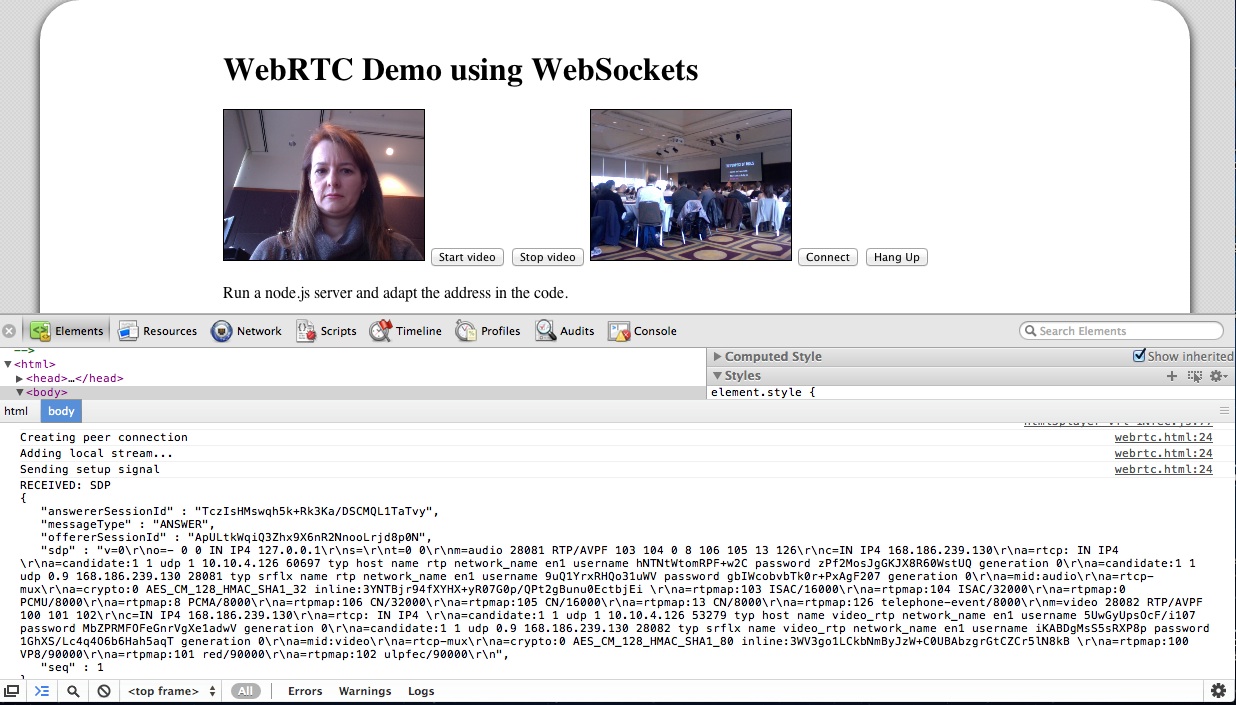

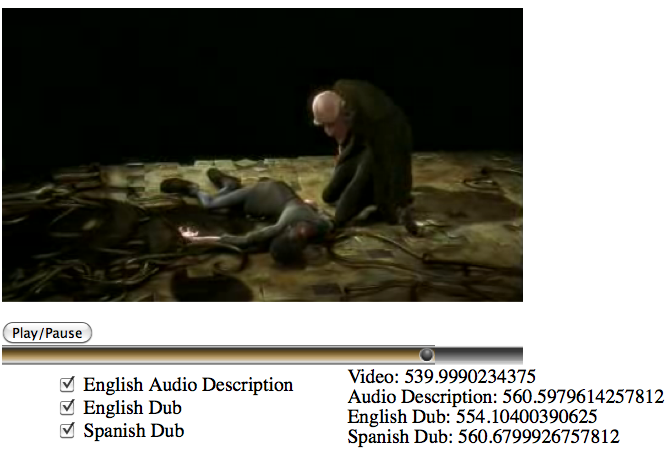
 Screenshot of first itext video player experiment